
-
Star
(129)
You must be signed in to star a gist -
Fork
(34)
You must be signed in to fork a gist
-
-
Save RyanAkilos/3808c17f79e77c4117de35aa68447045 to your computer and use it in GitHub Desktop.
| import numpy as np | |
| from keras import backend as K | |
| from keras.models import Sequential | |
| from keras.layers.core import Dense, Dropout, Activation, Flatten | |
| from keras.layers.convolutional import Convolution2D, MaxPooling2D | |
| from keras.preprocessing.image import ImageDataGenerator | |
| from sklearn.metrics import classification_report, confusion_matrix | |
| #Start | |
| train_data_path = 'F://data//Train' | |
| test_data_path = 'F://data//Validation' | |
| img_rows = 150 | |
| img_cols = 150 | |
| epochs = 30 | |
| batch_size = 32 | |
| num_of_train_samples = 3000 | |
| num_of_test_samples = 600 | |
| #Image Generator | |
| train_datagen = ImageDataGenerator(rescale=1. / 255, | |
| rotation_range=40, | |
| width_shift_range=0.2, | |
| height_shift_range=0.2, | |
| shear_range=0.2, | |
| zoom_range=0.2, | |
| horizontal_flip=True, | |
| fill_mode='nearest') | |
| test_datagen = ImageDataGenerator(rescale=1. / 255) | |
| train_generator = train_datagen.flow_from_directory(train_data_path, | |
| target_size=(img_rows, img_cols), | |
| batch_size=batch_size, | |
| class_mode='categorical') | |
| validation_generator = test_datagen.flow_from_directory(test_data_path, | |
| target_size=(img_rows, img_cols), | |
| batch_size=batch_size, | |
| class_mode='categorical') | |
| # Build model | |
| model = Sequential() | |
| model.add(Convolution2D(32, (3, 3), input_shape=(img_rows, img_cols, 3), padding='valid')) | |
| model.add(Activation('relu')) | |
| model.add(MaxPooling2D(pool_size=(2, 2))) | |
| model.add(Convolution2D(32, (3, 3), padding='valid')) | |
| model.add(Activation('relu')) | |
| model.add(MaxPooling2D(pool_size=(2, 2))) | |
| model.add(Convolution2D(64, (3, 3), padding='valid')) | |
| model.add(Activation('relu')) | |
| model.add(MaxPooling2D(pool_size=(2, 2))) | |
| model.add(Flatten()) | |
| model.add(Dense(64)) | |
| model.add(Activation('relu')) | |
| model.add(Dropout(0.5)) | |
| model.add(Dense(5)) | |
| model.add(Activation('softmax')) | |
| model.compile(loss='categorical_crossentropy', | |
| optimizer='rmsprop', | |
| metrics=['accuracy']) | |
| #Train | |
| model.fit_generator(train_generator, | |
| steps_per_epoch=num_of_train_samples // batch_size, | |
| epochs=epochs, | |
| validation_data=validation_generator, | |
| validation_steps=num_of_test_samples // batch_size) | |
| #Confution Matrix and Classification Report | |
| Y_pred = model.predict_generator(validation_generator, num_of_test_samples // batch_size+1) | |
| y_pred = np.argmax(Y_pred, axis=1) | |
| print('Confusion Matrix') | |
| print(confusion_matrix(validation_generator.classes, y_pred)) | |
| print('Classification Report') | |
| target_names = ['Cats', 'Dogs', 'Horse'] | |
| print(classification_report(validation_generator.classes, y_pred, target_names=target_names)) | |


To plot a ROC curve and AUC score for multi-class classification:
# set plot figure size
fig, c_ax = plt.subplots(1,1, figsize = (12, 8))

def multiclass_roc_auc_score(y_test, y_pred, average="macro"):
    lb = LabelBinarizer()
    lb.fit(y_test)
    y_test = lb.transform(y_test)
    y_pred = lb.transform(y_pred)

    for (idx, c_label) in enumerate(all_labels): # all_labels: no of the labels, for ex. ['cat', 'dog', 'rat']
        fpr, tpr, thresholds = roc_curve(y_test[:,idx].astype(int), y_pred[:,idx])
        c_ax.plot(fpr, tpr, label = '%s (AUC:%0.2f)'  % (c_label, auc(fpr, tpr)))
    c_ax.plot(fpr, fpr, 'b-', label = 'Random Guessing')
    return roc_auc_score(y_test, y_pred, average=average)

# calling
valid_generator.reset() # resetting generator
y_pred = model.predict_generator(valid_generator, verbose = True)
y_pred = np.argmax(y_pred, axis=1)
multiclass_roc_auc_score(valid_generator.classes, y_pred)
thanks for your code. it works very well.

So great!

From the discussion, what I have gathered is that the validation generator has to be prepared with Shuffle=False.
However, I have already prepared the validation generator without setting shuffle=False and carried out model building.
(this implicitly sets shuffle=True)
In this situation, is there a way to obtain the predicted classes in the same order as the actual classes in the validation generator?
Or do I have to redo everything, re-setting the validation generator?
As per this link, (keras-team/keras#6499), I defined a new generator on the validation set with shuffle=False.
I am trying to use this generator with model.predict_generator.
However, I still get different values for y_pred each time I run it. Any solution?
steps after model building
<validation_generator2 = datagen.flow_from_directory('./runData_RGB/test/', #color_mode='grayscale',
class_mode='categorical', batch_size=64, target_size=(224, 224), shuffle=False)
y_test = validation_generator2.classes
y_pred = np.argmax(model.predict_generator(validation_generator2, steps= len(validation_generator2)), axis=1)>

To plot a ROC curve and AUC score for multi-class classification:
def multiclass_roc_auc_score(y_test, y_pred, average="macro"):
    lb = LabelBinarizer()
    lb.fit(y_test)
    y_test = lb.transform(y_test)
    y_pred = lb.transform(y_pred)

    for (idx, c_label) in enumerate(all_labels): # all_labels: no of the labels
        fpr, tpr, thresholds = roc_curve(y_test[:,idx].astype(int), y_pred[:,idx])
        c_ax.plot(fpr, tpr, label = '%s (AUC:%0.2f)'  % (c_label, auc(fpr, tpr)))
    c_ax.plot(fpr, fpr, 'b-', label = 'Random Guessing')
    return roc_auc_score(y_test, y_pred, average=average)

# calling
valid_generator.reset() # resetting generator
y_pred = model.predict_generator(valid_generator, verbose = True)
y_pred = np.argmax(y_pred, axis=1)
multiclass_roc_auc_score(valid_generator.classes, y_pred)
What does all_label means? I am getting error on that

To plot a ROC curve and AUC score for multi-class classification:
def multiclass_roc_auc_score(y_test, y_pred, average="macro"):
    lb = LabelBinarizer()
    lb.fit(y_test)
    y_test = lb.transform(y_test)
    y_pred = lb.transform(y_pred)

    for (idx, c_label) in enumerate(all_labels): # all_labels: no of the labels
        fpr, tpr, thresholds = roc_curve(y_test[:,idx].astype(int), y_pred[:,idx])
        c_ax.plot(fpr, tpr, label = '%s (AUC:%0.2f)'  % (c_label, auc(fpr, tpr)))
    c_ax.plot(fpr, fpr, 'b-', label = 'Random Guessing')
    return roc_auc_score(y_test, y_pred, average=average)

# calling
valid_generator.reset() # resetting generator
y_pred = model.predict_generator(valid_generator, verbose = True)
y_pred = np.argmax(y_pred, axis=1)
multiclass_roc_auc_score(valid_generator.classes, y_pred)
What is c_ax in this code? Could you please help
To plot a ROC curve and AUC score for multi-class classification:
def multiclass_roc_auc_score(y_test, y_pred, average="macro"): lb = LabelBinarizer() lb.fit(y_test) y_test = lb.transform(y_test) y_pred = lb.transform(y_pred) for (idx, c_label) in enumerate(all_labels): # all_labels: no of the labels fpr, tpr, thresholds = roc_curve(y_test[:,idx].astype(int), y_pred[:,idx]) c_ax.plot(fpr, tpr, label = '%s (AUC:%0.2f)' % (c_label, auc(fpr, tpr))) c_ax.plot(fpr, fpr, 'b-', label = 'Random Guessing') return roc_auc_score(y_test, y_pred, average=average) # calling valid_generator.reset() # resetting generator y_pred = model.predict_generator(valid_generator, verbose = True) y_pred = np.argmax(y_pred, axis=1) multiclass_roc_auc_score(valid_generator.classes, y_pred)What does all_label means? I am getting error on that
It is the number of labels in your dataset. all_labels has to be replaced by a number(the number of labels you have in your data)

ROC Curve
``from sklearn.metrics import roc_curve, auc, roc_auc_score
import matplotlib.pyplot as plt

# make a prediction
y_pred_keras = loaded_model.predict_generator(validation_generator, validation_generator.samples // validation_generator.batch_size+1) #(test_gen, steps=len(df_val), verbose=1)
fpr_keras, tpr_keras, thresholds_keras = roc_curve(validation_generator.classes, y_pred_keras)
auc_keras = auc(fpr_keras, tpr_keras)


plt.figure(1)
plt.plot([0, 1], [0, 1], 'k--')
plt.plot(fpr_keras, tpr_keras, label='area = {:.3f}'.format(auc_keras))
plt.xlabel('False positive rate')
plt.ylabel('True positive rate')
plt.title('ROC curve')
plt.legend(loc='best')
plt.show()

I am getting error like: Found input variables with inconsistent numbers of samples: [30, 150]
my train data has 600 images and test data has 30 images.
Below is the code. please help me to solve this issue!
thanks.
CNN_model.fit_generator(
        training_set,
        steps_per_epoch=600, # No of images in training set
        epochs=1,
        validation_data=test_set,
        validation_steps=30)# No of images in test set

Y_pred = CNN_model.predict_generator(test_set, 30 )
y_pred = np.argmax(Y_pred, axis=1)
print('Confusion Matrix')
print(confusion_matrix(test_set.classes, y_pred))
@Mamunahmed33
It's number of targets in your dataset. For example:
all_labels = ['cat' , 'dog' , 'human`]
# set plot figure size
fig, c_ax = plt.subplots(1,1, figsize = (12, 8))
I updated the above solution. Please check.

if the target image is only "cat", "dog", "horse"; why did you use 6 dense layer at the end? wouldn't it be only 3?

Could someone guide me how to get the labels of validation_set when it gets pair images as input and then constructed with ImageDataGenerator as following:
GEN = ImageDataGenerator(rescale = 1./255)

def two_inputs(generator, X1, X2, batch_size, img_height, img_width):
    U = generator.flow_from_directory(X1,
                                            target_size=(img_height, img_width),
                                            batch_size=batch_size,
                                            shuffle= False,
                                            class_mode='binary',
                                            seed=1221)
    V = generator.flow_from_directory(X2,
                                            target_size=(img_height, img_width),
                                            batch_size=batch_size,
                                            shuffle= False,
                                            class_mode='binary',
                                            seed=1221)
    while True:
        X1i = U.next()
        X2i = V.next()
        yield [X1i[0], X2i[0]], X2i[1]   # Yield both images and their mutual label
In the following scenario I can get predictions by preds = base_model.predict_generator(val_flow) where val_flow is
val_flow = two_inputs(generator= GEN,
                      X1 = val_05_dirs,
                      X2 = val_06_dirs,
                      batch_size = batch_size,
                      img_height=img_height,
                      img_width=img_width
                      )
I need need to get fpr and tpr using fpr, tpr, _ = metrics.roc_curve(LABELS, preds).
Therefore I am trying to get the LABELS of a full val_flow which addressing two val_05_dirs , val_06_dirs folders.
Thanks in advance
if the target image is only "cat", "dog", "horse"; why did you use 6 dense layers at the end? wouldn't it be only 3?
It was a demonstration reply of my comment, not for the main post.

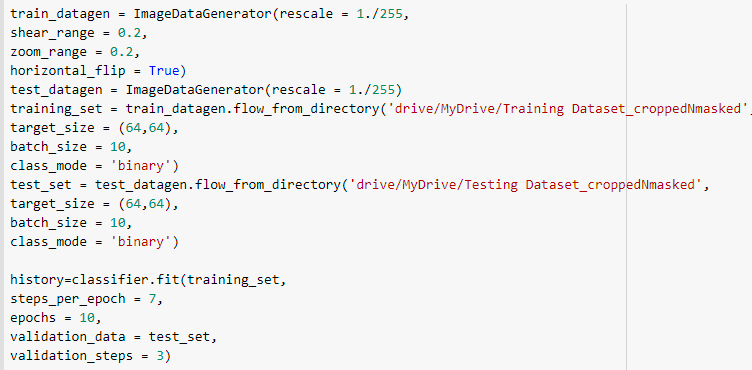
How do I plot confusion matrix for this?

I'm curious. How do you plot it like is done in this example?

confusion matrix doesn't work with validation_generator , how to plot the confusion matrix accurately
validation_generator = test_datagen.flow_from_directory(
validation_data_dir,
target_size=(img_height, img_width),
batch_size=batch_size,
class_mode='categorical',shuffle='false')
cnn_model_history = cnn_model.fit_generator(
train_generator,
steps_per_epoch=nb_train_samples// batch_size ,
epochs=epochs,
validation_data=validation_generator,
validation_steps=nb_validation_samples// batch_size,shuffle='false',
workers = 4)
validation_generator.reset()
Y_pred = cnn_model.predict(validation_generator, nb_validation_samples // batch_size+1)
y_pred = np.argmax(Y_pred, axis=1)
print('Confusion Matrix')
print(confusion_matrix(validation_generator.classes,y_pred)
it shows the accuracy of 98 percent but gives the wrong values of confusion matrix
Confusion Matrix
[[34 38 32 35 30 16 20 31 30 33]
[33 24 42 35 21 20 22 30 35 36]
[26 23 31 35 19 22 17 25 29 29]
[32 39 26 31 32 23 22 25 28 41]
[28 20 16 18 15 11 21 23 19 25]
[30 20 14 22 15 8 19 19 23 25]
[16 26 21 21 17 17 14 25 19 20]
[30 45 25 35 15 18 22 42 30 37]
[31 31 36 33 28 25 21 34 31 29]
[35 35 21 28 19 17 21 37 48 38]]
Is the used code correct?
Nice. Very helpful.

Confusion Matrix
[[34 38 32 35 30 16 20 31 30 33]
[33 24 42 35 21 20 22 30 35 36]
[26 23 31 35 19 22 17 25 29 29]
[32 39 26 31 32 23 22 25 28 41]
[28 20 16 18 15 11 21 23 19 25]
[30 20 14 22 15 8 19 19 23 25]
[16 26 21 21 17 17 14 25 19 20]
[30 45 25 35 15 18 22 42 30 37]
[31 31 36 33 28 25 21 34 31 29]
[35 35 21 28 19 17 21 37 48 38]]
Random results like this happens when you make shuffle=True in test_generator. So it should be like this:
test_generator = test_datagen.flow_from_directory(
    test_dir,
    shuffle=False,
    ...
)
Thank you So much !!

Thank you.
Bot I got an error. Please tell the solution.


ERROR IS -IndexError: index 131 is out of bounds for axis 1 with size 131

Thank you.
Bot I got an error. Please tell the solution.
ERROR IS -IndexError: index 131 is out of bounds for axis 1 with size 131
you need to import "from sklearn.metrics import roc_auc_score" "from sklearn.metrics import roc_curve"
"from sklearn.metrics import auc" libraries
cc. @Anushajadav
Here is the complete end-to-end example for plotting roc on multi-class classification.
@Mamunahmed33
It's number of targets in your dataset. For example:all_labels = ['cat' , 'dog' , 'human`]# set plot figure size fig, c_ax = plt.subplots(1,1, figsize = (12, 8))I updated the above solution. Please check.
Thanks

Confusion Matrix
[[34 38 32 35 30 16 20 31 30 33]
[33 24 42 35 21 20 22 30 35 36]
[26 23 31 35 19 22 17 25 29 29]
[32 39 26 31 32 23 22 25 28 41]
[28 20 16 18 15 11 21 23 19 25]
[30 20 14 22 15 8 19 19 23 25]
[16 26 21 21 17 17 14 25 19 20]
[30 45 25 35 15 18 22 42 30 37]
[31 31 36 33 28 25 21 34 31 29]
[35 35 21 28 19 17 21 37 48 38]]Random results like this happens when you make
shuffle=Truein test_generator. So it should be like this:test_generator = test_datagen.flow_from_directory( test_dir, shuffle=False, ... )
Thanks ,this was my problem.

I'm curious. How do you plot it like is done in this example?
def plot_confusion_matrix(cm,
                          classes,
                          normalize=False,
                          title='Confusion matrix',
                          cmap=plt.cm.Blues):

    plt.imshow(cm,
               interpolation='nearest',
               cmap=cmap)

    plt.title(title)
    plt.colorbar()
    tick_marks = np.arange(len(classes))
    plt.xticks(tick_marks, classes, rotation=55)
    plt.yticks(tick_marks, classes)

    fmt = 'd'
    thresh = cm.max() / 2.

    for i, j in itertools.product(range(cm.shape[0]), range(cm.shape[1])):
        plt.text(j,
                 i,
                 format(cm[i, j], fmt),
                 horizontalalignment="center",
                 color="white" if cm[i, j] > thresh else "black")

    plt.ylabel('True Label')
    plt.xlabel('Predicted Label')
    plt.tight_layout()


cm = confusion_matrix(validation_generator.classes, y_pred)

cm_plot_label = ['Cats', 'Dogs', 'Horse']
plot_confusion_matrix(cm, cm_plot_label, title ='Confusion matrix')
Hello, can anyone help me to solve this problem please? There is no prediction for Class 2, how do I solve this?
This is my code:
test_dataset = test.flow_from_directory('testdata/', target_size=(i_size, j_size), batch_size=128, class_mode='binary', color_mode="grayscale")
Y_pred = model.predict(test_dataset, 129)
y_pred = np.argmax(Y_pred, axis=1)
print('Confusion Matrix')
print(confusion_matrix(test_dataset.classes, y_pred))
print('Classification Report')
labels_names = ['C1', 'C2']
print(classification_report(test_dataset.classes, y_pred, target_names=labels_names))
Found 3592 images belonging to 2 classes.
29/29 [==============================] - 6s 207ms/step
Confusion Matrix
[[1796 0]
[1796 0]]
Classification Report
precision recall f1-score support
      C1       0.50      1.00      0.67      1796
      C2       0.00      0.00      0.00      1796

accuracy                           0.50      3592
macro avg 0.25 0.50 0.33 3592
weighted avg 0.25 0.50 0.33 3592
UndefinedMetricWarning: Precision and F-score are ill-defined and being set to 0.0 in labels with no predicted samples. Use zero_division parameter to control this behavior. _warn_prf(average, modifier, msg_start, len(result))
Hello, can anyone help me to solve this problem please? There is no prediction for Class 2, how do I solve this? This is my code:
test_dataset = test.flow_from_directory('testdata/', target_size=(i_size, j_size), batch_size=128, class_mode='binary', color_mode="grayscale")
Y_pred = model.predict(test_dataset, 129)
y_pred = np.argmax(Y_pred, axis=1)
print('Confusion Matrix')
print(confusion_matrix(test_dataset.classes, y_pred))
print('Classification Report')
labels_names = ['C1', 'C2']
print(classification_report(test_dataset.classes, y_pred, target_names=labels_names))
Found 3592 images belonging to 2 classes. 29/29 [==============================] - 6s 207ms/step Confusion Matrix [[1796 0] [1796 0]] Classification Report precision recall f1-score supportC1 0.50 1.00 0.67 1796 C2 0.00 0.00 0.00 1796 accuracy 0.50 3592macro avg 0.25 0.50 0.33 3592 weighted avg 0.25 0.50 0.33 3592
UndefinedMetricWarning: Precision and F-score are ill-defined and being set to 0.0 in labels with no predicted samples. Use
zero_divisionparameter to control this behavior. _warn_prf(average, modifier, msg_start, len(result))
it seems that some labels in y_test don't appear in y_pred, see this .

Hi!, very good gist.
I think you have to put shuffle=False when you do test_datagen.flow_from_directory() so the samples don't get shuffled and have the same order as validation_generator.classesVery good comment man!
I was struggling to understand why my model had good metrics, but when predicting without the 'Shuffle = False' I got bad results. Thank you so much !
Very easy to pickup this code..Thanks!!
For large number of classes, it will be difficult to write all of the target names.
Instead of this target_names = ['Cats', 'Dogs', 'Horse' ]
you can use this, list(train_generator.class_indices.keys())