
mkdir osm
wget -O osm/planet.mbtiles https://hidrive.ionos.com/api/sharelink/download?id=SYEgScrRe
podman run -ti --rm -p 9000:9000 --name sms -v $(pwd)/osm/:/data/ registry.gitlab.com/markuman/sms:latest
firefox http://localhost:9000

Krzysztof Doll burasuk

Haythamasalama
/ laravel-spa-authentication.md
Last active
July 5, 2026 19:36
Setting Up Authentication for Laravel Single Page Applications (SPA)

npm uses Semantic Versioning.
MAJOR.MINOR.PATCH[-PRERELEASE][+BUILD]
| Part | Meaning |
|---|

Hector1567XD
/ .gitlab-ci
Last active
December 28, 2021 13:38
— forked from Slauta/.gitlab-ci
electron-updater from private repo gitlab.com (Fix Feed URL 20/05/2021)
This file contains hidden or bidirectional Unicode text that may be interpreted or compiled differently than what appears below. To review, open the file in an editor that reveals hidden Unicode characters.
Learn more about bidirectional Unicode characters
| variables: | |
| VERSION_ID: '1.0.$CI_PIPELINE_ID' | |
| stages: | |
| - build | |
| build: | |
| image: slauta93/electron-builder-win | |
| stage: build | |
| artifacts: |

Automating things in software development is more than useful and using Ansible is one way to automate software provisioning, configuration management, and application deployment. Normally you would install Ansible to your control node just like any other application but an alternate strategy is to deploy Ansible inside a standalone Docker image. But why would you do that? This approach has benefits to i.a. operational processes.
Although Ansible does not require installation of any agents within managed nodes, the environment where Ansible is installed is not so simple to setup. In control node it requires specific Python libraries and their system dependencies. So instead of using package manager to install Ansible and it’s dependencies we just pull a Docker image.
By creating an Ansible Docker image you get the Ansible version you want and isolate all of the required dependencies from the host machine which potentially might break things in other area

bgauduch
/ 0 - Multiple git identities on one machine.md
Last active
September 3, 2026 11:59
Multiple git identities on one machine: config per folder and per provider (personal vs work). Every command verified.
One machine, several git identities (personal vs work, GitHub vs GitLab, two accounts on one provider). Each repository picks its own name, email and credentials. In a hurry: Appendix B, once per rule.
A wrong identity does not fail: git commits and pushes under the wrong author. Part 1 ends with the check that catches it.
| Feature | Minimum git |
|---|

PCreations
/ rxjs-diagrams.md
Last active
September 2, 2026 16:32
Super Intuitive Interactive Diagrams to learn combining RxJS sequences by Max NgWizard K


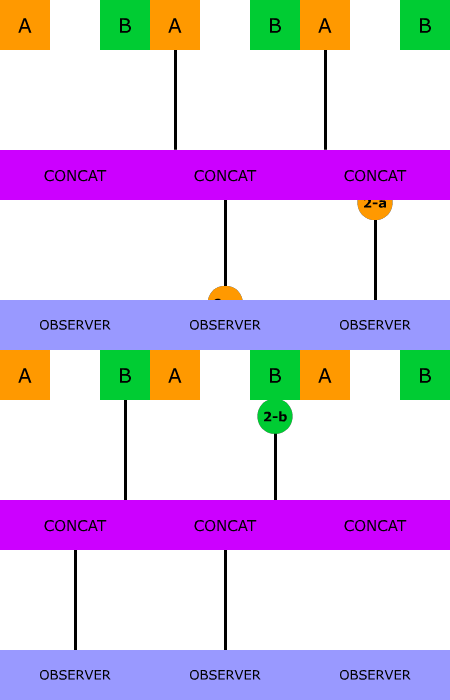

This file contains hidden or bidirectional Unicode text that may be interpreted or compiled differently than what appears below. To review, open the file in an editor that reveals hidden Unicode characters.
Learn more about bidirectional Unicode characters
| variables: | |
| VERSION_ID: '1.0.$CI_PIPELINE_ID' | |
| stages: | |
| - build | |
| build: | |
| image: slauta93/electron-builder-win | |
| stage: build | |
| artifacts: |

This file contains hidden or bidirectional Unicode text that may be interpreted or compiled differently than what appears below. To review, open the file in an editor that reveals hidden Unicode characters.
Learn more about bidirectional Unicode characters
| env - `cat /root/env.sh` /bin/bash -c $1 >> /var/log/cron.log 2>&1 |

Rich-Harris
/ service-workers.md
Last active
August 7, 2026 09:39
Stuff I wish I'd known sooner about service workers
I recently had several days of extremely frustrating experiences with service workers. Here are a few things I've since learned which would have made my life much easier but which isn't particularly obvious from most of the blog posts and videos I've seen.
I'll add to this list over time – suggested additions welcome in the comments or via twitter.com/rich_harris.
Chrome 51 has some pretty wild behaviour related to console.log in service workers. Canary doesn't, and it has a load of really good service worker related stuff in devtools.
NewerOlder