
Check if gettext is installed, if not use Homebrew to get it:
$ brew install gettextGet the gettext library and cpp flags, and configure with those flags:
$ brew info gettext | grep FLAGS
LDFLAGS:  -L/usr/local/opt/gettext/lib
CPPFLAGS: -I/usr/local/opt/gettext/include
$ LDFLAGS=-L/usr/local/opt/gettext/lib CPPFLAGS=-I/usr/local/opt/gettext/include ./configure
Apply this patch:
$ wget -q https://github.com/sabotage-linux/sabotage/raw/master/KEEP/steghide-gcc.patch
$ patch --verbose -p0  < steghide-0.5.1/steghide-gcc.patch
And this other patch to use glibtool and specify the --tag flag:
$ diff -u src/Makefile.old src/Makefile
--- src/Makefile.old	2018-08-06 19:03:10.000000000 -0600
+++ src/Makefile	2018-08-06 19:05:29.000000000 -0600
@@ -106,7 +106,7 @@
 POSUB = po
 RANLIB = ranlib
 SET_MAKE =
-SHELL = /bin/sh
+SHELL = /bin/bash
 STRIP =
 USE_INCLUDED_LIBINTL = no
 USE_INTLDIR_FALSE =
@@ -190,7 +190,7 @@
 WavPCMSampleValue.cc error.cc main.cc msg.cc SMDConstructionHeuristic.cc

 localedir = $(datadir)/locale
-LIBTOOL = $(SHELL) libtool
+LIBTOOL = $(SHELL) glibtool --tag CXX
 MAINTAINERCLEANFILES = Makefile.in
 subdir = src
 mkinstalldirs = $(SHELL) $(top_srcdir)/mkinstalldirs
Then make :)


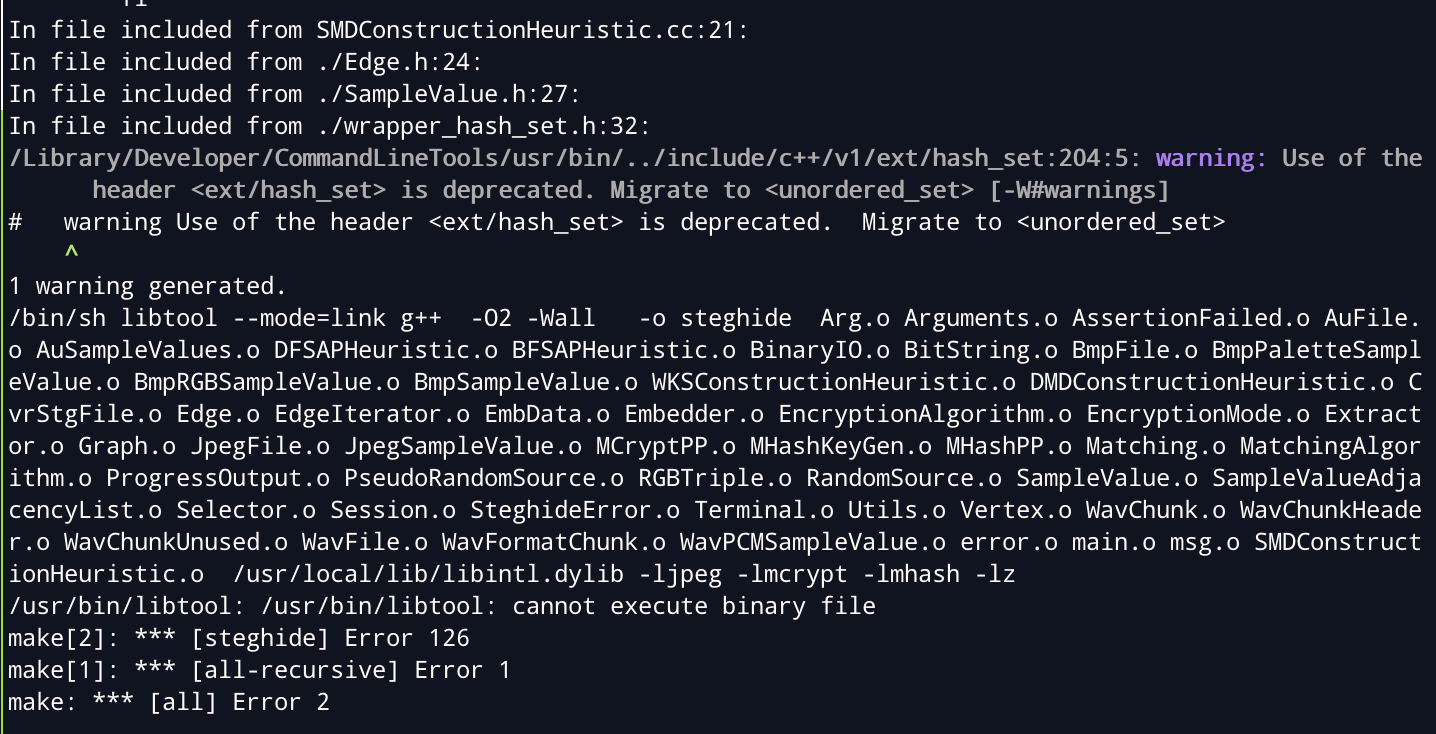


I literally ran into every issue on this page, so I'm going to clarify.
1.) Download steghide from their website and save it somewhere you'll remember. Make sure it's the 0.5.1 version. steghide-0.5.1
First error I got when I ran
./configurewas similar to the one mentioned by @b4dc0d3d.If you get this error, please go to the specified links in the error (e.g. http://mcrypt.sourceforge.net/, http://mhash.sourceforge.net/ ... etc ) and download the files.
cdinto the folder you just downloaded and run$ ./configure && make && make check && sudo make install. Do this for each of the ones you download.cdback into your steghide folder and run the./configurecommand again. It should run without errors.After this follow the steps above.
Fixing the
diff: src/Makefile.old: No such file or directoryerror @QuentaSim got.When you get to
cdintosteghide-0.5.1/before runningwgetcommand, then go back one directory (i.ecd ../) and run thepatchcommand.The whole thing should look similar to
please remember to change
/place/you/downloaded/...Fixing
diff: src/Makefile.old: No such file or directoryerror.When I got to
diff -u src/Makefile.old src/Makefile, I kept getting thediff: src/Makefile.old: No such file or directoryerrorI couldn't figure out how to get it to work, so I ended up not using that command.
Instead, I
cd-ed into the/steghide-0.5.1/src, and change it manually with nano (i.e.nano Makefile).This should open a little text-like box in your terminal with a bunch of stuff. Looking at the original instructions, replace everything in red with everything in green inside your Makefile, while in nano.
Once you have changed them, save the file using
control-x, pressyto confirm changes, and hitenterto keep the file name the same.Now you can run
makein yoursteghide-0.5.1/directory and it should work.I really hope this helps someone out there.