

djonko
/ Free DNS Servers.md
Created
October 30, 2026 18:46
— forked from yunga/Free DNS Servers.md
a small list of free DNS servers
djonko
/ pfSense-config-backup.sh
Created
December 29, 2023 20:40
— forked from ilumos/pfSense-config-backup.sh
This file contains hidden or bidirectional Unicode text that may be interpreted or compiled differently than what appears below. To review, open the file in an editor that reveals hidden Unicode characters.
Learn more about bidirectional Unicode characters
| # In Diagnostics > Command Prompt, run: | |
| mkdir -p /root/.ssh # Create a .ssh folder for the pfSense root user | |
| ssh-keygen -t rsa -q -b 2048 -N "" -f /root/.ssh/id_rsa # Generate a public/private key pair for pfSense | |
| cat /root/.ssh/id_rsa.pub # Get pfSense's public key for adding to the remote server | |
| ssh -oStrictHostKeyChecking=no user@example.com # Add the remote host's host key to pfsense's "known_hosts" file | |
| # Run this command in Diagnostics > Command Prompt | |
| # and if it succeeds, add it as a cron job in Services > Cron | |
| /usr/bin/scp -i /root/.ssh/id_rsa /cf/conf/config.xml user@backup.example.com:~/config-`date +\%Y-\%m-\%d`.xml 2>&1 | /usr/bin/logger -t config-backup |
djonko
/ manual.md
Created
November 5, 2023 02:51
— forked from Rankarusu/manual.md
Setting up fail2ban with nginx proxy manager running via docker
trying to follow this tutorial, i was not able to get fail2ban to work in my setup, so here is a gist in case I forget.
sudo apt install fail2ban
This file contains hidden or bidirectional Unicode text that may be interpreted or compiled differently than what appears below. To review, open the file in an editor that reveals hidden Unicode characters.
Learn more about bidirectional Unicode characters
| # Requis | |
| # 1) prepare the tunnel config file Ex: /etc/wireguard/nameofconfig.conf | |
| # 2) On debian or ubuntu install | |
| sudo apt install resolvconf | |
| sudo apt install wireguard | |
| # 3) start up the vpn tunnel | |
| wg-quick up nameofconfig |
This file contains hidden or bidirectional Unicode text that may be interpreted or compiled differently than what appears below. To review, open the file in an editor that reveals hidden Unicode characters.
Learn more about bidirectional Unicode characters
| #!/usr/bin/env bash | |
| EMAIL_ENV="mail@mail.com" | |
| KEY_PATH_ENV="$HOME/.ssh/id_github_ed25519" | |
| ssh-keygen -t ed25519 -C $EMAIL_ENV -f "$KEY_PATH_ENV" | |
| eval "$(ssh-agent -s)" | |
| ssh-add "$KEY_PATH_ENV" |
djonko
/ .editorconfig
Created
July 9, 2023 19:54
— forked from patrick-werner/.editorconfig
Google Java CodeStyle editorconfig
This file contains hidden or bidirectional Unicode text that may be interpreted or compiled differently than what appears below. To review, open the file in an editor that reveals hidden Unicode characters.
Learn more about bidirectional Unicode characters
| [*] | |
| charset = utf-8 | |
| end_of_line = lf | |
| indent_size = 2 | |
| indent_style = space | |
| insert_final_newline = false | |
| max_line_length = 100 | |
| tab_width = 2 | |
| ij_continuation_indent_size = 4 | |
| ij_formatter_off_tag = @formatter:off |
djonko
/ create-cloud-template.sh
Last active
July 3, 2023 22:50
— forked from chriswayg/create-cloud-template.sh
This script will download a cloud image of many Linux distros and create a Proxmox 6 KVM template from it.
This file contains hidden or bidirectional Unicode text that may be interpreted or compiled differently than what appears below. To review, open the file in an editor that reveals hidden Unicode characters.
Learn more about bidirectional Unicode characters
| #!/bin/bash | |
| set -o errexit | |
| clear | |
| printf "\n*** This script will download a cloud image and create a Proxmox VM template from it. ***\n\n" | |
| ### HOW TO USE | |
| ### Pre-req: | |
| ### - run on a Proxmox 6 server | |
| ### - a dhcp server should be active on vmbr1 |
djonko
/ proxmox-lxc-resize.sh
Created
September 5, 2022 00:24
Increase or decrease disk size of LXC Container on Proxmox
This file contains hidden or bidirectional Unicode text that may be interpreted or compiled differently than what appears below. To review, open the file in an editor that reveals hidden Unicode characters.
Learn more about bidirectional Unicode characters
| #!/bin/bash | |
| pct stop <id> | |
| vzdump <id> -storage <storage> -compress lzo | |
| pct destroy <id> | |
| pct restore <id> /path/to/storeage/vzdump-lxc-<id>....tar.lzo --rootfs local:<newsize> |
djonko
/ README.md
Created
June 12, 2022 21:45
— forked from gjreasoner/README.md
Expand Ubuntu 20 Proxmox Disk
# Resize the file system in UI, under VM -> Hardware -> Click on the disk to resize, click "Resize disk" button

# Confirm increase in disk space (1TB in my case)
$ lsblk
NAME                      MAJ:MIN RM  SIZE RO TYPE MOUNTPOINT
sda                         8:0    0    1T  0 disk
├─sda1                      8:1    0    1M  0 part
├─sda2                      8:2    0    1G  0 part /boot
└─sda3                      8:3    0    1T  0 part
djonko
/ iterm2-solarized.md
Created
May 4, 2022 00:27
— forked from kevin-smets/iterm2-solarized.md
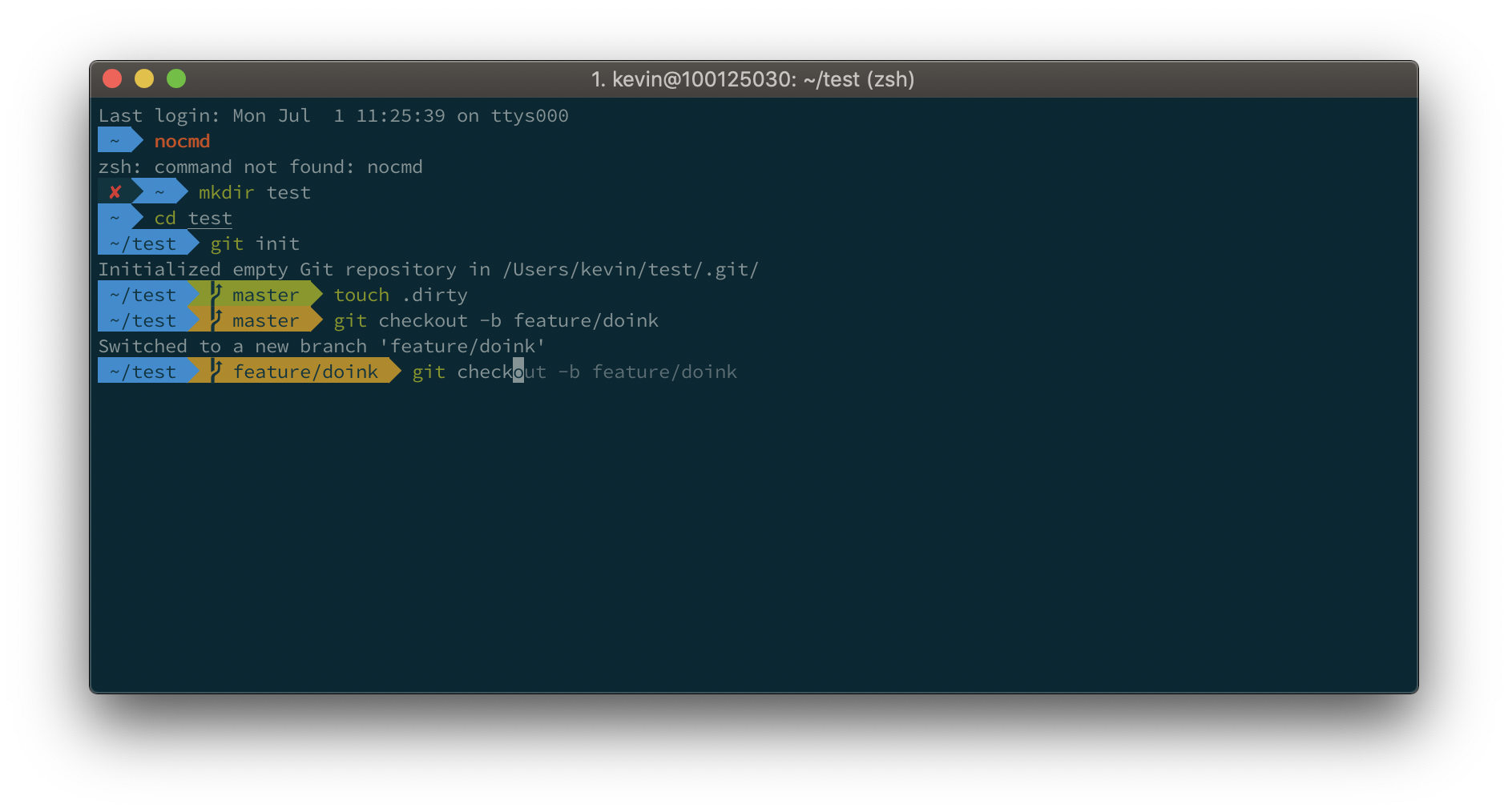
iTerm2 + Oh My Zsh + Solarized color scheme + Source Code Pro Powerline + Font Awesome + [Powerlevel10k] - (macOS)

NewerOlder