
The complete guide to cutting your Claude Code context consumption by ~60%.
Six open-source tools, each saving tokens at a different stage of the LLM interaction loop. No overlap between them — they compose into a single pipeline that effectively doubles your usable context window.
User Prompt
  → [MCP-Memory-Service]    Cross-session knowledge → skip re-discovery
  → [MCP-Context-Provider]  Targeted context rules → skip brute-force file reading
    → LLM thinks → [Caveman]  Terse responses → no filler tokens
      → Tool calls → [MCPlex]  3 meta-tools → not 37 definitions
        → Bash/CLI → [RTK]  Output filtering → 60% less CLI noise
          → Tool results → [context-mode]  Sandboxing → 98% less raw output
What: Hook-based proxy that intercepts CLI commands (git, ls, curl, gh, etc.) and filters output before it hits the context window. Zero-config — installs as a Claude Code hook, rewrites commands transparently.
Measured savings: 60.2% average across 282 commands. Top hits: gh api (44%), ls (49%), curl (99%), gh pr view (96%), pytest --collect (99.8%).
Install:
cargo install rtk
# Add to Claude Code hooks — see RTK docs for hook config
Measure:
rtk gain              # Summary: total tokens saved, per-command breakdown
rtk gain --history    # Recent commands with individual savings
rtk discover          # Analyze Claude Code history for missed optimization opportunities
Repo: github.com/rtk-ai/rtk
What: MCP server + Claude Code plugin that sandboxes raw tool output into SQLite/FTS5 instead of dumping it into context. When you need data, it returns only BM25-ranked search hits — not the full output. One ctx_batch_execute call replaces 30+ individual tool calls.
Claimed savings: 98% on tool output. Observed: 9 commands producing 5.2KB indexed, only relevant search snippets returned to context.
Install:
# Claude Code plugin (fully automatic hooks + slash commands):
/plugin marketplace add mksglu/context-mode
/plugin install context-mode@context-mode
# Restart Claude Code

# Optional speed boost (3-5x):
curl -fsSL https://bun.sh/install | bash
Measure:
/context-mode:ctx-stats    # Per-session: bytes sandboxed, tokens saved, per-tool breakdown
/context-mode:ctx-doctor   # Health check: runtimes, hooks, FTS5, version
Repo: github.com/mksglu/context-mode
What: Rust gateway that acts as the central hub for your entire MCP server fleet. All upstream MCP servers (memory-service, context-provider, code-context, shodh, etc.) are configured inside MCPlex's config — Claude Code only sees a single mcplex endpoint. Instead of exposing all upstream tools (37 in our case = ~8,762 tokens), MCPlex exposes 3 lightweight meta-tools (~273 tokens). The LLM discovers real tools on-demand via mcplex_find_tools(query) with semantic routing (BM25 + IDF + server-name boost).
This is the architectural centerpiece: MCPlex replaces N separate MCP server entries in your Claude Code config with one gateway entry. Components #5 (MCP-Context-Provider) and #6 (MCP-Memory-Service) are configured as MCPlex upstreams, not as standalone Claude Code MCP servers.
Measured savings: 96.9% on tools/list (35,049 → 1,093 bytes). Per session start: ~8,489 tokens saved. Bonus: RBAC, audit log, response caching, real-time dashboard, self-healing respawn (<100ms detection, 3.7s recovery).
Install:
git clone https://github.com/modernops888/mcplex.git
cd mcplex
cargo build --release

# Configure ALL your MCP upstream servers in my-config.toml:
# [[servers]]
# name = "memory"
# command = "/path/to/memory"
# args = ["server"]
#
# [[servers]]
# name = "context-provider"
# command = "node"
# args = ["/path/to/MCP-Context-Provider/dist/server/index.js"]
#
# ... etc for each MCP server you want behind the gateway

./target/release/mcplex --config my-config.toml

# Claude Code sees ONLY mcplex — one entry replaces all upstream servers:
# ~/.claude.json (Linux):
# "mcplex": { "type": "http", "url": "http://127.0.0.1:3100/mcp" }

# macOS/Claude Desktop (needs stdio bridge):
# "mcplex": { "command": "node", "args": ["bridge.mjs"] }
Note: You can add as many MCP servers to MCPlex as you need — any server that speaks stdio or streamable-http works as an upstream. The token savings scale with the number of servers: more upstream tools hidden behind the 3 meta-tools = higher reduction ratio. MCP servers that don't work with MCPlex (e.g., SSE-only servers like context7) can still be configured directly in Claude Code's native MCP settings alongside the mcplex entry — both approaches coexist.
Measure:
# Compare tools/list payload sizes:
curl -s -X POST http://127.0.0.1:3100/mcp \
  -H 'Content-Type: application/json' \
  -d '{"jsonrpc":"2.0","id":1,"method":"tools/list"}' | wc -c
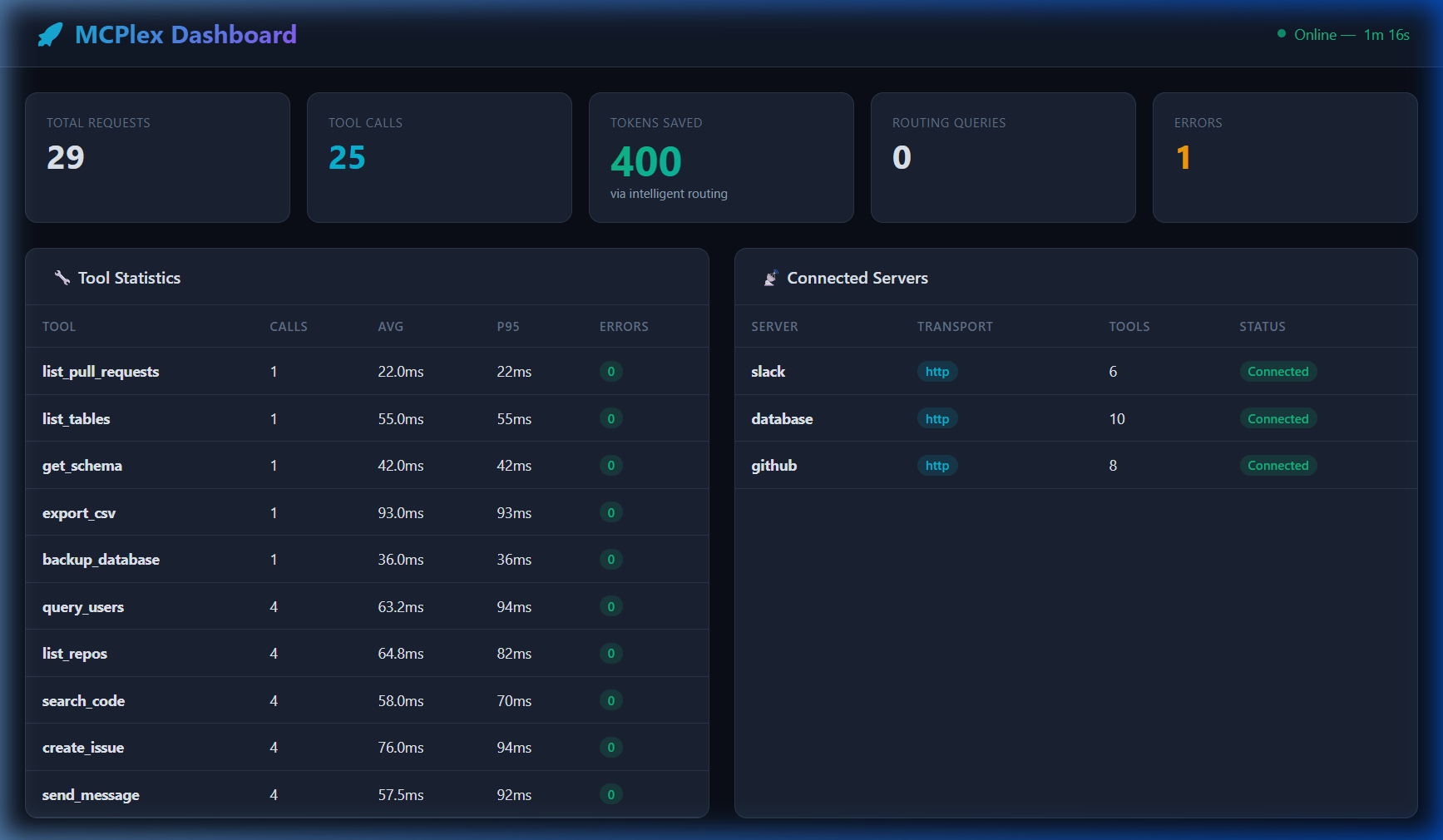
# Dashboard with per-tool latency, call counts, event feed:
open http://127.0.0.1:9090
Dashboard (live — 4 servers, 37 tools, real traffic):
Repo: github.com/modernops888/mcplex
What: Claude Code plugin that rewrites the LLM's system prompt to enforce terse, filler-free responses. Drops articles, hedging, pleasantries, and verbose explanations. Technical substance stays. Code blocks unchanged.
Estimated savings: 20-40% on output tokens. A 50-word standard explanation becomes ~20 words. Compounds over long sessions.
Install:
/plugin marketplace add JuliusBrussee/caveman
/plugin install caveman@caveman
# Restart Claude Code — caveman activates automatically

# Control:
/caveman lite     # Light touch
/caveman full     # Classic caveman (default)
/caveman ultra    # Maximum compression
# "stop caveman" or "normal mode" to disable
Measure: Qualitative — compare response lengths with/without. No built-in metrics (output token reduction is hard to A/B within a single session).
Repo: github.com/JuliusBrussee/caveman
What: MCP server that provides curated, rule-based context per tool category instead of the LLM reading entire files. Categories include writing rules, syntax conventions, platform-specific configs, etc. The LLM gets exactly the rules it needs for the current task — not the whole rulebook.
Estimated savings: Prevents ~1K-5K tokens per context lookup. Instead of reading a 3,000-line config file, the LLM gets a 200-token targeted rule set.
Install:
git clone https://github.com/doobidoo/MCP-Context-Provider.git
cd MCP-Context-Provider
npm install && npm run build

# Configured as MCPlex upstream (in mcplex my-config.toml), NOT in ~/.claude.json:
# [[servers]]
# name = "context-provider"
# command = "node"
# args = ["/path/to/MCP-Context-Provider/dist/server/index.js"]
# env = { CONTEXTS_PATH = "/path/to/contexts", INSTINCTS_PATH = "/path/to/instincts" }
Measure: Qualitative — observe whether the LLM reads full files or uses targeted context calls. Accessible via mcplex_find_tools("context rules") → mcplex_call_tool("list_available_contexts").
Repo: github.com/doobidoo/MCP-Context-Provider
What: MCP server with hybrid SQLite + Cloudflare Vectorize backend. Stores memories across sessions (decisions, discoveries, errors, code edits, conversations). Instead of re-discovering project context each session, the LLM calls memory_search and gets prior knowledge in one call.
Estimated savings: Prevents ~5K-20K tokens of re-discovery per session start. One memory_search("project architecture") returns what previously required reading 10+ files.
Stats from production: 4,436 memories, 68 added in last 7 days, semantic search via embeddings.
Install:
git clone https://github.com/doobidoo/mcp-memory-service.git
cd mcp-memory-service
uv sync  # or pip install -e .

# Configured as MCPlex upstream (in mcplex my-config.toml), NOT in ~/.claude.json:
# [[servers]]
# name = "memory"
# command = "/path/to/.venv/bin/memory"
# args = ["server"]
# env = { MCP_MEMORY_STORAGE_BACKEND = "hybrid", CLOUDFLARE_API_TOKEN = "${CLOUDFLARE_API_TOKEN}", ... }
Measure:
# Via MCP tool:
memory_health   # Backend stats, memory count, query performance
memory_stats    # Breakdown by type, recent activity
Repo: github.com/doobidoo/mcp-memory-service
Measured on a real production setup: Manjaro Linux, Claude Code v2.1.104, Opus 4.6, 4 MCP upstream servers behind MCPlex.
| Layer | Where it saves | Savings | Confidence |
|---|---|---|---|
| RTK | CLI output | 60.2% (117.1K tokens over 282 commands) | Measured |
| context-mode | Tool output | ~98% (5.2KB sandboxed, snippets returned) | Claimed + observed |
| MCPlex | tools/list | 96.9% (8,762 → 273 tokens) | Measured |
| Caveman | LLM responses | ~20-40% output reduction | Estimated |
| Context-Provider | File reading | ~1K-5K tokens/lookup prevented | Estimated |
| Memory-Service | Session start | ~5K-20K tokens/session prevented | Estimated |
On a typical 1-hour Claude Code session (~50 tool calls, ~20 CLI commands, ~100K token budget):
| Component | Tokens saved |
|---|---|
| RTK | ~12K |
| context-mode | ~20K |
| MCPlex | ~8.5K |
| Caveman | ~5K |
| Context-Provider | ~3K |
| Memory-Service | ~10K |
| Total | ~58.5K (~58.5%) |
A 200K context window performs like ~350K. The savings compound — fewer tokens wasted means more room for actual work, which means fewer compactions, which means less context loss.
# 1. RTK
cargo install rtk

# 2. context-mode (Claude Code plugin)
# In Claude Code:
/plugin marketplace add mksglu/context-mode
/plugin install context-mode@context-mode

# 3. MCPlex
git clone https://github.com/modernops888/mcplex.git && cd mcplex
cargo build --release
# Configure my-config.toml, then run or set up as systemd service

# 4. Caveman (Claude Code plugin)
# In Claude Code:
/plugin marketplace add JuliusBrussee/caveman
/plugin install caveman@caveman

# 5. MCP-Context-Provider
git clone https://github.com/doobidoo/MCP-Context-Provider.git
cd MCP-Context-Provider && npm install && npm run build

# 6. MCP-Memory-Service
git clone https://github.com/doobidoo/mcp-memory-service.git
cd mcp-memory-service && uv sync

# Restart Claude Code. Verify:
rtk gain                         # RTK stats
/context-mode:ctx-doctor         # context-mode health
/context-mode:ctx-stats          # context-mode savings
curl http://127.0.0.1:9090       # MCPlex dashboard
Built and measured by @doobidoo during a weekend of auditing, fixing, and deploying MCPlex. The stack evolved from a single tool evaluation into a 6-layer optimization pipeline over 3 days of production usage with Claude Code.