
| name | tab-strip-navigation |
|---|---|
| description | How to build hierarchical (tiered) tab-strip navigation in a server-rendered web app, so every page shows where it sits at every level - a site bar, a section tier beneath it, page or context tiers below that. Covers how a tier is built, how the current tab is found at each tier, how tiers nest, URL scheme, styling by depth, capability filtering and unavailable entries, the separate case of in-page panel tabs, the request specs that prove each tier, and how hand-written tiers go wrong. Use when adding a tab tier, giving a section sub-sections, or putting a switcher above an existing strip. |
Tiers of tabs, stacked top to bottom, each answering one question about where the reader is:
Tier 0  site bar       <Section A>  <Section B>  <Section C>
Tier 1  section tabs   <Part 1>  <Part 2>
Tier 2  page tabs      <Page 1>  <Page 2>  <Page 3>
        content
The labels in angle brackets, here and below, are placeholders. Take the tabs from the app being built, never from an example.
Two principles drive every rule below.
- Context is chrome, never memory. From the page alone the reader can see the current choice at every tier. Nothing about where they are is held in their head, a session, or a dropdown they have to open.
- Siblings are visible. The sub-sections at a level are tabs at that level, not a menu. This is progressive disclosure: one level at a time, and everything at that level on screen.
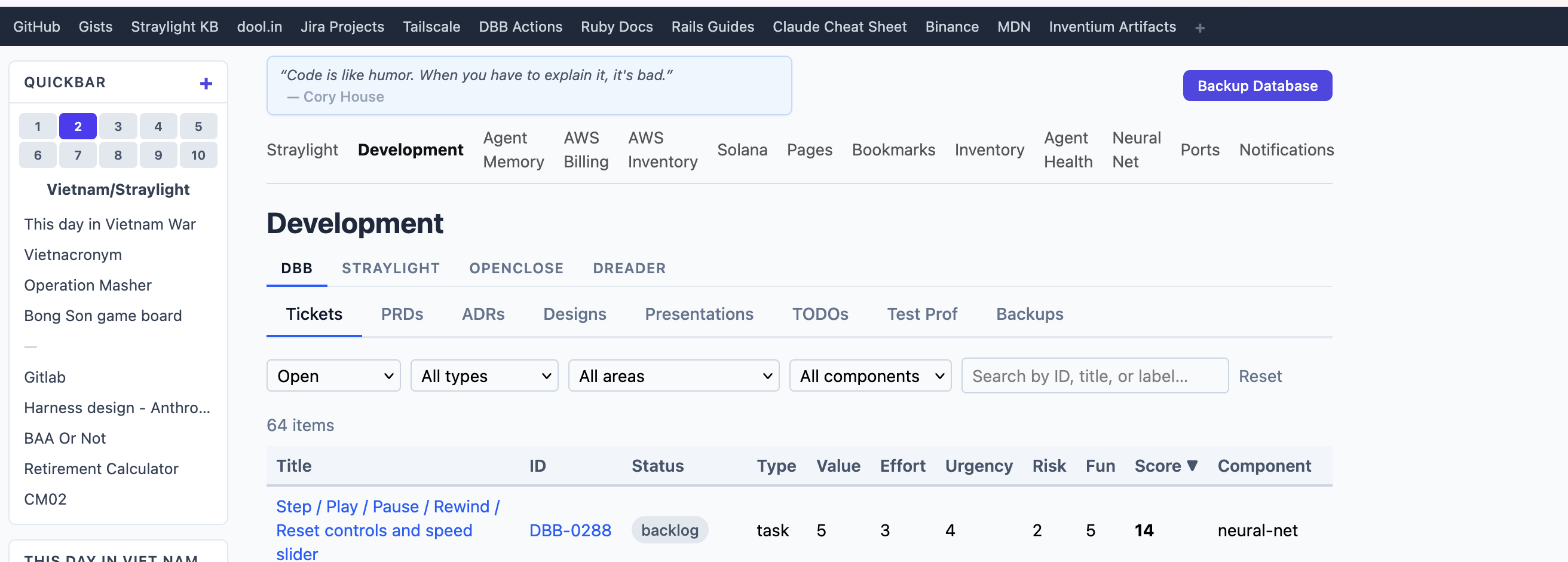
A section with three tiers, from the top. The tab labels in the picture belong to that app; read the picture for its shape.
| tier | role | current tab | how it is current |
|---|---|---|---|
| 0 | site bar: which section | bold | the section's member paths |
| 1 | context switcher: which corpus the section shows | underlined; the default context, so its URL has no context segment | a path segment, the default by its absence |
| 2 | kind tabs: which kind of thing in that corpus | underlined | a query parameter for views of one page, the path for tabs that are pages of their own |
The section heading sits between tiers 0 and 1. Tiers 1 and 2 share one block, the switcher smaller and denser than the tabs it scopes. The selects and search under tier 2 are filter state, not a tier: they reset when tier 1 or 2 changes.
The dark bar of outside links across the top and the panel on the left are not part of this skill.
Decide which one you are building before writing anything. They look alike and behave differently.
| Navigation tier | Panel tabs | |
|---|---|---|
| A tab is | a link to its own URL | a control that shows a panel of this page |
| Current marked by | aria-current="page" |
aria-selected="true" |
| The choice lives in | the path, or a query parameter | ?tab= |
| Switching | a full navigation | history.replaceState, no history entry |
If the tab's content is another page, with its own action and its own data, it is a tier. If it is another view of data the page already loaded, it is panel tabs (see the section on them).
- One
<nav>per tier, each with its ownaria-label("Site", "sections", " pages"). The label is how a screen reader announces the tier and how a spec finds it. - One current tab per tier, on every page of the section, marked
aria-current="page". A section usually spans more than one prefix: its tab is current on/<section>, on its sub-paths, and on member pages that live under other prefixes. Write that membership list once, in the parent tier, and derive both the parent's highlight and whether the child tier renders from it. - A child tier is rendered by its parent. The site bar renders a section's tier when that section is current. Pages do not render child tiers themselves, so no page can show a child tier with its parent unmarked, or forget the tier on one page of the section.
- Say how a tab is current. There are three ways, and a tier uses
one: a path prefix, a query parameter (
?<kind>=), or a local the caller passes (active_tab:). The partial's header comment states which.- Prefix trap:
start_with?("/<section>")also matches/<section>archive. Matchpath == "/<section>" || path.start_with?("/<section>/"). Two sections whose prefixes overlap (/project,/projects) highlight the wrong tab.
- Prefix trap:
- On the lowest tier, the current page is text, not a link
(
<span aria-current="page"><Page></span>). A link to the page you are on does nothing. The other links on that tier carry the state the page was reached with: from an item's page, the link back to the list keeps the filters that led there. - A tier shows only what its context has. A context without a kind of thing gets no tab for it, not a disabled one. The absence of the thing is the absence of the tab. This is filter-state honesty applied to navigation: the strip never implies something exists that does not.
- Unavailable differs from absent. An entry that belongs in the tier but cannot be reached right now (its data source missing on this machine) renders muted and unlinked, with the reason in its tooltip, and its URL, reached directly, explains the reason in the content area. It is never dropped (a tab that vanishes reads as a bug) and never a 500.
- Switching at tier N carries tier N+1 over when it can. Moving from one context to another keeps the kind tab when the target has that kind, and falls back to the target's first tab when it does not. Filters and search reset, because they belong to what was left.
- The default context pays nothing. Omit it from the URL, so links
made before the tier existed still work; put the others in the path
(
/<section>for the default,/<section>/<contexts>/<slug>for another). - One URL per page. The default's explicit form
(
/<section>/<contexts>/<default-slug>) redirects to the short one, permanently. - Literal segments before wildcards. Declare
<contexts>/:slugbefore:id, or the router reads the literal segment as an id. An unknown slug is a 404. - Engines lose the host's route helpers. A tier rendered inside a mounted engine's layout cannot call the host's named routes, so its paths are plain strings. Say so in the partial's header, with the list of paths to update if a mount point moves.
- One active vocabulary at every tier, and on panel tabs: an accent
bottom border and dark text for the current tab (
border-b-2 border-blue-600 text-slate-900), muted text and a transparent border for the rest, darkening on hover (text-slate-500 border-transparent hover:text-slate-700 hover:border-slate-300), with-mb-pxso the current tab's border sits on the strip's rule. A panel strip in another accent reads as another kind of control. - Tiers differ in size, so they read as levels. A context switcher
sits directly above the tabs it scopes and is smaller and denser than
them (
px-3 py-1.5 text-xs uppercase tracking-wideroverpx-4 py-2 text-sm). Tiers that scope each other share one bordered block, so they read as one instrument and not two unrelated rows. - Muted palette. No saturated fills; no dark strip backgrounds.
- Class strings live in one place. Tailwind does not scan
.rbfiles by default, so classes emitted from a helper or component need an@sourceentry or they are purged.
-
The choice lives in
?tab=, so a refresh, a bookmark and a pasted link all open the same panel. -
The server reads the parameter and renders the chosen panel visible in the first response, so the page does not flash its default and then swap. It accepts only ids the view renders, falling back to the default otherwise: an id matching no panel would hide every panel.
def resolve_tab(allowed, default)
  allowed.include?(params[:tab]) ? params[:tab] : default
end
-
On click, write the parameter with
replaceState, built from the current URL so sibling parameters (?period=) survive. A tab flip is not a navigation:pushStatewould make Back walk the tabs instead of leaving the page. -
The script toggles the same classes the server renders for a current and an other tab, hover classes included, so a switch in the browser leaves the same DOM as a server render of that tab.
The easy way to add a tier is to copy the last one: a partial that repeats the tab classes link by link and finds its current tab its own way. By the third copy, extract: a declaration per section (label, path, how a tab is current, which context it needs) and one renderer that draws any tier from it, at any depth. A new tier is then a declaration, not a partial.
The extraction can come in steps, each worth shipping alone:
- One predicate for "is this path in the section", exact or followed by a slash, used by every tab.
- The tab classes in one helper.
- Each section's membership list as data the parent tier reads, which also decides whether the child tier renders.
- The renderer, drawing every tier from the declarations.
Each of these has a spec that catches it and a fix that ships before the single mechanism.
- A child tier rendered by its pages. A page added to the section later renders the child tier but is missing from the parent's membership list: the child tier shows a current tab and the site bar shows none. Catch it with the shared example run against every page that renders the child tier. Fix it by adding the page to the list, then by having the parent render the child tier (rule 3).
- A bare prefix match.
start_with?("/<section>")is also current on/<section>archive. Catch it with one spec per tab against a path that shares its prefix. Fix it with step 1 above. - A second copy of a tier for another context. The default context's tier is a partial; another context's tier is drawn inline from its capabilities. The two drift in labels and classes. Fix it by drawing both from the capability list, the default included.
- The default context served at its explicit URL. The long form renders the same page instead of redirecting, so two URLs bookmark one page. Fix it with a permanent redirect in the routes.
- Panel tabs in another accent. Their script toggles its own colors, so a tabbed page's panel strip looks unlike the tiers above it. Fix it by toggling the tier vocabulary.
A request spec per tier, run against the HTML the server sends:
- Find the tier by its
aria-labeland reduce it to{ text:, href:, current: }per link. Assert the whole tier as one array: which tabs, in which order, which one current. Oneeqshows whichever of the three broke. - A shared example, "a page in the
section", run against a page at every level and every member page outside the main prefix. It checks the parent tier marks only its section current and the child tier marks the right tab. - One page outside the section: the parent tab is unmarked and the child
tier is absent (
eq([])). - On the lowest tier, the current page appears as
[label, nil, "page"]: present, not linked, marked. - A page rendered by an engine's layout still shows its tiers.
- Seen red once: change the expected current tab, and confirm the failure prints the tier.
Browser checks are end-to-end specs (Playwright through Capybara), not a person clicking through.
- Kind: navigation tier or panel tabs?
- The tier's
aria-label, its tabs in order, and how each is current. - The section's member paths, written once in the parent tier.
- Rendered from the parent, not from pages.
- Context filtering and the unavailable state, if the tier depends on context above it.
- URLs: default omitted, explicit default redirected, literal routes before wildcards.
- Styling from the shared vocabulary; size set by depth.
- Request specs: the whole tier per level, the off-prefix members, one page outside, seen red.