Skip to content

Instantly share code, notes, and snippets.

View edubxb's full-sized avatar
🕶️
daemons in the shell

Eduardo Bellido Bellido edubxb

🕶️
daemons in the shell
View GitHub Profile
@thtools
thtools / caddy_labels.md
Created July 16, 2025 16:21 — forked from omltcat/caddy_labels.md
Caddy with Docker Labels: Easy config for wildcard certs and Authelia

What is this?

One great feature of caddy-docker-proxy is that you can quickly define config rules with Docker Compose labels in each containers on the fly like Traefik, instead of at a centralized place. With this feature, we can define everything in compose files, and don't ever need to mess with a config file (Caddyfile or JSON).

Taking advantage of snippets, I created this docker-compose.yaml example so that you can quickly define routing rules and add authetication like Authelia with just 3 lines of labels below each docker container you use.

With this example, should not ever need to manually edit Caddyfile config.

When you add a new container, you just need to do this:

networks:
You are an expert in SQL and Tinybird. Follow these instructions when working with .datasource and .pipe files:
<command_calling>
You have commands at your disposal to develop a tinybird project:
- tb build: to build the project locally and check it works.
- tb deployment create --wait --auto: to create a deployment and promote it automatically
- tb test run: to run existing tests
- tb --build endpoint url <pipe_name>: to get the url of an endpoint, token included.
- tb --build endpoint data <pipe_name>: to get the data of an endpoint. You can pass parameters to the endpoint like this: tb --build endpoint data <pipe_name> --param1 value1 --param2 value2
@omltcat
omltcat / caddy_labels.md
Last active November 15, 2025 22:43
Caddy with Docker Labels: Easy config for wildcard certs and Authelia

What is this?

One great feature of caddy-docker-proxy is that you can quickly define config rules with Docker Compose labels in each containers on the fly like Traefik, instead of at a centralized place. With this feature, we can define everything in compose files, and don't ever need to mess with a config file (Caddyfile or JSON).

Taking advantage of snippets, I created this docker-compose.yaml example so that you can quickly define routing rules and add authetication like Authelia with just 3 lines of labels below each docker container you use.

With this example, should not ever need to manually edit Caddyfile config.

When you add a new container, you just need to do this:

networks:
@kennypete
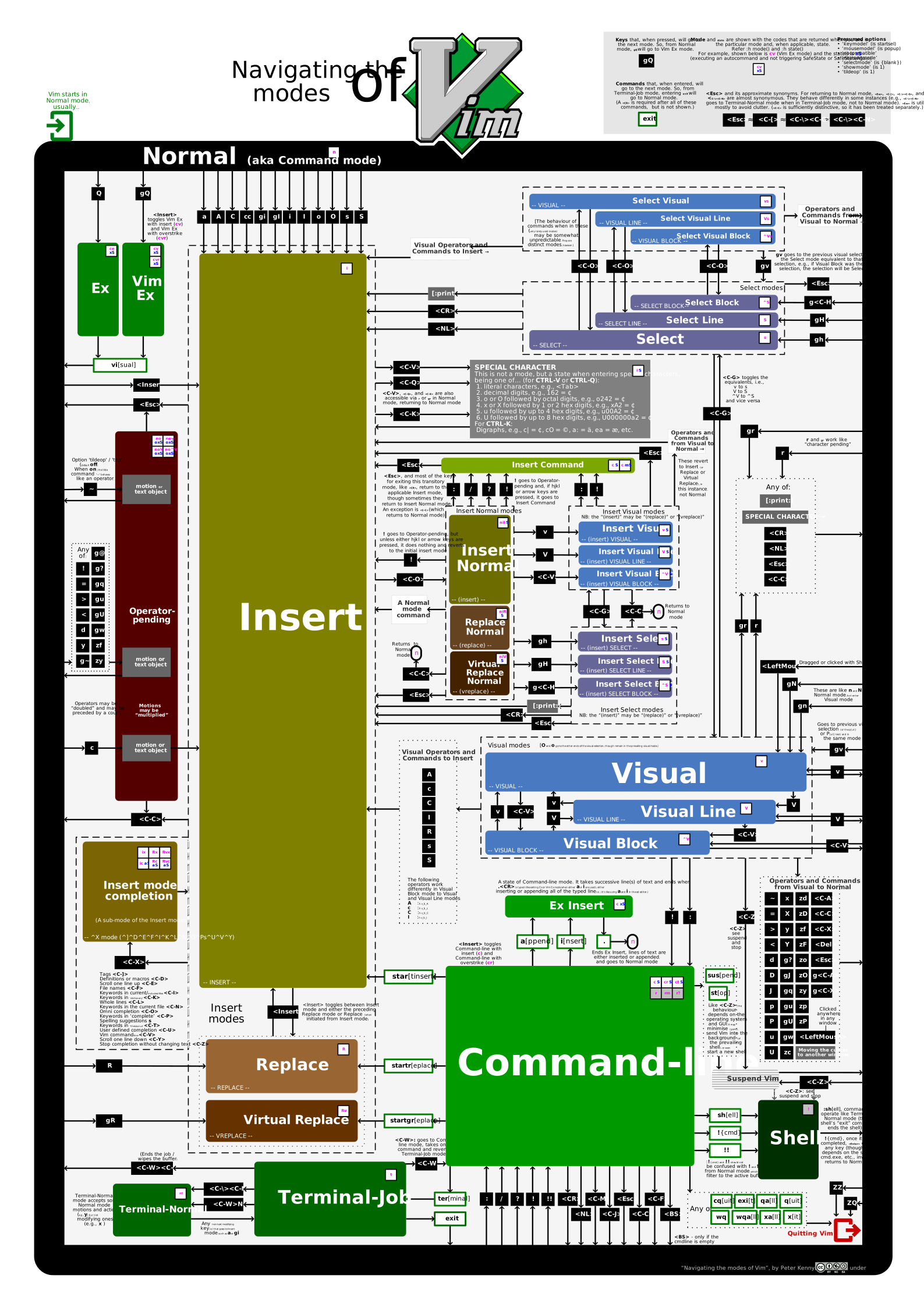
kennypete / navigating_the_modes_of_Vim.md
Created April 18, 2024 20:46
Navigating the modes of Vim

Navigating the modes of Vim

This diagram illustrates navigating through Vim’s modes. It was built factoring Vim 9 (i.e., all its modes, including up to two new modes, cr and cvr, in November 2023). Information about the state() and 'showmode' is provided too.

SVG version

Some features are only available in the SVG version. It is not provided directly from within this gist’s files because SVGs do not always play nicely in GitHub (particularly, refusing to display embedded fonts).

The SVG version includes hover text help, which shows pertinent information about the underlying key, command, mode, etc.

Reverse interview

Engineering

  1. What tech stack do you use? Are you rolling out new technologies or sunsetting older ones? Do you have any legacy system that you need to maintain?
  2. What is your maturity stage? Finding a direction, feature work, maintenance...
  3. What are the next big engineering challenges you will face?
  4. How are requirements delivered to the engineering teams? How are technical decisions made and communicated?
  5. What level of involvement do engineers have in relation to architecture and system design? How much freedom for decision making do individual developers have? What happens if an engineer identifies areas of improvement?
  6. What is the junior/senior balance of the team?
@m-radzikowski
m-radzikowski / script-template.sh
Last active October 9, 2025 00:41
Minimal safe Bash script template - see the article with full description: https://betterdev.blog/minimal-safe-bash-script-template/
#!/usr/bin/env bash
set -Eeuo pipefail
trap cleanup SIGINT SIGTERM ERR EXIT
script_dir=$(cd "$(dirname "${BASH_SOURCE[0]}")" &>/dev/null && pwd -P)
usage() {
cat <<EOF
Usage: $(basename "${BASH_SOURCE[0]}") [-h] [-v] [-f] -p param_value arg1 [arg2...]

#Effective Communication


Prepare the conversation.

  • Why are we having this conversation?
    Your time is valuable, other people's time is valuable. If you need to use this time, the least you can do is to prepare it. Things such as "what do you want to achieve?", "What info you need to give?", and all following...
  • What do you expect from the meeting?
    How many times do you go to a meeting without thinking what's the outcome you want from it?
  • Try to understand the audience.:
  • How can I get to my audience better?.
@dbonillaf
dbonillaf / links_bonilista_458.md
Last active March 12, 2020 23:01
Links sobre la enseñanza de programación a niños
@maltehol
maltehol / vimwiki2html.md
Last active February 22, 2019 21:52 — forked from enpassant/vimwiki2html.md
Convert VimWiki to HTML (markdown, mediawiki)

With this wiki2html.sh bash script and pandoc program, you can convert markdown to html.

Usage: In the vim list section of the .vimrcfile, include options:

let g:vimwiki_list = [{'path': ‘your_wiki_place',
  \ 'path_html': ‘wiki_html_location’,
  \ 'syntax': 'markdown',
 \ 'ext': '.md',