
Using Google Cloud, deploy a sample application to Google Kubernetes Engine (GKE), and expose it both on a public IP address using a regional external Application Load Balancer, and on a private IP address using an internal passthrough Network Load Balancer.
The two load balancers use different network endpoint groups (NEGs) to reach the Kubernetes Pods where the sample application runs.
The regional external Application Load Balancer accesses the sample
application using
zonal GCE_VM_IP_PORT NEGs,
while the internal passthrough Network Load Balancer uses
zonal GCE_VM_IP NEGs.
It is possible to configure the regional external Application Load Balancer and the sample application in separate Google Cloud projects by using a Shared VPC and cross-project service referencing. The diagram below shows an example of such a design.
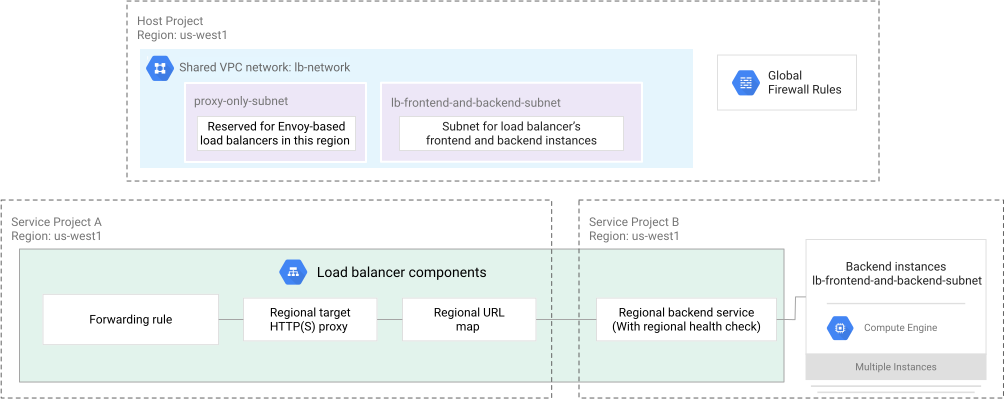
In this design, one service project is used for the regional external Application Load Balancer frontend, and another service project is used for the regional external Application Load Balancer backend and the sample application.
For brevity, this document does not include steps to
provision a Shared VPC.
To use a Shared VPC, skip the step below that creates a VPC network, use
your Shared VPC name as the value of the NETWORK environment variable, and
specify values for the BACKEND_PROJECT_ID, FRONTEND_PROJECT_ID, and
HOST_PROJECT_ID environment variables that match your environment.
Define environment variables for VPC network configuration, you can change these values to match your existing environment:
NETWORK=lb-network
BACKEND_PROJECT_ID=$(gcloud config get project 2> /dev/null)
FRONTEND_PROJECT_ID=$(gcloud config get project 2> /dev/null)
HOST_PROJECT_ID=$(gcloud config get project 2> /dev/null)
REGION=us-west1
APP_SUBNET=lb-frontend-and-backend-subnet
APP_SUBNET_CIDR=10.1.2.0/24
PROXY_SUBNET=proxy-only-subnet
PROXY_SUBNET_CIDR=10.129.0.0/23
CLUSTER=app-cluster
Create a VPC network with custom subnet mode:
gcloud compute networks create $NETWORK \
  --subnet-mode=custom \
  --project=$HOST_PROJECT_ID
Create a subnet:
gcloud compute networks subnets create $APP_SUBNET \
  --network=$NETWORK \
  --range=$APP_SUBNET_CIDR \
  --region=$REGION \
  --project=$HOST_PROJECT_ID
Create a proxy-only subnet:
gcloud compute networks subnets create $PROXY_SUBNET \
  --purpose=REGIONAL_MANAGED_PROXY \
  --role=ACTIVE \
  --region=$REGION \
  --network=$NETWORK \
  --range=$PROXY_SUBNET_CIDR \
  --project=$HOST_PROJECT_ID
Create firewall rules:
gcloud compute firewall-rules create allow-internal-$NETWORK \
  --network=$NETWORK \
  --allow=tcp,udp,icmp \
  --source-ranges=10.0.0.0/8 \
  --project=$HOST_PROJECT_ID

gcloud compute firewall-rules create allow-health-checks-$NETWORK \
  --network=$NETWORK \
  --action=allow \
  --direction=ingress \
  --source-ranges=130.211.0.0/22,35.191.0.0/16 \
  --target-tags=allow-health-checks \
  --rules=tcp \
  --project=$HOST_PROJECT_ID

gcloud compute firewall-rules create allow-proxies-$NETWORK \
  --network=$NETWORK \
  --action=allow \
  --direction=ingress \
  --source-ranges=10.129.0.0/23 \
  --target-tags=allow-proxies \
  --rules=tcp:80,tcp:443,tcp:8080,tcp:8443 \
  --project=$HOST_PROJECT_ID
Create a GKE cluster with ILB subsetting, and with network tags that enable health checks and access from the proxy-only subnet:
api_server_ipv4_cidr=172.16.129.64/28

gcloud container clusters create $CLUSTER \
  --enable-dataplane-v2 \
  --enable-ip-alias \
  --enable-l4-ilb-subsetting \
  --enable-master-global-access \
  --enable-private-nodes \
  --gateway-api=standard \
  --location=$REGION \
  --master-ipv4-cidr=$api_server_ipv4_cidr \
  --network=projects/$HOST_PROJECT_ID/global/networks/$NETWORK \
  --release-channel=rapid \
  --subnetwork=projects/$HOST_PROJECT_ID/regions/$REGION/subnetworks/$APP_SUBNET \
  --workload-pool=${HOST_PROJECT_ID}.svc.id.goog \
  --enable-autoscaling \
  --max-nodes=3 \
  --min-nodes=1 \
  --num-nodes=1 \
  --scopes=cloud-platform,userinfo-email \
  --tags=allow-health-checks,allow-proxies \
  --project=$BACKEND_PROJECT_ID
Optional: Create a firewall that only allows access to the GKE cluster API server from your the current public IP address of your workstation:
my_public_ip="$(dig TXT +short o-o.myaddr.l.google.com @ns1.google.com | sed 's/"//g')"

gcloud container clusters update $CLUSTER \
  --enable-master-authorized-networks \
  --master-authorized-networks "${my_public_ip}/32" \
  --location=$REGION \
--project=$BACKEND_PROJECT_IDCreate a Kubernetes Namespace resource:
cat << EOF > namespace.yaml
apiVersion: v1
kind: Namespace
metadata:
  name: my-app
EOF

kubectl apply --filename=namespace.yaml

kubectl config set-context --current --namespace=my-app
Create a Kubernetes Deployment resource, with topologySpreadConstraints
that specify best effort scheduling of pods across separate nodes and zones:
cat << EOF > deployment.yaml
apiVersion: apps/v1
kind: Deployment
metadata:
  name: hello-app
  namespace: my-app
spec:
  replicas: 3
  selector:
    matchLabels:
      app: hello-app
  template:
    metadata:
      labels:
        app: hello-app
    spec:
      automountServiceAccountToken: false
      containers:
      - name: hello-app
        image: us-docker.pkg.dev/google-samples/containers/gke/whereami:v1.2.22
        ports:
        - containerPort: 8080
          name: app-port
      topologySpreadConstraints:
      - labelSelector:
          matchLabels:
            app: hello-app
        maxSkew: 1
        topologyKey: kubernetes.io/hostname
        whenUnsatisfiable: ScheduleAnyway
      - labelSelector:
          matchLabels:
            app: hello-app
        maxSkew: 1
        topologyKey: topology.kubernetes.io/zone
        whenUnsatisfiable: ScheduleAnyway
EOF

kubectl apply --filename=deployment.yaml
Create a Kubernetes Service resource. The cloud.google.com/neg annotation
triggers the
NEG controller
to create zonal GCE_VM_IP_PORT NEGs, while the
networking.gke.io/load-balancer-type: "Internal" annotation triggers
creation of an internal passthrough Network Load Balancer. Because the GKE
cluster uses ILB subsetting, the internal passthrough Network Load Balancer
uses zonal GCE_VM_IP NEGs as backends:
cat << EOF > service.yaml
apiVersion: v1
kind: Service
metadata:
  name: hello-app
  namespace: my-app
  annotations:
    cloud.google.com/neg: '{"exposed_ports": {"8080":{"name": "hello-app-neg"}}}'
    networking.gke.io/load-balancer-type: "Internal"
    networking.gke.io/internal-load-balancer-allow-global-access: "true"
spec:
  type: LoadBalancer
  externalTrafficPolicy: Cluster
  selector:
    app: hello-app
  ports:
  - name: tcp-port
    protocol: TCP
    port: 8080
    targetPort: 8080
EOF

kubectl apply --filename=service.yaml
Optional: Inspect the NEGs created from the annotations on the Kubernetes Service resource:
kubectl get service hello-app --namespace=my-app \
  --output=jsonpath="{.metadata.annotations.cloud\.google\.com/neg-status}" | jq
The output resembles the following:
{
  "network_endpoint_groups": {
    "0": "k8s2-xxxxxxxx-my-app-hello-app-xxxxxxxx",
    "8080": "hello-app-neg"
  },
  "zones": [
    "us-west1-a",
    "us-west1-b",
    "us-west1-c"
  ]
}
The value of the field network_endpoint_groups["0"] is the name of the
zonal GCE_VM_IP NEGs created for the internal passthrough Network Load
Balancer.
The value of the field network_endpoint_groups["8080"] is the name of the
zonal GCE_VM_IP_PORT NEGs created by the cloud.google.com/neg annotation
on the Kubernetes Service resource. You will use the zonal GCE_VM_IP_PORT
NEGs as backends for the backend service of the regional external Application
Load Balancer.
NEGs are created for both NEG types in the zones listed in the .zones array.
The steps below use the Compute Engine API to create the regional external Application Load Balancer resources.
It is also possible to use the GKE implementation of the
Kubernetes Gateway API to create the
regional external Application Load Balancer resources. To do so, follow the
instructions on
Deploying Gateways,
and specify
gke-l7-regional-external-managed
as the
gatewayClassName
value.
Create a regional health check:
gcloud compute health-checks create http hello-app-bes-hc \
  --use-serving-port \
  --region=$REGION \
  --project=$BACKEND_PROJECT_ID
Create a regional backend service for the sample application:
gcloud compute backend-services create hello-app-bes \
  --protocol=HTTP \
  --health-checks=hello-app-bes-hc \
  --health-checks-region=$REGION \
  --load-balancing-scheme=EXTERNAL_MANAGED \
  --region=$REGION \
  --project=$BACKEND_PROJECT_ID
Add the zonal GCE_VM_IP_PORT NEGs as backends to the backend service:
kubectl get service hello-app --namespace=my-app \
  --output=jsonpath="{.metadata.annotations.cloud\.google\.com/neg-status}" \
  | jq --raw-output '.zones[]' \
  | xargs -I{} -L1 \
      gcloud compute backend-services add-backend hello-app-bes \
        --balancing-mode=RATE \
        --max-rate-per-endpoint=100 \
        --network-endpoint-group=hello-app-neg \
        --network-endpoint-group-zone={} \
        --region=$REGION \
--project=$BACKEND_PROJECT_IDFor brevity, this guide configures plain-text HTTP access. For production environments, we recommend configuring HTTPS access by provisioning a SSL certificate and a target HTTPS proxy.
Create a URL map:
gcloud compute url-maps create rxalb-url-map \
  --default-service=projects/$BACKEND_PROJECT_ID/regions/$REGION/backendServices/hello-app-bes \
  --region=$REGION \
  --project=$FRONTEND_PROJECT_ID
Create a target HTTP proxy:
gcloud compute target-http-proxies create rxalb-http-proxy \
  --url-map=rxalb-url-map \
  --url-map-region=$REGION \
  --region=$REGION \
  --project=$FRONTEND_PROJECT_ID
Reserve a regional external IP address:
gcloud compute addresses create rxalb-ip \
  --network-tier=PREMIUM \
  --region=$REGION \
  --project=$FRONTEND_PROJECT_ID
Create a forwarding rule for port 80:
gcloud compute forwarding-rules create rxalb-fr \
  --load-balancing-scheme=EXTERNAL_MANAGED \
  --ports=80 \
  --address=rxalb-ip \
  --target-http-proxy=rxalb-http-proxy \
  --target-http-proxy-region=$REGION \
  --region=$REGION \
  --backend-service-region=$REGION \
  --network=projects/$HOST_PROJECT_ID/global/networks/$NETWORK \
  --project=$FRONTEND_PROJECT_ID
It may take a few minutes for the load balancer to be ready.
Get the public IP address of the regional external Application Load Balancer:
EXTERNAL_IP=$(gcloud compute addresses describe rxalb-ip \
  --region=$REGION \
  --project=$FRONTEND_PROJECT_ID \
  --format='value(address)')
Send a HTTP request to the sample application via the regional external Application Load Balancer:
curl http://$EXTERNAL_IPCreate a Compute Engine VM instance to verify connectivity to the sample application via the internal passthrough Network Load Balancer:
zone=$REGION-b

gcloud compute instances create ilb-verification \
  --network=$NETWORK \
  --subnet=$APP_SUBNET \
  --zone=$zone \
  --no-scopes \
  --no-service-account \
  --tags=allow-ssh \
  --project=$BACKEND_PROJECT_ID
Create a firewall rule that allows SSH access to the VM instance from the current public IP address of your workstation:
my_public_ip="$(dig TXT +short o-o.myaddr.l.google.com @ns1.google.com | sed 's/"//g')"

gcloud compute firewall-rules create allow-ssh-from-me-$NETWORK \
  --network=$NETWORK \
  --action=allow \
  --direction=ingress \
  --target-tags=allow-ssh \
  --rules=tcp:22 \
  --project=$HOST_PROJECT_ID
Get the private IP address of the internal passthrough Network Load Balancer and store it in a file:
kubectl get service hello-app --namespace=my-app \
  --output=jsonpath="{.status.loadBalancer.ingress[0].ip}" \
  > internal-ip.txt
Copy the file containing the private IP address of the internal passthrough Network Load Balancer to the VM instance using Secure Copy Protocol (SCP):
gcloud compute scp internal-ip.txt ilb-verification:~ --zone=$zone \
  --project=$BACKEND_PROJECT_ID
Connect to the VM instance using SSH:
gcloud compute ssh ilb-verification --zone=$zone \
  --project=$BACKEND_PROJECT_ID
In the SSH session, send a HTTP request to the sample application via the internal passthrough Network Load Balancer:
curl http://$(cat internal-ip.txt):8080Leave the SSH session:
exitDelete the resources:
gcloud compute firewall-rules delete allow-ssh-from-me-$NETWORK --quiet \
  --project=$HOST_PROJECT_ID

gcloud compute instances delete ilb-verification --quiet \
  --zone=$zone \
  --project=$BACKEND_PROJECT_ID

gcloud compute forwarding-rules delete rxalb-fr --quiet \
  --region=$REGION \
  --project=$FRONTEND_PROJECT_ID

gcloud compute addresses delete rxalb-ip --quiet \
  --region=$REGION \
  --project=$FRONTEND_PROJECT_ID

gcloud compute target-http-proxies delete rxalb-http-proxy --quiet \
  --region=$REGION \
  --project=$FRONTEND_PROJECT_ID

gcloud compute url-maps delete rxalb-url-map --quiet \
  --region=$REGION \
  --project=$FRONTEND_PROJECT_ID

gcloud compute backend-services delete hello-app-bes --quiet \
  --region=$REGION \
  --project=$BACKEND_PROJECT_ID

gcloud compute health-checks delete hello-app-bes-hc --quiet \
  --region=$REGION \
  --project=$BACKEND_PROJECT_ID

kubectl delete service hello-app --namespace=my-app
kubectl delete deployment hello-app --namespace=my-app

gcloud compute firewall-rules delete allow-proxies-$NETWORK --quiet \
  --project=$HOST_PROJECT_ID

gcloud compute firewall-rules delete allow-health-checks-$NETWORK --quiet \
  --project=$HOST_PROJECT_ID

gcloud compute firewall-rules delete allow-internal-$NETWORK --quiet \
  --project=$HOST_PROJECT_ID

gcloud container clusters delete $CLUSTER --quiet \
  --location=$REGION \
  --project=$BACKEND_PROJECT_ID

gcloud compute networks subnets delete $PROXY_SUBNET --quiet \
  --region=$REGION \
  --project=$HOST_PROJECT_ID

gcloud compute networks subnets delete $APP_SUBNET --quiet \
  --region=$REGION \
  --project=$HOST_PROJECT_ID

gcloud compute networks delete $NETWORK --quiet \
--project=$HOST_PROJECT_ID- Network endpoint groups overview
- Create an internal load balancer
- Set up a global external Application Load Balancer with hybrid connectivity
- Container-native load balancing through standalone zonal NEGs
- Deploying Gateways
- Reduce operational complexity and costs with a central load balancer
- External Application Load Balancer overview
- Set up regional external Application Load Balancers with Shared VPC
- Configure a load balancer with a cross-project backend service