Skip to content

Instantly share code, notes, and snippets.

@hew
Last active June 10, 2022 19:13
Show Gist options
  • Select an option

  • Save hew/4356975264a2ac3334272e71c6938535 to your computer and use it in GitHub Desktop.

Select an option

Save hew/4356975264a2ac3334272e71c6938535 to your computer and use it in GitHub Desktop.
Operator Mono w/ Italics on OSX VIm

You Want This - but on Vim

Read on to find out to how to get it.

First

Get Operator Mono

Second

  1. Create a file named xterm-256color-italic.terminfo in your home directory (or wherever)
  1. Run the install (below) with tic
let &t_ZH="\e[3m"
let &t_ZR="\e[23m"

xterm-256color-italic|xterm with 256 colors and italic,
	sitm=\E[3m, ritm=\E[23m,
	use=xterm-256color,
#
# Install:
#
#   tic xterm-256color-italic.terminfo
#
# Usage:
#
#   export TERM=xterm-256color-italic
#

Third

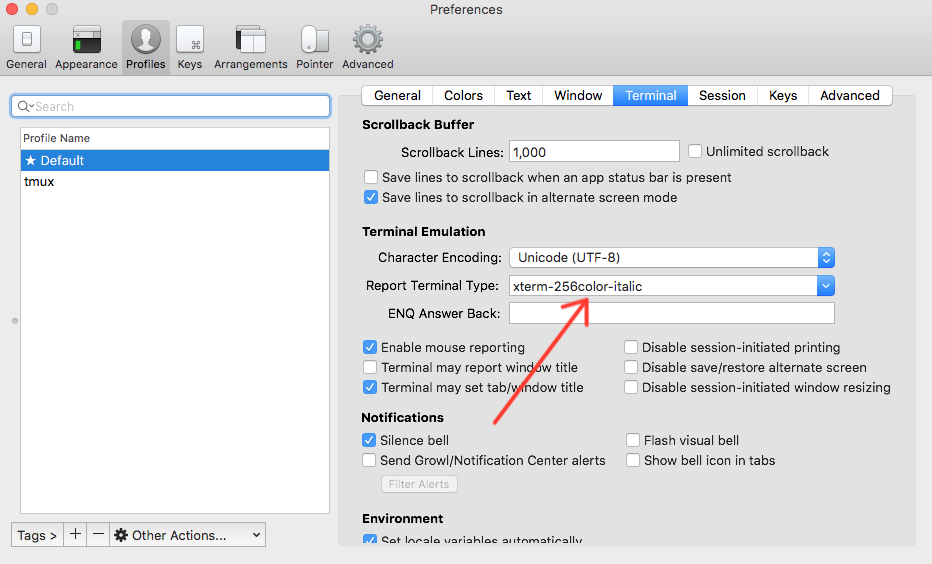
Change your iTerm terminal type to match the variable created above
Fourth

Open up your init.vim/.vimrc and add the following

(Note that you don't need to use OceanicNext, but I recommend that color scheme.)

    colorscheme OceanicNext
    hi htmlArg gui=italic
    hi Comment gui=italic
    hi Type    gui=italic
    hi htmlArg cterm=italic
    hi Comment cterm=italic
    hi Type    cterm=italic

Operator Mono w/ Italics on OSX Vim

@adamki

adamki commented May 24, 2017

Copy link
Copy Markdown

Im a bit confused by step 2. can you clarify?

i've made a file. specifically confused what to do next.

@adamki

adamki commented May 24, 2017

Copy link
Copy Markdown

nvm. figured it out.

@philipobenito

Copy link
Copy Markdown

@adamki what did you do?

@brentdodell

brentdodell commented Jul 24, 2017

Copy link
Copy Markdown

@Has anyone used this recently? I'm getting the following errors on macOS Sierra v10.12.5:

"xterm-256color-italic.terminfo", line 1, col 18: whitespace in name or alias field
"xterm-256color-italic.terminfo", line 2, col 19, terminal 'let &t_ZH="e[3m"': whitespace in name or alias field

As far as I can tell, there is no whitespace there.

@kuiro5

kuiro5 commented Aug 21, 2017

Copy link
Copy Markdown

@brentdodell, @philipobenito try just this:

xterm-256color-italic|xterm with 256 colors and italic,
  sitm=\E[3m, ritm=\E[23m,
  use=xterm-256color,

You will also have to manually type xterm-256color-italic in "Report Terminal Type" in iTerm, it probably won't show up as an option in the autocomplete.

@hew

hew commented Sep 20, 2018

Copy link
Copy Markdown
Author

You will also have to manually type xterm-256color-italic in "Report Terminal Type" in iTerm, it probably won't show up as an option in the autocomplete.

Yes this is the key missing instruction from the original post.

@eshack94

Copy link
Copy Markdown

Does this still work in December 2019 on Mac OS X Catalina?

@hew

hew commented Dec 31, 2019

Copy link
Copy Markdown
Author

@eshack94 It should. Let me know if it doesn't work. I'll try and help.

Sign up for free to join this conversation on GitHub. Already have an account? Sign in to comment