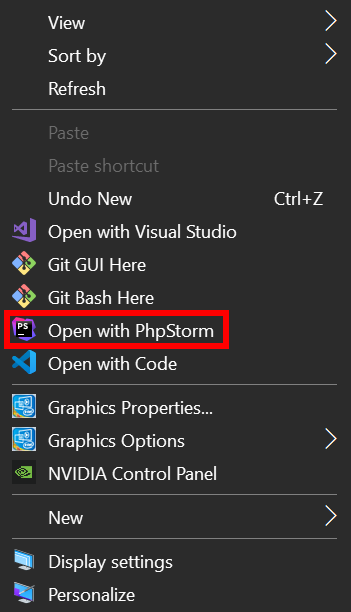
-
-
Save ibrahimhajjaj/e2265bd37ba072d6abc924635418e434 to your computer and use it in GitHub Desktop.
| @echo off | |
| SET PhpStormPath=C:\Program Files\JetBrains\PhpStorm 2020.3.3\bin\phpstorm64.exe | |
| echo Adding file entries | |
| @reg add "HKEY_CLASSES_ROOT\*\shell\PhpStorm" /t REG_SZ /v "" /d "Open in PhpStorm" /f | |
| @reg add "HKEY_CLASSES_ROOT\*\shell\PhpStorm" /t REG_EXPAND_SZ /v "Icon" /d "%PhpStormPath%,0" /f | |
| @reg add "HKEY_CLASSES_ROOT\*\shell\PhpStorm\command" /t REG_SZ /v "" /d "%PhpStormPath% \"%%1\"" /f | |
| echo Adding within a folder entries | |
| @reg add "HKEY_CLASSES_ROOT\Directory\Background\shell\PhpStorm" /t REG_SZ /v "" /d "Open with PhpStorm" /f | |
| @reg add "HKEY_CLASSES_ROOT\Directory\Background\shell\PhpStorm" /t REG_EXPAND_SZ /v "Icon" /d "%PhpStormPath%,0" /f | |
| @reg add "HKEY_CLASSES_ROOT\Directory\Background\shell\PhpStorm\command" /t REG_SZ /v "" /d "%PhpStormPath% \"%%V\"" /f | |
| echo Adding folder entries | |
| @reg add "HKEY_CLASSES_ROOT\Directory\shell\PhpStorm" /t REG_SZ /v "" /d "Open with PhpStorm" /f | |
| @reg add "HKEY_CLASSES_ROOT\Directory\shell\PhpStorm" /t REG_EXPAND_SZ /v "Icon" /d "%PhpStormPath%,0" /f | |
| @reg add "HKEY_CLASSES_ROOT\Directory\shell\PhpStorm\command" /t REG_SZ /v "" /d "%PhpStormPath% \"%%1\"" /f |


This method worked in Windows 10. In Windows 11 Phpstorm disappeared from the right click menu and setting it again with this method does not change anything :(

This method worked in Windows 10. In Windows 11 Phpstorm disappeared from the right click menu and setting it again with this method
does not change anything :(
It still works just fine ✔️ , but you have to right-click on the folder from the outside.

O! Thank you! Now I see, it works!

Works when run as administrator!
Pycharm code for you lazies out there
@echo off

SET StormPath=C:\Program Files\JetBrains\PyCharm 2021.2.3\bin\pycharm64.exe

echo Adding file entries
@reg add "HKEY_CLASSES_ROOT\*\shell\PyCharm" /t REG_SZ /v "" /d "Open in PyCharm"   /f
@reg add "HKEY_CLASSES_ROOT\*\shell\PyCharm" /t REG_EXPAND_SZ /v "Icon" /d "%StormPath%,0" /f
@reg add "HKEY_CLASSES_ROOT\*\shell\PyCharm\command" /t REG_SZ /v "" /d "%StormPath% \"%%1\"" /f

echo Adding within a folder entries
@reg add "HKEY_CLASSES_ROOT\Directory\Background\shell\PyCharm" /t REG_SZ /v "" /d "Open with PyCharm"   /f
@reg add "HKEY_CLASSES_ROOT\Directory\Background\shell\PyCharm" /t REG_EXPAND_SZ /v "Icon" /d "%StormPath%,0" /f
@reg add "HKEY_CLASSES_ROOT\Directory\Background\shell\PyCharm\command" /t REG_SZ /v "" /d "%StormPath% \"%%V\"" /f

echo Adding folder entries
@reg add "HKEY_CLASSES_ROOT\Directory\shell\PyCharm" /t REG_SZ /v "" /d "Open with PyCharm"   /f
@reg add "HKEY_CLASSES_ROOT\Directory\shell\PyCharm" /t REG_EXPAND_SZ /v "Icon" /d "%StormPath%,0" /f
@reg add "HKEY_CLASSES_ROOT\Directory\shell\PyCharm\command" /t REG_SZ /v "" /d "%StormPath% \"%%1\"" /f

@noamzilo - Thanks much appreciated worked for me :)

how do I remove it ?
it works but the idea just opens in light edit mode and doesn't recognize the path

For PyCharm
@echo off

SET PyCharmPath=C:\Program Files (x86)\JetBrains\PyCharm 2022.1.3\bin\pycharm64.exe

echo Adding file entries
@reg add "HKEY_CLASSES_ROOT\*\shell\PyCharm" /t REG_SZ /v "" /d "Open in PyCharm"   /f
@reg add "HKEY_CLASSES_ROOT\*\shell\PyCharm" /t REG_EXPAND_SZ /v "Icon" /d "%PyCharmPath%,0" /f
@reg add "HKEY_CLASSES_ROOT\*\shell\PyCharm\command" /t REG_SZ /v "" /d "%PyCharmPath% \"%%1\"" /f

echo Adding within a folder entries
@reg add "HKEY_CLASSES_ROOT\Directory\Background\shell\PyCharm" /t REG_SZ /v "" /d "Open with PyCharm"   /f
@reg add "HKEY_CLASSES_ROOT\Directory\Background\shell\PyCharm" /t REG_EXPAND_SZ /v "Icon" /d "%PyCharmPath%,0" /f
@reg add "HKEY_CLASSES_ROOT\Directory\Background\shell\PyCharm\command" /t REG_SZ /v "" /d "%PyCharmPath% \"%%V\"" /f

echo Adding folder entries
@reg add "HKEY_CLASSES_ROOT\Directory\shell\PyCharm" /t REG_SZ /v "" /d "Open with PyCharm"   /f
@reg add "HKEY_CLASSES_ROOT\Directory\shell\PyCharm" /t REG_EXPAND_SZ /v "Icon" /d "%PyCharmPath%,0" /f
@reg add "HKEY_CLASSES_ROOT\Directory\shell\PyCharm\command" /t REG_SZ /v "" /d "%PyCharmPath% \"%%1\"" /f
For WebStorm
@echo off

SET WebStormPath=C:\Program Files (x86)\JetBrains\WebStorm 2022.1.3\bin\webstorm64.exe

echo Adding file entries
@reg add "HKEY_CLASSES_ROOT\*\shell\WebStorm" /t REG_SZ /v "" /d "Open in WebStorm"   /f
@reg add "HKEY_CLASSES_ROOT\*\shell\WebStorm" /t REG_EXPAND_SZ /v "Icon" /d "%WebStormPath%,0" /f
@reg add "HKEY_CLASSES_ROOT\*\shell\WebStorm\command" /t REG_SZ /v "" /d "%WebStormPath% \"%%1\"" /f

echo Adding within a folder entries
@reg add "HKEY_CLASSES_ROOT\Directory\Background\shell\WebStorm" /t REG_SZ /v "" /d "Open with WebStorm"   /f
@reg add "HKEY_CLASSES_ROOT\Directory\Background\shell\WebStorm" /t REG_EXPAND_SZ /v "Icon" /d "%WebStormPath%,0" /f
@reg add "HKEY_CLASSES_ROOT\Directory\Background\shell\WebStorm\command" /t REG_SZ /v "" /d "%WebStormPath% \"%%V\"" /f

echo Adding folder entries
@reg add "HKEY_CLASSES_ROOT\Directory\shell\WebStorm" /t REG_SZ /v "" /d "Open with WebStorm"   /f
@reg add "HKEY_CLASSES_ROOT\Directory\shell\WebStorm" /t REG_EXPAND_SZ /v "Icon" /d "%WebStormPath%,0" /f
@reg add "HKEY_CLASSES_ROOT\Directory\shell\WebStorm\command" /t REG_SZ /v "" /d "%WebStormPath% \"%%1\"" /f
For IntelliJ
@echo off

SET IntelliJPath=C:\Program Files (x86)\JetBrains\IntelliJ IDEA 2022.1.3\bin\idea64.exe

echo Adding file entries
@reg add "HKEY_CLASSES_ROOT\*\shell\IntelliJ" /t REG_SZ /v "" /d "Open in IntelliJ"   /f
@reg add "HKEY_CLASSES_ROOT\*\shell\IntelliJ" /t REG_EXPAND_SZ /v "Icon" /d "%IntelliJPath%,0" /f
@reg add "HKEY_CLASSES_ROOT\*\shell\IntelliJ\command" /t REG_SZ /v "" /d "%IntelliJPath% \"%%1\"" /f

echo Adding within a folder entries
@reg add "HKEY_CLASSES_ROOT\Directory\Background\shell\IntelliJ" /t REG_SZ /v "" /d "Open with IntelliJ"   /f
@reg add "HKEY_CLASSES_ROOT\Directory\Background\shell\IntelliJ" /t REG_EXPAND_SZ /v "Icon" /d "%IntelliJPath%,0" /f
@reg add "HKEY_CLASSES_ROOT\Directory\Background\shell\IntelliJ\command" /t REG_SZ /v "" /d "%IntelliJPath% \"%%V\"" /f

echo Adding folder entries
@reg add "HKEY_CLASSES_ROOT\Directory\shell\IntelliJ" /t REG_SZ /v "" /d "Open with IntelliJ"   /f
@reg add "HKEY_CLASSES_ROOT\Directory\shell\IntelliJ" /t REG_EXPAND_SZ /v "Icon" /d "%IntelliJPath%,0" /f
@reg add "HKEY_CLASSES_ROOT\Directory\shell\IntelliJ\command" /t REG_SZ /v "" /d "%IntelliJPath% \"%%1\"" /f

This will not work if the installation was done with JetBrain Tool Box... any solution?

Make sure to change PhpStormPath to match your current path.
Thanks a lot.
This will not work if the installation was done with JetBrain Tool Box... any solution?
Please change the pycharm path as following:
C:\Users\XXX\AppData\Local\JetBrains\Toolbox\apps\PyCharm-P\ch-0\223.7571.203\bin\pycharm64.exe
It works for me.

Use following code
If file not exists then will open the "Open File" dialog box for selecting "pycharm64.exe" file manually.
@ECHO off
setlocal EnableDelayedExpansion
SET PhpStormPath="C:\Program Files\JetBrains\PhpStorm 2021.3\bin\phpstorm64.exe"
IF EXIST %PhpStormPath% (ECHO File found: %PhpStormPath%) ELSE (ECHO File not found: %PhpStormPath% && CALL :LoadExeFile PhpStormPath)

SET updated=false

IF EXIST %PhpStormPath% (

	reg QUERY "HKEY_CLASSES_ROOT\*\shell\PhpStorm" > nul 2> nul
	if %errorlevel% GTR 0 (
		echo Adding file entries
		@reg add "HKEY_CLASSES_ROOT\*\shell\PhpStorm" /t REG_SZ /v "" /d "Open in PhpStorm"   /f
		@reg add "HKEY_CLASSES_ROOT\*\shell\PhpStorm" /t REG_EXPAND_SZ /v "Icon" /d "%PhpStormPath%,0" /f
		@reg add "HKEY_CLASSES_ROOT\*\shell\PhpStorm\command" /t REG_SZ /v "" /d "%PhpStormPath% \"%%1\"" /f
		SET updated=true
	)

	reg QUERY "HKEY_CLASSES_ROOT\Directory\Background\shell\PhpStorm" > nul 2> nul
	if %errorlevel% GTR 0 (
		echo Adding within a folder entries
		@reg add "HKEY_CLASSES_ROOT\Directory\Background\shell\PhpStorm" /t REG_SZ /v "" /d "Open with PhpStorm"   /f
		@reg add "HKEY_CLASSES_ROOT\Directory\Background\shell\PhpStorm" /t REG_EXPAND_SZ /v "Icon" /d "%PhpStormPath%,0" /f
		@reg add "HKEY_CLASSES_ROOT\Directory\Background\shell\PhpStorm\command" /t REG_SZ /v "" /d "%PhpStormPath% \"%%V\"" /f
		SET updated=true
	)

	reg QUERY "HKEY_CLASSES_ROOT\Directory\shell\PhpStorm" > nul 2> nul
	if %errorlevel% GTR 0 (
		echo Adding folder entries
		@reg add "HKEY_CLASSES_ROOT\Directory\shell\PhpStorm" /t REG_SZ /v "" /d "Open with PhpStorm"   /f
		@reg add "HKEY_CLASSES_ROOT\Directory\shell\PhpStorm" /t REG_EXPAND_SZ /v "Icon" /d "%PhpStormPath%,0" /f
		@reg add "HKEY_CLASSES_ROOT\Directory\shell\PhpStorm\command" /t REG_SZ /v "" /d "%PhpStormPath% \"%%1\"" /f
		SET updated=true
	)
	if %updated% equ true ( ECHO Registry Updated Successfull! ) ELSE (ECHO Registry not updated may be values already exists!)
) ELSE ( echo File %PhpStormPath% does not exist )


endlocal
PAUSE
EXIT /B %ERRORLEVEL%
:LoadExeFile
SET ps_fn=ofd.ps1
ECHO [System.Reflection.Assembly]::LoadWithPartialName("System.windows.forms") ^| out-null > %ps_fn%
ECHO $OpenFileDialog = New-Object System.Windows.Forms.OpenFileDialog >> %ps_fn%
ECHO $OpenFileDialog.initialDirectory = "C:\Program Files\JetBrains" >> %ps_fn%
ECHO $OpenFileDialog.filter = "Exe File (*.exe)|*.exe" >> %ps_fn%
ECHO $OpenFileDialog.ShowDialog() >> %ps_fn%
ECHO $OpenFileDialog.filename >> %ps_fn%
for /F "tokens=* usebackq" %%a in (`powershell -executionpolicy bypass -file %ps_fn%`) do if not "%%a" == "Cancel" if not "%%a" == "OK" SET filename=%%a
del %ps_fn%
SET "%~1=%filename%"
EXIT /B 0

@echo off
SET StormPath=C:\Program Files\JetBrains\PyCharm 2021.2.3\bin\pycharm64.exe
echo Adding file entries
@reg add "HKEY_CLASSES_ROOT*\shell\PyCharm" /t REG_SZ /v "" /d "Open in PyCharm" /f
@reg add "HKEY_CLASSES_ROOT*\shell\PyCharm" /t REG_EXPAND_SZ /v "Icon" /d "%StormPath%,0" /f
@reg add "HKEY_CLASSES_ROOT*\shell\PyCharm\command" /t REG_SZ /v "" /d "%StormPath% "%%1"" /fecho Adding within a folder entries
@reg add "HKEY_CLASSES_ROOT\Directory\Background\shell\PyCharm" /t REG_SZ /v "" /d "Open with PyCharm" /f
@reg add "HKEY_CLASSES_ROOT\Directory\Background\shell\PyCharm" /t REG_EXPAND_SZ /v "Icon" /d "%StormPath%,0" /f
@reg add "HKEY_CLASSES_ROOT\Directory\Background\shell\PyCharm\command" /t REG_SZ /v "" /d "%StormPath% "%%V"" /fecho Adding folder entries
@reg add "HKEY_CLASSES_ROOT\Directory\shell\PyCharm" /t REG_SZ /v "" /d "Open with PyCharm" /f
@reg add "HKEY_CLASSES_ROOT\Directory\shell\PyCharm" /t REG_EXPAND_SZ /v "Icon" /d "%StormPath%,0" /f
@reg add "HKEY_CLASSES_ROOT\Directory\shell\PyCharm\command" /t REG_SZ /v "" /d "%StormPath% "%%1"" /f
@mahelbir thank you so much

Thanks

Thank you

it works, thank you

Legend! Thanks for posting

On my Win 11 this sctipt add context menu only for file, not for folder/directory. But I use https://www.nirsoft.net/utils/file_types_manager.html for add menu items manually
Thanks.