
-
Star
(393)
You must be signed in to star a gist -
Fork
(46)
You must be signed in to fork a gist
-
-
Save mandiwise/dc53cb9da00856d7cdbb to your computer and use it in GitHub Desktop.
| // Reference: http://stackoverflow.com/questions/4822471/count-number-of-lines-in-a-git-repository | |
| $ git ls-files | xargs wc -l |


Helpful awesome. 👏

perfect thanks!

Thanks!! 👍

Great!

you should try this https://api.github.com/repos/<user/repo>/languages
Replace <user/repo>

Genius

Amazing, thank you!

@PhilLab I had the same problem, but I solved it like this: git ls-files | xargs wc -l | grep -o "[0-9]* total" | awk '{SUM += $1} END {print SUM}'

Hi All,
Any Ide where I can exclude all the comments with the below command
$ git ls-files | xargs wc -l
I assume that the above command will give you list of lines of code including the comments , Any command to not include comments and only the line of code count.

this is a total LINE count in files found, not "lines of code". this will include comments and blank lines.
so, "A command to calculate lines of code in all tracked files in a Git repo" is not accurate.

you should try this
https://api.github.com/repos/<user/repo>/languages
Replace <user/repo>
Super OP ❤️❤️

you should try this https://api.github.com/repos/<user/repo>/languages
Replace <user/repo>
Thanks, that's all you ever need!

Great
IMPORTANT
the url https://api.github.com/repos/<user/repo>/languages does not return number of lines but it returns charecters in a git repo.
I found this while working on an api, this was the data i got from all my repos:
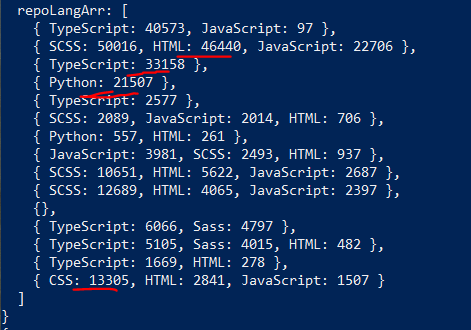
I'm just a hobbyist dev and I'm sure I cannot write 13k lines of css. I copies all the css and went to character counter and found that it was number of charecters that was returned not lines

Thanks, for my custom extension (py) files and for files in folders, I modified it to the following:
┌──(umar_0x01@b0x)-[~/scripts/0llScan]
└─$ git ls-files */*.py *.py | xargs wc -l
    6 insides/__init__.py
   73 insides/colors.py
  216 insides/functions.py
   13 modules/__init__.py
   61 modules/dirsearch.py
   37 modules/gau.py
   43 modules/linkfinder.py
   37 modules/nikto.py
   35 modules/nuclei.py
   32 modules/owasp.py
   46 modules/testssl.py
   36 modules/wappalyzer.py
   42 modules/whatweb.py
  109 scan.py
  786 total
For characters:
┌──(umar_0x01@b0x)-[~/scripts/0llScan]
└─$ git ls-files */*.py *.py | xargs wc -c
  121 insides/__init__.py
 1356 insides/colors.py
 5508 insides/functions.py
  421 modules/__init__.py
 1530 modules/dirsearch.py
  997 modules/gau.py
 1019 modules/linkfinder.py
  898 modules/nikto.py
  711 modules/nuclei.py
  695 modules/owasp.py
 1151 modules/testssl.py
  847 modules/wappalyzer.py
  995 modules/whatweb.py
 3645 scan.py
19894 total
Getting the error:
'xargs' is not recognized as an internal or external command,
operable program or batch file.
Was running it from Windows' console. Run it from the Git Bash to make it work.

https://api.github.com/repos/<user/repo>/languages
Awesome

I made an app to do it completely remotely, on a forked repo, without having to clone it - https://klock.herokuapp.com/
This does not work anymore.
Does it have a new home?

I made an app to do it completely remotely, on a forked repo, without having to clone it - https://klock.herokuapp.com/
This does not work anymore. Does it have a new home?
I guess this was a free app. Heroku recently removed hosting apps for free on their platform
I made an app to do it completely remotely, on a forked repo, without having to clone it - https://klock.herokuapp.com/
This does not work anymore. Does it have a new home?
I guess this was a free app. Heroku recently removed hosting apps for free on their platform
author here. yes it was and yes they killed it. I can resurrect it on another free platform if there is interest in it.
or you can just run it locally - https://github.com/alexivkin/klock

I thought I'd add my own command here in case it helps anyone:
git ls-files | grep -vE '\.(webp|ttf|json|png|js)$' | xargs wc -l | sort -nr
This counts lines of code ignoring various image file types, fonts, json/js (I'm counting code in a python project and the .js would distort things). It sorts it by size for you too.
Or instead of filtering via inversion filter, you can
git ls-files | xargs -I{} sh -c "file '{}' | grep -q text && echo '{}'" | sort -nr

omg thank you ❤️

I find this pretty useful (for public repos) https://codetabs.com/count-loc/count-loc-online.html
Plus there's an open API: https://api.codetabs.com/v1/loc?github=bluesky-social/social-app
[
 {
  "language": "TypeScript",
  "files": 620,
  "lines": 83349,
  "blanks": 5334,
  "comments": 2259,
  "linesOfCode": 75756
 },
 {
  "language": "JavaScript",
  "files": 23,
  "lines": 705,
  "blanks": 40,
  "comments": 46,
  "linesOfCode": 619
 },
 {
  "language": "SVG",
  "files": 23,
  "lines": 55,
  "blanks": 0,
  "comments": 0,
  "linesOfCode": 55
 },
 {
  "language": "Markdown",
  "files": 13,
  "lines": 689,
  "blanks": 201,
  "comments": 0,
  "linesOfCode": 488
 },
 {
  "language": "Go",
  "files": 9,
  "lines": 903,
  "blanks": 114,
  "comments": 64,
  "linesOfCode": 725
 },
 {
  "language": "JSON",
  "files": 9,
  "lines": 512,
  "blanks": 0,
  "comments": 0,
  "linesOfCode": 512
 },
 {
  "language": "Patch",
  "files": 9,
  "lines": 3968,
  "blanks": 17,
  "comments": 0,
  "linesOfCode": 3951
 },
 {
  "language": "YAML",
  "files": 8,
  "lines": 466,
  "blanks": 43,
  "comments": 30,
  "linesOfCode": 393
 },
 {
  "language": "HTML",
  "files": 7,
  "lines": 707,
  "blanks": 42,
  "comments": 16,
  "linesOfCode": 649
 },
 {
  "language": "Shell",
  "files": 5,
  "lines": 126,
  "blanks": 24,
  "comments": 25,
  "linesOfCode": 77
 },
 {
  "language": "Swift",
  "files": 5,
  "lines": 383,
  "blanks": 55,
  "comments": 41,
  "linesOfCode": 287
 },
 {
  "language": "gitignore",
  "files": 3,
  "lines": 124,
  "blanks": 23,
  "comments": 31,
  "linesOfCode": 70
 },
 {
  "language": "Makefile",
  "files": 2,
  "lines": 81,
  "blanks": 19,
  "comments": 4,
  "linesOfCode": 58
 },
 {
  "language": "Plain Text",
  "files": 2,
  "lines": 13,
  "blanks": 1,
  "comments": 0,
  "linesOfCode": 12
 },
 {
  "language": "C Header",
  "files": 1,
  "lines": 3,
  "blanks": 0,
  "comments": 0,
  "linesOfCode": 3
 },
 {
  "language": "Dockerfile",
  "files": 1,
  "lines": 74,
  "blanks": 17,
  "comments": 9,
  "linesOfCode": 48
 },
 {
  "language": "Gemfile",
  "files": 1,
  "lines": 6,
  "blanks": 2,
  "comments": 1,
  "linesOfCode": 3
 },
 {
  "language": "JSX",
  "files": 1,
  "lines": 9,
  "blanks": 1,
  "comments": 0,
  "linesOfCode": 8
 },
 {
  "language": "License",
  "files": 1,
  "lines": 7,
  "blanks": 3,
  "comments": 0,
  "linesOfCode": 4
 },
 {
  "language": "Objective C",
  "files": 1,
  "lines": 26,
  "blanks": 5,
  "comments": 0,
  "linesOfCode": 21
 },
 {
  "language": "TypeScript Typings",
  "files": 1,
  "lines": 8,
  "blanks": 0,
  "comments": 0,
  "linesOfCode": 8
 },
 {
  "language": "Total",
  "files": 745,
  "lines": 92214,
  "blanks": 5941,
  "comments": 2526,
  "linesOfCode": 83747
 }
]
An improvement based on what has already been said, by the way thanks for the tip.
Line counter for child folders with aggregator removing image files (webp|ttf|png|jpg|jpeg) :
How to use:
bash counter.sh foldername
counter.sh:
#!/bin/bash

# Root Folder
root_dir=$1

#  Count initialization
total_lines=0

# Loop
for folder in "$root_dir"/*; do
    # Check is folder
    if [ -d "$folder" ] && [ ! "$(basename "$folder")" = ".*" ] && [ -d "$folder/.git" ]; then
        # Run count command
        lines_in_folder=$(cd "$folder"; git ls-files | grep -vE '\.(webp|ttf|png|jpg|jpeg)$' | sed 's/.*/"&"/' |  xargs wc -l | grep -o "[0-9]* total" | awk '{SUM += $1} END {print SUM}')
        current_branch=$(cd "$folder"; git rev-parse --abbrev-ref HEAD)
        printf "%-80s -> %s lines\n" "$(basename "$folder") ($current_branch)" "$lines_in_folder"


        # Increment total lines
        total_lines=$((total_lines + lines_in_folder))

    fi
done

# Show total lines
echo "Total: $total_lines lines"


To only include the lines of code, can simply do
git ls-files "*.go" | xargs cat | grep -v '^\s*$' | grep -v '^\s*#' | wc -l
Just replace .go with your language's file extension. This excludes blank lines, configurations and comments so it presents an accurate number of actual lines of code.

nstall cloc
choco install cloc
then
cd repo-name
then
cloc .
Install cloc
choco install clocthencd repo-namethencloc .
Repo https://github.com/AlDanial/cloc GPL-2.0 / 22k stars
I made an app to do it completely remotely, on a forked repo, without having to clone it - https://klock.herokuapp.com/