Skip to content

Instantly share code, notes, and snippets.

@odan
Last active February 26, 2026 18:45
Show Gist options
  • Select an option

  • Save odan/1abe76d373a9cbb15bed to your computer and use it in GitHub Desktop.

Select an option

Save odan/1abe76d373a9cbb15bed to your computer and use it in GitHub Desktop.
Installing Xdebug for XAMPP

Installing Xdebug for XAMPP with PHP 7.x

Requirements

Setup

If the file C:\xampp\php\ext\php_xdebug.dll already exists, you can skip the download.

[XDebug]
zend_extension = "c:\xampp\php\ext\php_xdebug.dll"
;zend_extension = "c:\xampp\php\ext\php_xdebug-2.9.7-7.4-vc15-x86_64.dll"
xdebug.remote_autostart = 1
xdebug.profiler_append = 0
xdebug.profiler_enable = 0
xdebug.profiler_enable_trigger = 0
xdebug.profiler_output_dir = "c:\xampp\tmp"
;xdebug.profiler_output_name = "cachegrind.out.%t-%s"
xdebug.remote_enable = 1
xdebug.remote_handler = "dbgp"
xdebug.remote_host = "127.0.0.1"
xdebug.remote_log = "c:\xampp\tmp\xdebug.txt"
xdebug.remote_port = 9000
xdebug.trace_output_dir = "c:\xampp\tmp"
;36000 = 10h
xdebug.remote_cookie_expire_time = 36000
  • Restart Apache

  • Click the Github ★ Star button :-)

PhpStorm

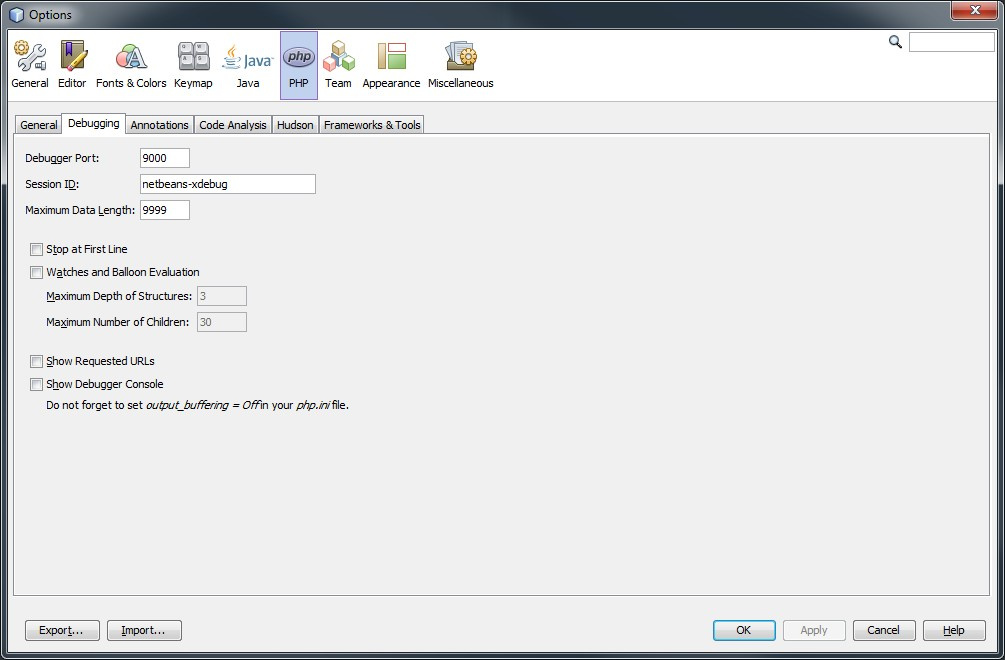
Netbeans

Visual Studio Code

Adobe Brackets

Sublime Text 2 and 3

Start debugger from the console

Enter cmd:

set XDEBUG_CONFIG="idekey=xdebug"
php test.php

Postman

Add XDEBUG_SESSION_START=PHPSTORM as query parameter to the url, e.g.

Follow me on Twitter | Blog

@amindeist

Copy link
Copy Markdown

thank...very good

@HenkPoley

HenkPoley commented Jul 16, 2019

Copy link
Copy Markdown

@odan : For XAMPP Version 7.3.4 you need to download the (Zend) Thread Safe (TS/ZTS) version: https://xdebug.org/files/php_xdebug-2.7.2-7.3-vc15-x86_64.dll

Why they call it ZTS in one place, and TS in another 🤷‍♂️


btw, people can also use the built-in Xdebug by using zend_extension = "C:\xampp\php\ext\php_xdebug.dll" instead of the line above.

This actually works for me, while the version you point to doesn't.


I didn't need to unblock the DLL, even with Windows Defender on High+ cloud detection level ('Block At First Sight').

@azazqadir

Copy link
Copy Markdown

This process of install xdebug on windows based stack can be simpler if you use the xdebug installation wizard. To use the wizard tool create a PHP file and add this in the file

Now run this file in the browser and copy the details in the box and paste it in the wizard tool. Now, click Analyze my phpinfo() output button

Now you will some instructions, follow it and you are good to go.

Source: PHP debug process with xdebug

@nonew

nonew commented Aug 24, 2019

Copy link
Copy Markdown

Can you help to figure out how to config in MacOS?

@free-developers

Copy link
Copy Markdown

Thank you so much

@hide2go

hide2go commented Oct 28, 2019

Copy link
Copy Markdown

YES! Thank you so much!!

@GitHub-Mike

Copy link
Copy Markdown

Attention:

This version http://xdebug.org/files/php_xdebug-2.7.2-7.3-vc15-x86_64.dll works only on PHP 7.3.x and 64bit XAMPP

The version for PHP 7.3.0 and 32bit XAMPP is: http://xdebug.org/files/php_xdebug-2.8.0-7.3-vc15.dll (current release is 2.8.0)

@yosigosi

yosigosi commented Jan 5, 2020

Copy link
Copy Markdown

The same as westy92 commented, also I needed to add the php.ini line:
xdebug.remote_autostart = 1.
Environment:
Ubuntu 18.04 php 7.2 Eclipse 2019-09

@remasterzero

Copy link
Copy Markdown

I give you the thousand star 👍
image

@odan

odan commented Apr 7, 2020

Copy link
Copy Markdown
Author

@remasterzero Awesome!!! 🤩 🥳🍾

@meksiabdou

Copy link
Copy Markdown

Thank you so much <3

@ThomasBerne

Copy link
Copy Markdown

Very usefull ! Think you so much !

@fqodry

fqodry commented Aug 5, 2020

Copy link
Copy Markdown

thank you!! very useful 👍

@paresh-developer

paresh-developer commented Sep 11, 2020

Copy link
Copy Markdown

Thanks ! you resolved my 3 days headache

@anjalbinayak

Copy link
Copy Markdown

Thank you, I can never imagine to live without var_dump readable output.

@vid100

vid100 commented Oct 8, 2020

Copy link
Copy Markdown

Thank you so much..

@nalendro16

Copy link
Copy Markdown

really apreciate your work! thanks

@bksubramanyarao

Copy link
Copy Markdown

thanks a ton 👍

@moehammadiqbql

Copy link
Copy Markdown

thankyou

@Dorothee47

Copy link
Copy Markdown

Thank you very much for your excellent instruction!

I work with Windows 10 and Apache Netbeans 12.2.
I had to add the following statement in php.ini:

xdebug.idekey="netbeans-xdebug"

@nileshp9495

Copy link
Copy Markdown

Thanks. Very useful

@zericksp

zericksp commented Apr 1, 2021

Copy link
Copy Markdown

Great. Finally I can use Xdebug at VS Code!

@paresh-developer

Copy link
Copy Markdown

How should we go for IIS debug ???

@os3albert

Copy link
Copy Markdown

Thank You Man!!! 😇 🤓 ❤️

@webrefer

Copy link
Copy Markdown

thank you

@vukasinpetrovic

vukasinpetrovic commented Oct 15, 2021

Copy link
Copy Markdown

Awesome, thank you! ❤️

@wordpressyu

Copy link
Copy Markdown

a tutorial like this ,
should be for wamp server.
when wordpress is installed on wamp ,
what neccessry confugurations of wamp should be done ?
thnks

@ElvisAns

ElvisAns commented Feb 24, 2022

Copy link
Copy Markdown

It works but you are commenting the name of the downloaded file
instead of
zend_extension = "c:\xampp64\php\ext\php_xdebug.dll"
;zend_extension = "c:\xampp64\php\ext\php_xdebug-2.9.7-7.4-vc15-x86_64.dll"
i used

;zend_extension = "c:\xampp64\php\ext\php_xdebug.dll"
zend_extension = "c:\xampp64\php\ext\php_xdebug-2.9.7-7.4-vc15-x86_64.dll"

@amirdora

amirdora commented Sep 9, 2022

Copy link
Copy Markdown

Thank you for adding links here, on PECL doesn't seem to be available for php 7.4.

@zulfirman

zulfirman commented Nov 2, 2023

Copy link
Copy Markdown

For Xdebug version 3 use this config in php.ini

[XDebug]
zend_extension = "c:\xampp\php\ext\php_xdebug.dll"
xdebug.mode=debug
xdebug.start_with_request=yes
xdebug.profiler_append = 0
;xdebug.profiler_output_dir = "c:\xampp\tmp"
;xdebug.profiler_output_name = "cachegrind.out.%t-%s"
xdebug.remote_handler = "dbgp"
xdebug.client_host = "127.0.0.1"
xdebug.log = "c:\xampp\tmp\xdebug.txt"
xdebug.client_port = 9000
xdebug.output_dir = "c:\xampp\tmp"
;36000 = 10h
xdebug.remote_cookie_expire_time = 36000

https://xdebug.org/docs/upgrade_guide#changed-xdebug.profiler_enable

Sign up for free to join this conversation on GitHub. Already have an account? Sign in to comment