|
<!DOCTYPE html> |
|
<html> |
|
<head> |
|
<title>Basic Snake HTML Game</title> |
|
<meta charset="UTF-8"> |
|
<style> |
|
html, body { |
|
height: 100%; |
|
margin: 0; |
|
} |
|
|
|
body { |
|
background: black; |
|
display: flex; |
|
align-items: center; |
|
justify-content: center; |
|
} |
|
canvas { |
|
border: 1px solid white; |
|
} |
|
</style> |
|
</head> |
|
<body> |
|
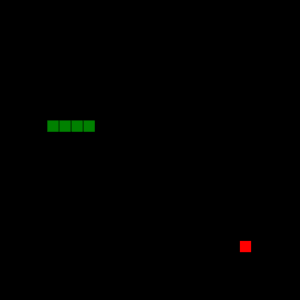
<canvas width="400" height="400" id="game"></canvas> |
|
<script> |
|
var canvas = document.getElementById('game'); |
|
var context = canvas.getContext('2d'); |
|
|
|
// the canvas width & height, snake x & y, and the apple x & y, all need to be a multiples of the grid size in order for collision detection to work |
|
// (e.g. 16 * 25 = 400) |
|
var grid = 16; |
|
var count = 0; |
|
|
|
var snake = { |
|
x: 160, |
|
y: 160, |
|
|
|
// snake velocity. moves one grid length every frame in either the x or y direction |
|
dx: grid, |
|
dy: 0, |
|
|
|
// keep track of all grids the snake body occupies |
|
cells: [], |
|
|
|
// length of the snake. grows when eating an apple |
|
maxCells: 4 |
|
}; |
|
var apple = { |
|
x: 320, |
|
y: 320 |
|
}; |
|
|
|
// get random whole numbers in a specific range |
|
// @see https://stackoverflow.com/a/1527820/2124254 |
|
function getRandomInt(min, max) { |
|
return Math.floor(Math.random() * (max - min)) + min; |
|
} |
|
|
|
// game loop |
|
function loop() { |
|
requestAnimationFrame(loop); |
|
|
|
// slow game loop to 15 fps instead of 60 (60/15 = 4) |
|
if (++count < 4) { |
|
return; |
|
} |
|
|
|
count = 0; |
|
context.clearRect(0,0,canvas.width,canvas.height); |
|
|
|
// move snake by it's velocity |
|
snake.x += snake.dx; |
|
snake.y += snake.dy; |
|
|
|
// wrap snake position horizontally on edge of screen |
|
if (snake.x < 0) { |
|
snake.x = canvas.width - grid; |
|
} |
|
else if (snake.x >= canvas.width) { |
|
snake.x = 0; |
|
} |
|
|
|
// wrap snake position vertically on edge of screen |
|
if (snake.y < 0) { |
|
snake.y = canvas.height - grid; |
|
} |
|
else if (snake.y >= canvas.height) { |
|
snake.y = 0; |
|
} |
|
|
|
// keep track of where snake has been. front of the array is always the head |
|
snake.cells.unshift({x: snake.x, y: snake.y}); |
|
|
|
// remove cells as we move away from them |
|
if (snake.cells.length > snake.maxCells) { |
|
snake.cells.pop(); |
|
} |
|
|
|
// draw apple |
|
context.fillStyle = 'red'; |
|
context.fillRect(apple.x, apple.y, grid-1, grid-1); |
|
|
|
// draw snake one cell at a time |
|
context.fillStyle = 'green'; |
|
snake.cells.forEach(function(cell, index) { |
|
|
|
// drawing 1 px smaller than the grid creates a grid effect in the snake body so you can see how long it is |
|
context.fillRect(cell.x, cell.y, grid-1, grid-1); |
|
|
|
// snake ate apple |
|
if (cell.x === apple.x && cell.y === apple.y) { |
|
snake.maxCells++; |
|
|
|
// canvas is 400x400 which is 25x25 grids |
|
apple.x = getRandomInt(0, 25) * grid; |
|
apple.y = getRandomInt(0, 25) * grid; |
|
} |
|
|
|
// check collision with all cells after this one (modified bubble sort) |
|
for (var i = index + 1; i < snake.cells.length; i++) { |
|
|
|
// snake occupies same space as a body part. reset game |
|
if (cell.x === snake.cells[i].x && cell.y === snake.cells[i].y) { |
|
snake.x = 160; |
|
snake.y = 160; |
|
snake.cells = []; |
|
snake.maxCells = 4; |
|
snake.dx = grid; |
|
snake.dy = 0; |
|
|
|
apple.x = getRandomInt(0, 25) * grid; |
|
apple.y = getRandomInt(0, 25) * grid; |
|
} |
|
} |
|
}); |
|
} |
|
|
|
// listen to keyboard events to move the snake |
|
document.addEventListener('keydown', function(e) { |
|
// prevent snake from backtracking on itself by checking that it's |
|
// not already moving on the same axis (pressing left while moving |
|
// left won't do anything, and pressing right while moving left |
|
// shouldn't let you collide with your own body) |
|
|
|
// left arrow key |
|
if (e.which === 37 && snake.dx === 0) { |
|
snake.dx = -grid; |
|
snake.dy = 0; |
|
} |
|
// up arrow key |
|
else if (e.which === 38 && snake.dy === 0) { |
|
snake.dy = -grid; |
|
snake.dx = 0; |
|
} |
|
// right arrow key |
|
else if (e.which === 39 && snake.dx === 0) { |
|
snake.dx = grid; |
|
snake.dy = 0; |
|
} |
|
// down arrow key |
|
else if (e.which === 40 && snake.dy === 0) { |
|
snake.dy = grid; |
|
snake.dx = 0; |
|
} |
|
}); |
|
|
|
// start the game |
|
requestAnimationFrame(loop); |
|
</script> |
|
</body> |
|
</html> |



Really clean and elegant implementation 👏
Love how the grid system keeps everything aligned and makes collision detection simple.
One small improvement I’d suggest is preventing apple spawn on the snake body would make gameplay feel more polished. Also adding a score counter with context.fillText() would be a nice touch.
Great minimal example overall, super helpful for beginners getting into canvas games.
Cheers, Y2Down