mkdir -p ~/workspace/myproject

cd ~/workspace/myproject

claude-agents.sh                       # start or reattach a session
claude-agents.sh spawn researcher      # add a pane running claude
claude-agents.sh spawn implementer down # split downward
claude-agents.sh spawn-float debugger  # floating popup pane
claude-agents.sh list                  # see all claude sessions
Last active
October 19, 2026 13:15
-
-
Save thimslugga/c838a6f632201df94edf8968bd28b990 to your computer and use it in GitHub Desktop.
Agent Teams Setup
This file contains hidden or bidirectional Unicode text that may be interpreted or compiled differently than what appears below. To review, open the file in an editor that reveals hidden Unicode characters.
Learn more about bidirectional Unicode characters
| -- wezterm.lua -- config optimized for Claude Code | |
| -- Place at: ~/.wezterm.lua | |
| -- | |
| -- NOTE: Like zellij, WezTerm does not yet have native Claude Code | |
| -- agent team split-pane support (only tmux and iTerm2 do). | |
| -- Agent teams will fall back to in-process mode. However, WezTerm's | |
| -- CLI (wezterm cli split-pane, send-text, etc.) makes manual | |
| -- orchestration straightforward. See the companion launcher script. | |
| local wezterm = require("wezterm") | |
| local act = wezterm.action | |
| local config = wezterm.config_builder() | |
| -- ------------------------------------------------------------------- | |
| -- OS detection | |
| -- ------------------------------------------------------------------- | |
| local is_mac = wezterm.target_triple:find("darwin") ~= nil | |
| local is_linux = wezterm.target_triple:find("linux") ~= nil | |
| -- ------------------------------------------------------------------- | |
| -- Core settings for Claude Code | |
| -- ------------------------------------------------------------------- | |
| -- Large scrollback. Claude Code sessions produce a lot of output, | |
| -- especially during diffs and agent work. Default is 3500. | |
| config.scrollback_lines = 250000 | |
| -- Enable the kitty keyboard protocol. This is what makes Shift+Enter, | |
| -- Ctrl+Shift combos, and other modifier sequences work correctly in | |
| -- Claude Code without any hacks. WezTerm supports this natively. | |
| config.enable_kitty_keyboard = true | |
| -- Use vim as the scrollback pager. Ctrl+Shift+H opens the full | |
| -- scrollback in your editor for searching and copying. | |
| config.scrollback_pager = "vim -c 'set ft=man' -" | |
| -- Clipboard integration -- just works on all platforms. | |
| config.canonicalize_pasted_newlines = "None" | |
| -- Enable agent teams via environment variable. | |
| config.set_environment_variables = { | |
| CLAUDE_CODE_EXPERIMENTAL_AGENT_TEAMS = "1", | |
| -- WezTerm sets TERM_PROGRAM=WezTerm automatically. | |
| } | |
| -- ------------------------------------------------------------------- | |
| -- Appearance | |
| -- ------------------------------------------------------------------- | |
| -- Color scheme. WezTerm ships 700+ built-in schemes. | |
| -- Uncomment your preferred one: | |
| -- config.color_scheme = "Catppuccin Mocha" | |
| -- config.color_scheme = "Gruvbox dark, hard (base16)" | |
| -- config.color_scheme = "nord" | |
| -- config.color_scheme = "Tokyo Night" | |
| config.color_scheme = "Builtin Tango Dark" | |
| -- Font. Change to whatever you have installed. | |
| config.font_size = 13.0 | |
| -- config.font = wezterm.font("JetBrains Mono") | |
| -- config.font = wezterm.font("Fira Code") | |
| -- Window | |
| config.window_decorations = "RESIZE" | |
| config.window_padding = { left = 4, right = 4, top = 4, bottom = 4 } | |
| config.adjust_window_size_when_changing_font_size = false | |
| -- Tab bar | |
| config.use_fancy_tab_bar = false | |
| config.tab_bar_at_bottom = true | |
| config.hide_tab_bar_if_only_one_tab = false | |
| config.show_new_tab_button_in_tab_bar = false | |
| -- Show which pane is focused with a slightly different inactive color | |
| config.inactive_pane_hsb = { | |
| saturation = 0.8, | |
| brightness = 0.7, | |
| } | |
| -- ------------------------------------------------------------------- | |
| -- Leader key (Ctrl+Space, same as your tmux secondary prefix) | |
| -- ------------------------------------------------------------------- | |
| -- This gives you a tmux-like prefix key workflow. Press Ctrl+Space | |
| -- then a key within 1 second. The leader key does not interfere | |
| -- with Claude Code's own keybindings since it's a chord, not a | |
| -- single modifier. | |
| config.leader = { | |
| key = "Space", | |
| mods = "CTRL", | |
| timeout_milliseconds = 1000, | |
| } | |
| -- ------------------------------------------------------------------- | |
| -- Key bindings | |
| -- ------------------------------------------------------------------- | |
| config.keys = { | |
| -- == Pane splits (leader + | or -) == | |
| { | |
| key = "|", | |
| mods = "LEADER|SHIFT", | |
| action = act.SplitPane({ | |
| direction = "Right", | |
| size = { Percent = 50 }, | |
| }), | |
| }, | |
| { | |
| key = "-", | |
| mods = "LEADER", | |
| action = act.SplitPane({ | |
| direction = "Down", | |
| size = { Percent = 50 }, | |
| }), | |
| }, | |
| -- == Vim-style pane navigation (leader + h/j/k/l) == | |
| { key = "h", mods = "LEADER", action = act.ActivatePaneDirection("Left") }, | |
| { key = "j", mods = "LEADER", action = act.ActivatePaneDirection("Down") }, | |
| { key = "k", mods = "LEADER", action = act.ActivatePaneDirection("Up") }, | |
| { key = "l", mods = "LEADER", action = act.ActivatePaneDirection("Right") }, | |
| -- == Pane resize (leader + H/J/K/L) == | |
| { key = "H", mods = "LEADER|SHIFT", action = act.AdjustPaneSize({ "Left", 5 }) }, | |
| { key = "J", mods = "LEADER|SHIFT", action = act.AdjustPaneSize({ "Down", 3 }) }, | |
| { key = "K", mods = "LEADER|SHIFT", action = act.AdjustPaneSize({ "Up", 3 }) }, | |
| { key = "L", mods = "LEADER|SHIFT", action = act.AdjustPaneSize({ "Right", 5 }) }, | |
| -- == Pane zoom (leader + z) -- like tmux prefix+z == | |
| { key = "z", mods = "LEADER", action = act.TogglePaneZoomState }, | |
| -- == Close pane (leader + x) == | |
| { key = "x", mods = "LEADER", action = act.CloseCurrentPane({ confirm = true }) }, | |
| -- == Tab management == | |
| { key = "c", mods = "LEADER", action = act.SpawnTab("CurrentPaneDomain") }, | |
| { key = "n", mods = "LEADER", action = act.ActivateTabRelative(1) }, | |
| { key = "p", mods = "LEADER", action = act.ActivateTabRelative(-1) }, | |
| -- Direct tab access (leader + 1-9) | |
| { key = "1", mods = "LEADER", action = act.ActivateTab(0) }, | |
| { key = "2", mods = "LEADER", action = act.ActivateTab(1) }, | |
| { key = "3", mods = "LEADER", action = act.ActivateTab(2) }, | |
| { key = "4", mods = "LEADER", action = act.ActivateTab(3) }, | |
| { key = "5", mods = "LEADER", action = act.ActivateTab(4) }, | |
| -- == Alt-arrow pane navigation (no leader needed) == | |
| { key = "LeftArrow", mods = "ALT", action = act.ActivatePaneDirection("Left") }, | |
| { key = "RightArrow", mods = "ALT", action = act.ActivatePaneDirection("Right") }, | |
| { key = "UpArrow", mods = "ALT", action = act.ActivatePaneDirection("Up") }, | |
| { key = "DownArrow", mods = "ALT", action = act.ActivatePaneDirection("Down") }, | |
| -- == Reload config (leader + r) == | |
| { | |
| key = "r", | |
| mods = "LEADER", | |
| action = act.ReloadConfiguration, | |
| }, | |
| -- == Copy mode (leader + [) -- like tmux == | |
| { key = "[", mods = "LEADER", action = act.ActivateCopyMode }, | |
| -- == Open scrollback in vim (leader + e) == | |
| -- Captures the entire scrollback + visible area and opens in vim. | |
| { | |
| key = "e", | |
| mods = "LEADER", | |
| action = act.EmitEvent("open-scrollback-in-vim"), | |
| }, | |
| -- == Quick Claude Code pane (leader + y) == | |
| -- Splits right and launches claude in the new pane. | |
| -- Uses the two-step approach (split then send-text) to preserve | |
| -- your shell's PATH, since wezterm cli split-pane -- claude | |
| -- bypasses .bashrc/.zshrc and loses PATH entries. | |
| { | |
| key = "y", | |
| mods = "LEADER", | |
| action = act.SplitPane({ | |
| direction = "Right", | |
| size = { Percent = 60 }, | |
| command = { | |
| args = { is_mac and "/bin/zsh" or "/bin/bash", "-ilc", "claude" }, | |
| }, | |
| }), | |
| }, | |
| -- == Agent team layout: 3-way split (leader + a) == | |
| -- Creates a lead pane on the left (50%) and two agent panes | |
| -- stacked on the right. | |
| { | |
| key = "a", | |
| mods = "LEADER", | |
| action = act.EmitEvent("spawn-agent-layout"), | |
| }, | |
| -- == Workspace switching (leader + w) == | |
| -- WezTerm workspaces are the equivalent of tmux sessions. | |
| -- Each workspace is an independent group of windows/tabs/panes. | |
| { | |
| key = "w", | |
| mods = "LEADER", | |
| action = act.ShowLauncherArgs({ flags = "FUZZY|WORKSPACES" }), | |
| }, | |
| -- == New workspace (leader + W) == | |
| { | |
| key = "W", | |
| mods = "LEADER|SHIFT", | |
| action = act.PromptInputLine({ | |
| description = "Enter name for new workspace", | |
| action = wezterm.action_callback(function(window, pane, line) | |
| if line then | |
| window:perform_action( | |
| act.SwitchToWorkspace({ name = line }), | |
| pane | |
| ) | |
| end | |
| end), | |
| }), | |
| }, | |
| -- == Command palette (Ctrl+Shift+P) == | |
| -- Already bound by default, listed here for reference. | |
| -- { key = "P", mods = "CTRL|SHIFT", action = act.ActivateCommandPalette }, | |
| } | |
| -- ------------------------------------------------------------------- | |
| -- Custom events | |
| -- ------------------------------------------------------------------- | |
| -- Open full scrollback in vim | |
| wezterm.on("open-scrollback-in-vim", function(window, pane) | |
| local text = pane:get_lines_as_text(config.scrollback_lines) | |
| local tmpfile = os.tmpname() | |
| local f = io.open(tmpfile, "w+") | |
| if f then | |
| f:write(text) | |
| f:close() | |
| window:perform_action( | |
| act.SpawnCommandInNewTab({ | |
| args = { "vim", "-c", "normal G", tmpfile }, | |
| }), | |
| pane | |
| ) | |
| -- Clean up after vim exits (wezterm keeps the file reference) | |
| wezterm.sleep_ms(1000) | |
| end | |
| end) | |
| -- Spawn a 3-pane agent team layout in the current tab | |
| wezterm.on("spawn-agent-layout", function(window, pane) | |
| local shell = is_mac and "/bin/zsh" or "/bin/bash" | |
| -- Split right for agent-1 (takes 50% of the tab) | |
| local agent1 = pane:split({ | |
| direction = "Right", | |
| size = 0.5, | |
| args = { shell, "-ilc", "claude" }, | |
| }) | |
| -- Split agent-1 pane downward for agent-2 | |
| if agent1 then | |
| agent1:split({ | |
| direction = "Bottom", | |
| size = 0.5, | |
| args = { shell, "-ilc", "claude" }, | |
| }) | |
| end | |
| -- The original pane (left side) is your lead / shell. | |
| -- Type 'claude' in it to make it the team lead, or use it | |
| -- as a shell for git/tests/monitoring. | |
| end) | |
| -- ------------------------------------------------------------------- | |
| -- Tab title: show running process name | |
| -- ------------------------------------------------------------------- | |
| -- This helps identify which tab has which Claude Code agent. | |
| wezterm.on("format-tab-title", function(tab) | |
| local pane = tab.active_pane | |
| local title = pane.title | |
| -- Truncate long titles | |
| if #title > 24 then | |
| title = title:sub(1, 21) .. "..." | |
| end | |
| local index = tab.tab_index + 1 | |
| return string.format(" %d: %s ", index, title) | |
| end) | |
| -- ------------------------------------------------------------------- | |
| -- Right status: show workspace name and working directory | |
| -- ------------------------------------------------------------------- | |
| wezterm.on("update-status", function(window, pane) | |
| local workspace = window:active_workspace() | |
| local cwd = "" | |
| local cwd_uri = pane:get_current_working_dir() | |
| if cwd_uri then | |
| cwd = cwd_uri.file_path or "" | |
| -- Shorten home directory | |
| local home = os.getenv("HOME") or "" | |
| if home ~= "" and cwd:sub(1, #home) == home then | |
| cwd = "~" .. cwd:sub(#home + 1) | |
| end | |
| end | |
| window:set_right_status(wezterm.format({ | |
| { Foreground = { Color = "#6a9955" } }, | |
| { Text = " " .. workspace .. " " }, | |
| { Foreground = { Color = "#569cd6" } }, | |
| { Text = cwd .. " " }, | |
| })) | |
| end) | |
| return config |
This file contains hidden or bidirectional Unicode text that may be interpreted or compiled differently than what appears below. To review, open the file in an editor that reveals hidden Unicode characters.
Learn more about bidirectional Unicode characters
| #!/usr/bin/env bash | |
| set -euo pipefail | |
| # cc-agents.sh - Spawn Claude Code Agents in Zellij Panes | |
| # | |
| # Usage: | |
| # cc-agents.sh # start a new session with the layout | |
| # cc-agents.sh spawn researcher # spawn a named agent pane (right split) | |
| # cc-agents.sh spawn-float debugger # spawn a named floating agent pane | |
| # cc-agents.sh spawn-tab backend # spawn agent in a new tab | |
| # cc-agents.sh attach # attach to existing session | |
| # cc-agents.sh list # list running claude sessions | |
| # | |
| # Requires: zellij, claude (Claude Code CLI) | |
| SESSION_PREFIX="claude" | |
| LAYOUT_NAME="cc-agents" | |
| # Derive a session name from the current directory. | |
| # Same idea as the tmux config: one session per project directory. | |
| function dir_hash() { | |
| echo -n "$PWD" | md5sum 2>/dev/null | cut -c1-8 || | |
| echo -n "$PWD" | md5 2>/dev/null | cut -c1-8 || | |
| echo -n "$PWD" | cksum | cut -d' ' -f1 | |
| } | |
| SESSION_NAME="${SESSION_PREFIX}-$(dir_hash)" | |
| function cmd_start() { | |
| # If session already exists, attach to it | |
| if zellij list-sessions 2>/dev/null | grep -q "^${SESSION_NAME}"; then | |
| echo "Attach to an existing session: ${SESSION_NAME}" | |
| zellij attach "$SESSION_NAME" | |
| else | |
| echo "Start new session: ${SESSION_NAME}" | |
| echo "Current working directory: ${PWD}" | |
| zellij --session "$SESSION_NAME" --layout "$LAYOUT_NAME" | |
| fi | |
| } | |
| function cmd_spawn() { | |
| local name="${1:-agent}" | |
| local direction="${2:-right}" | |
| if [ -z "$ZELLIJ" ]; then | |
| echo "ERROR: not inside a zellij session." >&2 | |
| echo "Run 'cc-agents.sh' first to start a session." >&2 | |
| exit 1 | |
| fi | |
| echo "Spawning agent pane: ${name} (direction: ${direction})" | |
| zellij action new-pane --direction "$direction" --name "$name" -- claude | |
| } | |
| function cmd_spawn_float() { | |
| local name="${1:-agent}" | |
| if [ -z "$ZELLIJ" ]; then | |
| echo "Error: not inside a zellij session." >&2 | |
| exit 1 | |
| fi | |
| echo "INFO: Spawning floating agent pane: ${name}" | |
| zellij action new-pane --floating --name "$name" -- claude | |
| } | |
| function cmd_spawn_tab() { | |
| local name="${1:-agent}" | |
| if [ -z "$ZELLIJ" ]; then | |
| echo "ERROR: Not inside a zellij session." >&2 | |
| exit 1 | |
| fi | |
| echo "INFO: Spawning agent in new tab: ${name}" | |
| zellij action new-tab --name "$name" --layout-dir "$HOME/.config/zellij/layouts" | |
| # Give the tab a moment to initialize, then run claude in it | |
| sleep 0.3 | |
| zellij action write-chars "claude" | |
| zellij action write 10 # send Enter (newline char) | |
| } | |
| function cmd_attach() { | |
| if zellij list-sessions 2>/dev/null | grep -q "^${SESSION_NAME}"; then | |
| zellij attach "$SESSION_NAME" | |
| else | |
| echo "No session found for this directory (${SESSION_NAME})." >&2 | |
| echo "Run 'cc-agents.sh' to start one." >&2 | |
| exit 1 | |
| fi | |
| } | |
| function cmd_list() { | |
| echo "Claude Code Zellij Managed Sessions:" | |
| zellij list-sessions 2>/dev/null | grep "^${SESSION_PREFIX}" || echo " (none)" | |
| } | |
| function cmd_help() { | |
| cat <<'EOF' | |
| cc-agents.sh - Manage Claude Code agent panes in zellij | |
| Commands: | |
| (no args) Start or attach to a session for the current directory | |
| spawn <name> [dir] Spawn a named agent pane (split right by default) | |
| dir: right, down | |
| spawn-float <name> Spawn a named floating agent pane | |
| spawn-tab <name> Spawn an agent in a new tab | |
| attach Attach to the session for the current directory | |
| list List running claude sessions | |
| help Show this message | |
| Examples: | |
| cd ~/myproject | |
| cc-agents.sh # start session | |
| cc-agents.sh spawn researcher # add a researcher pane | |
| cc-agents.sh spawn implementer down # add an implementer below | |
| cc-agents.sh spawn-float debugger # floating debugger pane | |
| EOF | |
| } | |
| # --------------------------------------------------------------- | |
| # Main dispatch | |
| # --------------------------------------------------------------- | |
| case "${1:-}" in | |
| spawn) cmd_spawn "${2:-}" "${3:-right}" ;; | |
| spawn-float) cmd_spawn_float "${2:-}" ;; | |
| spawn-tab) cmd_spawn_tab "${2:-}" ;; | |
| attach) cmd_attach ;; | |
| list) cmd_list ;; | |
| help|--help|-h) cmd_help ;; | |
| "") cmd_start ;; | |
| *) | |
| echo "Unknown command: $1" >&2 | |
| cmd_help >&2 | |
| exit 1 | |
| ;; | |
| esac |
This file contains hidden or bidirectional Unicode text that may be interpreted or compiled differently than what appears below. To review, open the file in an editor that reveals hidden Unicode characters.
Learn more about bidirectional Unicode characters
| // cc_agents.kdl -- layout for Claude Code agent orchestration | |
| // | |
| // Place at: ~/.config/zellij/layouts/cc_agents.kdl | |
| // | |
| // Default tab: a single Claude Code lead pane + a shell pane. | |
| // Use the launcher script or `zellij action new-pane` to spawn | |
| // additional agent panes as needed. | |
| // | |
| // Usage: | |
| // zellij --layout cc-agents | |
| // zellij --layout cc-agents --session my-project | |
| layout { | |
| // --------------------------------------------------------------- | |
| // Tab 1: Lead agent + Shell | |
| // --------------------------------------------------------------- | |
| // The lead pane gets 70% width. The right side has a shell | |
| // for running git, tests, watching logs, etc. | |
| tab name="lead" focus=true { | |
| pane split_direction="vertical" { | |
| pane size="70%" name="lead" focus=true | |
| pane size="30%" name="shell" | |
| } | |
| } | |
| // --------------------------------------------------------------- | |
| // Tab 2: Agent workspace, pre-split for 2-3 agents | |
| // --------------------------------------------------------------- | |
| // Start with two empty panes side by side. Spawn claude in each | |
| // one manually, or use the launcher script. The swap_tiled_layout | |
| // below will auto-rearrange as you add more panes. | |
| tab name="agents" { | |
| pane split_direction="vertical" { | |
| pane name="agent-1" | |
| pane name="agent-2" | |
| } | |
| } | |
| // --------------------------------------------------------------- | |
| // Tab 3: Monitor for logs and server output | |
| // --------------------------------------------------------------- | |
| tab name="monitor" { | |
| pane split_direction="vertical" { | |
| pane name="logs" | |
| pane split_direction="horizontal" { | |
| pane name="server" | |
| pane name="tests" | |
| } | |
| } | |
| } | |
| // --------------------------------------------------------------- | |
| // Tab template (used for any new tabs created at runtime) | |
| // --------------------------------------------------------------- | |
| default_tab_template { | |
| pane size=1 borderless=true { | |
| plugin location="zellij:tab-bar" | |
| } | |
| children | |
| pane size=1 borderless=true { | |
| plugin location="zellij:status-bar" | |
| } | |
| } | |
| // --------------------------------------------------------------- | |
| // Swap layouts: auto-rearrange tiled panes as count changes | |
| // --------------------------------------------------------------- | |
| // When you add or remove panes, zellij picks the best layout | |
| // from these candidates. This keeps things readable as you | |
| // spawn more agent panes. | |
| swap_tiled_layout name="lead-right" { | |
| // 1 pane: just fullscreen it | |
| tab { | |
| pane | |
| } | |
| // 2 panes: 70/30 vertical split (lead on left) | |
| tab { | |
| pane split_direction="vertical" { | |
| pane size="70%" | |
| pane size="30%" | |
| } | |
| } | |
| // 3 panes: lead on left, two stacked on right | |
| tab { | |
| pane split_direction="vertical" { | |
| pane size="60%" | |
| pane split_direction="horizontal" size="40%" { | |
| pane | |
| pane | |
| } | |
| } | |
| } | |
| // 4 panes: 2x2 grid | |
| tab { | |
| pane split_direction="vertical" { | |
| pane split_direction="horizontal" { | |
| pane | |
| pane | |
| } | |
| pane split_direction="horizontal" { | |
| pane | |
| pane | |
| } | |
| } | |
| } | |
| // 5+ panes: lead on left, agents stacked on right | |
| tab { | |
| pane split_direction="vertical" { | |
| pane size="50%" | |
| pane split_direction="horizontal" size="50%" stacked=true { | |
| pane | |
| pane | |
| pane | |
| pane | |
| } | |
| } | |
| } | |
| } | |
| swap_tiled_layout name="equal-grid" { | |
| tab { | |
| pane | |
| } | |
| tab { | |
| pane split_direction="vertical" { | |
| pane | |
| pane | |
| } | |
| } | |
| tab { | |
| pane split_direction="vertical" { | |
| pane | |
| pane | |
| pane | |
| } | |
| } | |
| tab { | |
| pane split_direction="vertical" { | |
| pane split_direction="horizontal" { | |
| pane | |
| pane | |
| } | |
| pane split_direction="horizontal" { | |
| pane | |
| pane | |
| } | |
| } | |
| } | |
| } | |
| } |
This file contains hidden or bidirectional Unicode text that may be interpreted or compiled differently than what appears below. To review, open the file in an editor that reveals hidden Unicode characters.
Learn more about bidirectional Unicode characters
| #!/bin/bash | |
| set -euo pipefail | |
| # claude-wezterm.sh -- spawn Claude Code agent panes in WezTerm | |
| # | |
| # Place somewhere in your $PATH (e.g. ~/bin/claude-wezterm.sh) | |
| # chmod +x claude-wezterm.sh | |
| # | |
| # Usage: | |
| # claude-wezterm.sh # start claude in a new workspace | |
| # claude-wezterm.sh spawn researcher # spawn a named agent pane (right) | |
| # claude-wezterm.sh spawn implementer down # spawn agent below | |
| # claude-wezterm.sh team 3 # spawn N agent panes at once | |
| # claude-wezterm.sh list # list panes | |
| # | |
| # IMPORTANT: wezterm cli split-pane -- claude bypasses your shell | |
| # startup files (.bashrc, .zshrc), which means PATH entries from | |
| # nvm, homebrew, cargo, etc. are lost and claude won't be found. | |
| # This script uses the two-step approach: split first, then | |
| # send-text to type the command into the new shell. | |
| # | |
| # Requires: wezterm (running), claude (Claude Code CLI) | |
| # Spawn a pane and run a command in it via send-text. | |
| # Returns the new pane ID. | |
| spawn_pane() { | |
| local direction="${1:-right}" | |
| local name="${2:-agent}" | |
| local pane_id | |
| # Map friendly names to wezterm directions | |
| case "$direction" in | |
| right) direction="--right" ;; | |
| down|bottom) direction="--bottom" ;; | |
| left) direction="--left" ;; | |
| up|top) direction="--top" ;; | |
| *) direction="--right" ;; | |
| esac | |
| pane_id=$(wezterm cli split-pane "$direction") | |
| if [ -z "$pane_id" ]; then | |
| echo "Error: failed to create pane" >&2 | |
| return 1 | |
| fi | |
| # Give the shell a moment to initialize | |
| sleep 0.3 | |
| # Send the claude command into the new pane's shell. | |
| # This preserves PATH from .bashrc/.zshrc since the pane | |
| # started a login shell, not a bare process. | |
| printf 'claude\n' | wezterm cli send-text --pane-id "$pane_id" --no-paste | |
| echo "Spawned pane $pane_id ($name)" | |
| echo "$pane_id" | |
| } | |
| cmd_start() { | |
| # Create a new workspace named after the current directory | |
| local workspace | |
| workspace=$(basename "$PWD") | |
| echo "Starting workspace: ${workspace}" | |
| echo "Working directory: ${PWD}" | |
| # Spawn a new window in a named workspace | |
| wezterm cli spawn --workspace "$workspace" --cwd "$PWD" >/dev/null 2>&1 || true | |
| # Launch claude in the current pane | |
| printf 'claude\n' | wezterm cli send-text --no-paste | |
| } | |
| cmd_spawn() { | |
| local name="${1:-agent}" | |
| local direction="${2:-right}" | |
| spawn_pane "$direction" "$name" | |
| } | |
| cmd_team() { | |
| local count="${1:-3}" | |
| local i | |
| echo "Spawning ${count} agent panes..." | |
| # First agent goes to the right | |
| spawn_pane "right" "agent-1" >/dev/null | |
| # Remaining agents stack below the first one. | |
| # We need to focus the first agent pane before splitting. | |
| for ((i = 2; i <= count; i++)); do | |
| spawn_pane "down" "agent-${i}" >/dev/null | |
| done | |
| echo "Done. ${count} agent panes spawned." | |
| echo "Use 'wezterm cli list' to see all panes." | |
| } | |
| cmd_list() { | |
| echo "WezTerm panes:" | |
| wezterm cli list | |
| } | |
| cmd_help() { | |
| cat <<'EOF' | |
| claude-wezterm.sh -- manage Claude Code agent panes in WezTerm | |
| Commands: | |
| (no args) Start claude in current pane | |
| spawn <name> [dir] Spawn a named agent pane | |
| dir: right (default), down, left, up | |
| team <count> Spawn N agent panes at once (default: 3) | |
| list List all WezTerm panes | |
| help Show this message | |
| Examples: | |
| claude-wezterm.sh spawn researcher # right split | |
| claude-wezterm.sh spawn implementer down # bottom split | |
| claude-wezterm.sh team 4 # 4 agent panes | |
| Notes: | |
| WezTerm workspaces are the equivalent of tmux sessions. | |
| Use Leader+w (Ctrl+Space, w) to switch between workspaces. | |
| Use Leader+W to create a new named workspace. | |
| EOF | |
| } | |
| case "${1:-}" in | |
| spawn) cmd_spawn "${2:-}" "${3:-right}" ;; | |
| team) cmd_team "${2:-3}" ;; | |
| list) cmd_list ;; | |
| help|--help|-h) cmd_help ;; | |
| "") cmd_start ;; | |
| *) | |
| echo "Unknown command: $1" >&2 | |
| cmd_help >&2 | |
| exit 1 | |
| ;; | |
| esac |
This file contains hidden or bidirectional Unicode text that may be interpreted or compiled differently than what appears below. To review, open the file in an editor that reveals hidden Unicode characters.
Learn more about bidirectional Unicode characters
| // config.kdl -- zellij config optimized for Claude Code | |
| // Place at: ~/.config/zellij/config.kdl | |
| // | |
| // NOTE: Claude Code agent teams do not natively detect zellij yet | |
| // (only tmux and iTerm2). Agent panes must be spawned manually | |
| // via `zellij action` or using the included layout and launcher | |
| // script. There is an open feature request for native support. | |
| // ------------------------------------------------------------------- | |
| // Core options | |
| // ------------------------------------------------------------------- | |
| // Kitty keyboard protocol is supported natively in zellij. | |
| // This means Shift+Enter, Ctrl+Shift combos, etc. all work | |
| // with Claude Code without any hacks. Enabled by default if | |
| // your terminal supports it, but stated explicitly here. | |
| support_kitty_keyboard_protocol true | |
| // Session persistence across crashes and reboots. | |
| // Sessions serialize to ~/.cache/zellij/ automatically. | |
| session_serialization true | |
| // Also capture pane viewport content when serializing. | |
| // Lets you see where you left off after resurrection. | |
| pane_viewport_serialization true | |
| // Serialize scrollback so you don't lose Claude Code output | |
| // history on resurrection. 10000 lines is a good balance | |
| // between usefulness and disk/memory usage. | |
| scrollback_lines_to_serialize 10000 | |
| // How often to serialize (seconds). Default 60 is fine for | |
| // most use cases. Lower if you're paranoid about crashes. | |
| // serialization_interval 60 | |
| // Scrollback buffer. Claude Code produces a lot of output | |
| // during long sessions, especially with diffs and agent work. | |
| scroll_buffer_size 50000 | |
| // Use vim for scrollback editing (prefix + e in scroll mode). | |
| scrollback_editor "vim" | |
| // Mouse support for scrolling and pane selection. | |
| mouse_mode true | |
| // Clipboard -- use system clipboard. | |
| copy_clipboard "system" | |
| copy_on_select true | |
| // Don't show startup tips after initial setup. | |
| show_startup_tips false | |
| // When you open a new pane, use the current pane's working directory. | |
| // This is the zellij equivalent of tmux's -c "#{pane_current_path}". | |
| default_cwd "" | |
| // Auto-layout: let zellij rearrange panes to fit predefined | |
| // swap layouts when pane count changes. Useful when spawning | |
| // multiple agent panes. | |
| auto_layout true | |
| // Use the claude-agents layout by default (place it in | |
| // ~/.config/zellij/layouts/claude-agents.kdl). | |
| // Comment this out if you want the stock default layout. | |
| default_layout "claude-agents" | |
| // ------------------------------------------------------------------- | |
| // Keybindings | |
| // ------------------------------------------------------------------- | |
| // | |
| // Zellij uses a modal system. By default: | |
| // Ctrl+t = enter Tab mode | |
| // Ctrl+p = enter Pane mode | |
| // Ctrl+n = enter Resize mode | |
| // Ctrl+s = enter Scroll mode | |
| // Ctrl+o = enter Session mode | |
| // Ctrl+h = enter Move mode | |
| // Ctrl+q = quit | |
| // | |
| // These are sane defaults. The bindings below add shortcuts | |
| // specifically useful for Claude Code agent orchestration | |
| // without overriding the defaults. | |
| keybinds { | |
| // In normal mode, add Alt-key shortcuts for common actions | |
| // so you don't have to enter a sub-mode first. | |
| normal { | |
| // Quick pane splits (like tmux | and -) | |
| bind "Alt |" { NewPane "Right"; } | |
| bind "Alt -" { NewPane "Down"; } | |
| // Navigate between panes with Alt+arrow (no mode switch needed) | |
| bind "Alt Left" { MoveFocusOrTab "Left"; } | |
| bind "Alt Right" { MoveFocusOrTab "Right"; } | |
| bind "Alt Up" { MoveFocus "Up"; } | |
| bind "Alt Down" { MoveFocus "Down"; } | |
| // Quick tab switching | |
| bind "Alt 1" { GoToTab 1; } | |
| bind "Alt 2" { GoToTab 2; } | |
| bind "Alt 3" { GoToTab 3; } | |
| bind "Alt 4" { GoToTab 4; } | |
| bind "Alt 5" { GoToTab 5; } | |
| // Floating pane toggle -- useful for a quick Claude Code | |
| // popup without disrupting your layout. | |
| bind "Alt f" { ToggleFloatingPanes; } | |
| // New floating pane | |
| bind "Alt F" { NewFloatingPane; } | |
| // Toggle fullscreen on the focused pane (like tmux prefix+z) | |
| bind "Alt z" { ToggleFocusFullscreen; } | |
| // Tiled layout cycling (equivalent to the tmux layout bindings) | |
| bind "Alt t" { NextSwapLayout; } | |
| } | |
| // Add vim-style navigation in pane mode | |
| pane { | |
| bind "h" { MoveFocus "Left"; } | |
| bind "j" { MoveFocus "Down"; } | |
| bind "k" { MoveFocus "Up"; } | |
| bind "l" { MoveFocus "Right"; } | |
| } | |
| // Vim-style resize | |
| resize { | |
| bind "h" { Resize "Increase Left"; } | |
| bind "j" { Resize "Increase Down"; } | |
| bind "k" { Resize "Increase Up"; } | |
| bind "l" { Resize "Increase Right"; } | |
| bind "H" { Resize "Decrease Left"; } | |
| bind "J" { Resize "Decrease Down"; } | |
| bind "K" { Resize "Decrease Up"; } | |
| bind "L" { Resize "Decrease Right"; } | |
| } | |
| } | |
| // ------------------------------------------------------------------- | |
| // Theme | |
| // ------------------------------------------------------------------- | |
| // Minimal dark theme. Zellij ships with several built-in themes. | |
| // Uncomment one of the built-in options or define your own. | |
| // theme "dracula" | |
| // theme "gruvbox-dark" | |
| // theme "nord" | |
| // theme "catppuccin-mocha" | |
| // theme "tokyo-night" | |
| // Custom minimal theme: | |
| themes { | |
| claude-dark { | |
| fg "#d4d4d4" | |
| bg "#1e1e1e" | |
| black "#1e1e1e" | |
| red "#f44747" | |
| green "#6a9955" | |
| yellow "#d7ba7d" | |
| blue "#569cd6" | |
| magenta "#c586c0" | |
| cyan "#4ec9b0" | |
| white "#d4d4d4" | |
| orange "#ce9178" | |
| } | |
| } | |
| theme "claude-dark" | |
| // ------------------------------------------------------------------- | |
| // Environment variables | |
| // ------------------------------------------------------------------- | |
| // Enable Claude Code agent teams (experimental). | |
| // This tells Claude Code the feature is available, even though | |
| // zellij isn't auto-detected for split-pane spawning yet. | |
| env { | |
| CLAUDE_CODE_EXPERIMENTAL_AGENT_TEAMS "1" | |
| } |
Tmux helps you emulate several shell sessions within the same terminal
window.
My best use case for tmux:
- connecting to remote terminal sessions via ssh. You can set up several shell sessions within tmux to work in, if you used several ssh-sessions instead, you may have to re-enter the passwords and wait for the authentication.
- use in combination with
Vimto make it more powerful - save and recover shell sessions for minimum setup overhead after coming to a new day of work
- for using docker containers efficiently. By default
docker run -ti $IMAGE_NAME bashonly gives you one shell within the docker container. If you use tmux from within the container, you can launch different terminal apps / commands within the container.
You can control aspects of Tmux with different Tmux commands, either by invoking Tmux
$ tmux OPTION
to enter Tmux with the OPTION / COMMAND.
After you have invoked tmux, if you have to enter extra command for them to be recognized as tmux. By default this prefix is CTRL b which I will represent by C-b or
prefix.
C-b
And if you see some commands:
$ tmux COMMAND
that people can invoke before entering a tmux session, you can invoke the same command from within a tmux session by typing:
C-b : COMMAND
$ tmux new -s SESSION_NAME
and there should be a line showing that a tmux session is in place. A tmux session can be a group of terminal panes / windows which can be saved.
C-b D # then select one of the multiple sessions to detach
There are two ways you can do it, either by:
- panes (these are workspaces that are created by splitting the area of your terminal app, each workspace runs its own shell process)
- windows (aka tabs within tmux. Again each tab has its own shell process)
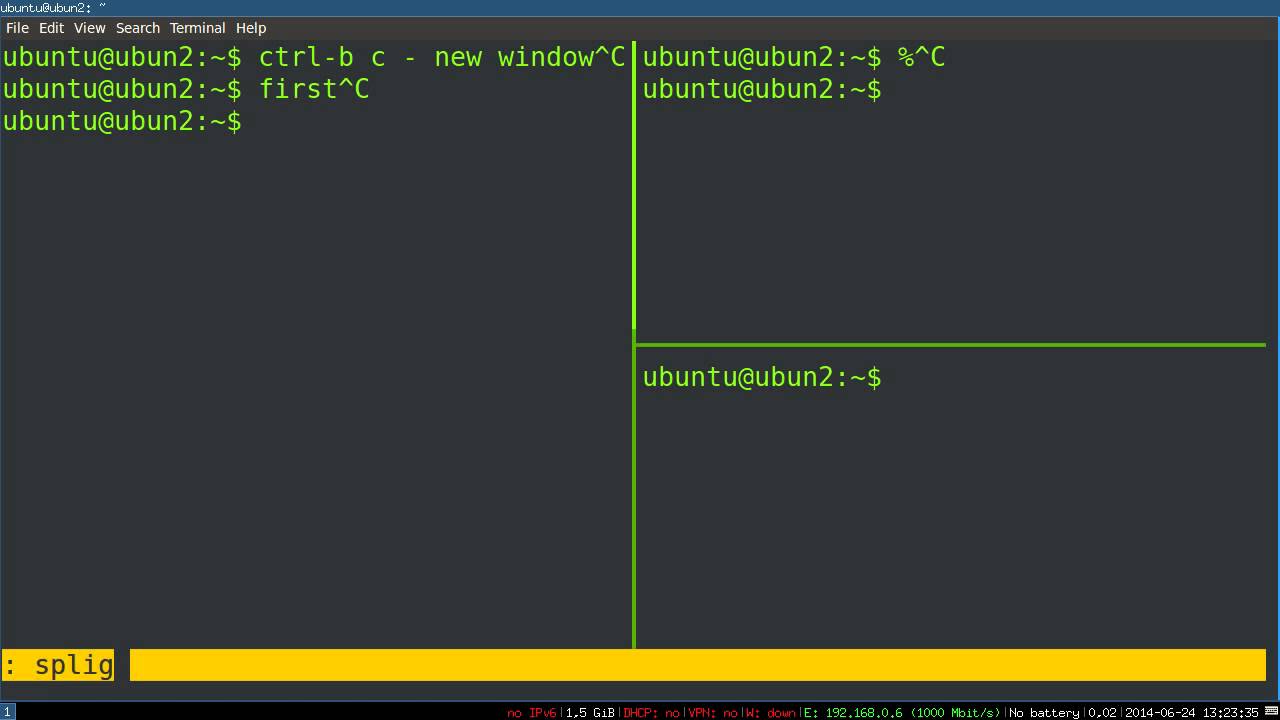
An example of how you can have a left vertical pane along side with two right horizontal panes:
for i in {0..255}; do
    printf "\x1b[38;5;${i}mcolour${i}\x1b[0m\n"
done
C-b %    # splits terminal into left and right panes
C-b "    # splits terminal into top and bottom panes
C-b <UP / DOWN / LEFT / RIGHT ARROW>  # move around panes after some mapping
C-b o    # jump between different panes
C-b C-o  # swap the location of two panes
C-b x    # kill the current pane
# M represents the `meta` key or `alt` on Mac keyboards
C-b M-1             # vertical split, all panes same width, or stack panes vertically
C-b M-2             # horizontal split, all panes same height
C-b M-3             # horizontal split, main pane on top,
                      other panes on bottom, vertically split, all same width
C-b M-4             # vertical split, main pane left,
                      other panes right, horizontally split, all same height
C-b M-5             # tile, new panes on bottom, same height before same width

# start scrolling up and down the tmux window using arrow keys
C-b [    # use C-c after done with scrolling
and within panes you can sub-split panes.
C-b Esc /           # Search downward
C-b Esc ?           # Search upward
C-b !  # from pane to window
 # join window 1 to current pane stacked vertically (up / bottom)
C-b :join-pane -v -s :1
# join window 1 to current pane stacked horizontally (left / right)
C-b :join-pane -h -s :1
C-b meta-1  # switch from horizontally stacked to vertically stacked panes
C-b meta-2  # switch from vertically stacked to horizonally stacked
reference navigate to pane that you want to resize, if you want to resize a pane to expand vertically down, do
C-b resize-pane -D 20
there are 4 options for resizing pane:
-D means down
-U means up
-L means left
-R means right
C-b c   # add a new window / tab to current session
C-b window-number  # switch to a particular window / tab
Windows (tabs)
C-b c  create window
C-b w  list windows
C-b n  next window
C-b p  previous window
C-b f  find window
C-b ,  name window
C-b &  kill window
C-b : attach -t SESSION_NAME  # attach / start a session
C-b : detach -t SESSION_NAME  # detach session / temporarily stop
C-b : kill-session -t SESSION_NAME  # killing a session
C-b ( # switch to previous session
C-b ) # switch to next session
C-b : ls  # list current sessions
C-b $  # rename current session
Saving / restoring tmux sessions with tmux resurrect
C-b C-s  # save
C-b C-r  # restore
The saved session files are at:
~/.tmux/resurrect/*.txt
C-b : source-file ~/.tmux.conf
You can fix all the key-bindings inside .tmux.conf and if you ever need the default keybindings in case you mess up, read this StackOverFlow post
# clipboard settings
set-option -g default-command "reattach-to-user-namespace -l bash"
setw -g mode-keys vi

# Setup 'v' to begin selection as in Vim

bind-key -t vi-copy v begin-selection
bind-key -t vi-copy y copy-pipe "reattach-to-user-namespace pbcopy"

# Update default binding of `Enter` to also use copy-pipe
unbind -t vi-copy Enter
bind-key -t vi-copy Enter copy-pipe "reattach-to-user-namespace pbcopy"

# Bind ']' to use pbpaste
bind ] run "reattach-to-user-namespace pbpaste | tmux load-buffer - && tmux paste-buffer"
make sure that your version of vim was compiled with support for clipboard which you can check when you type
$ vim --version | clipboard
+clipboard       +xterm_clipboard
the + sign means that the feature is supported. And you can enable synchronizing between X11 clipboard as indicated by this post
$ tmux list-keys
if the directory permissions / group memberships are changed between the creation of a tmux session and the use of the directory, the group memberships will not be up to date.
Use
exec su -l $USER
to update the group permissions.
See superuser post
$ tmux attach
protocol version mismatch (client 7, server 6)

$ pgrep tmux
3429
$ /proc/3429/exe attach
set -t SESSIONNAME status-bg blue
The stock bindings above are tmux defaults. These are the custom ones
from the accompanying tmux.conf in this gist:
| Keys | Action |
|---|---|
C-Space |
Secondary prefix (in addition to C-b) |
prefix r |
Reload ~/.config/tmux/tmux.conf |
prefix | / prefix - |
Split horizontal / vertical, new pane starts in the current directory (" and % unbound) |
prefix c |
New window in the current directory |
prefix h/j/k/l |
Move between panes (vim-style) |
prefix H/J/K/L |
Resize panes (repeatable) |
prefix t / prefix V / prefix B |
Tiled / main-vertical / main-horizontal layout |
prefix y |
80% popup with a per-directory persistent agent session. Dismiss and it keeps running in the background; prefix y again reattaches. The inner session uses F12 as its prefix so it never fights the outer C-b/C-Space. |
prefix ` |
80% shell popup in the current directory. Esc dismisses it; the underlying pane keeps running. Zero tokens: your own shell for ls, vim, git without leaving tmux. |
v / C-v / y (in vi copy mode) |
Begin selection / rectangle toggle / yank to system clipboard (via tmux-yank) |
Notes:
- Session names for the
ypopup are derived from the working directory withcksum, which is POSIX and works on both macOS and Linux (md5sumis Linux-only). aggressive-resize onkeeps windows full-size unless a client is actually viewing them; useful when attached from more than one device.detach-on-destroy offswitches to the most recent remaining session when one is destroyed instead of detaching you.
This file contains hidden or bidirectional Unicode text that may be interpreted or compiled differently than what appears below. To review, open the file in an editor that reveals hidden Unicode characters.
Learn more about bidirectional Unicode characters
| # tmux.conf | |
| # Copy to ~/.config/tmux/tmux.conf or ~/.tmux.conf | |
| # git clone https://github.com/tmux-plugins/tpm ~/.config/tmux/plugins/tpm | |
| # and then reload: tmux source-file ~/.config/tmux/tmux.conf | |
| # ------------------------------------------------------------------- | |
| # General | |
| # ------------------------------------------------------------------- | |
| # True color support | |
| set -g default-terminal "tmux-256color" | |
| set -ag terminal-overrides ",xterm-256color:RGB" | |
| # Use C-a instead (screen-like behavior) | |
| #set-option -g prefix C-a | |
| #unbind C-b | |
| #bind C-a send-prefix | |
| # Set Ctrl-Space as a secondary prefix key (in addition to the default Ctrl-b) | |
| set -g prefix2 C-Space | |
| bind C-Space send-prefix | |
| # Reload config | |
| #bind r source-file ~/.tmux.conf \; display-message "Config reloaded" | |
| bind r source-file ~/.config/tmux/tmux.conf \; display-message "tmux config reloaded." | |
| # Pass escape sequences (notifications, progress bar, clipboard) | |
| # through to the outer terminal. Without this, tmux eats them. | |
| set -g allow-passthrough on | |
| # OSC 52 clipboard -- works over SSH and nested sessions. | |
| set -g set-clipboard on | |
| # Extended key sequences | |
| set -g extended-keys on | |
| set -as terminal-features 'xterm*:extkeys' | |
| # Kill the 500ms escape delay | |
| set -sg escape-time 0 | |
| # Default 2000 lines is not enough | |
| set -g history-limit 250000 | |
| # Vi mode for copy mode and status keys. | |
| setw -g mode-keys vi | |
| set -g status-keys vi | |
| # Mouse for scrolling and pane selection. | |
| set -g mouse on | |
| # Focus events for cursor management | |
| set -g focus-events on | |
| # Highlight windows in the status bar when there is activity in them | |
| setw -g monitor-activity on | |
| # Show a status bar message when activity is detected in a non-active window | |
| set -g visual-activity on | |
| # Start window/pane numbering at 1 (0 is awkward to reach) | |
| set -g base-index 1 | |
| setw -g pane-base-index 1 | |
| # Renumber windows when one is closed. | |
| set -g renumber-windows on | |
| # Only shrink a window for clients actually looking at it (matters with | |
| # a phone/laptop attached to the same session). | |
| set -g aggressive-resize on | |
| # Destroying the last session switches to the most recent remaining one | |
| # instead of detaching you entirely (nicer with popup-spawned sessions). | |
| set -g detach-on-destroy off | |
| set-window-option -g automatic-rename on | |
| set-option -g set-titles on | |
| # ------------------------------------------------------------------- | |
| # tmux plugins (https://github.com/tmux-plugins/tpm) | |
| # ------------------------------------------------------------------- | |
| # tmux plugins | |
| set -g @plugin 'tmux-plugins/tpm' | |
| # tmux-sensible: a set of reasonable default tmux settings everyone can agree on | |
| #set -g @plugin 'tmux-plugins/tmux-sensible' | |
| # ------------------------------------------------------------------- | |
| # tmux-resurrect and tmux-continuum | |
| # ------------------------------------------------------------------- | |
| # tmux-resurrect: save and restore tmux sessions across system restarts | |
| #set -g @plugin 'tmux-plugins/tmux-resurrect' | |
| # tmux-continuum: continuously save sessions and auto-restore on tmux start | |
| #set -g @plugin 'tmux-plugins/tmux-continuum' | |
| # Automatically restore the last saved session when tmux starts | |
| #set -g @continuum-restore 'on' | |
| # Save sessions every 15 minutes | |
| #set -g @continuum-save-interval '15' | |
| # Also save the contents of each pane when capturing sessions | |
| #set -g @resurrect-capture-pane-contents 'on' | |
| # Use the Neovim session strategy when restoring (restores Neovim sessions too) | |
| #set -g @resurrect-strategy-nvim 'session' | |
| # ------------------------------------------------------------------- | |
| # Splits and navigation | |
| # ------------------------------------------------------------------- | |
| # Intuitive split bindings, open in current path. | |
| bind | split-window -h -c "#{pane_current_path}" | |
| bind - split-window -v -c "#{pane_current_path}" | |
| unbind '"' | |
| unbind % | |
| # New windows also inherit the current path. | |
| bind c new-window -c "#{pane_current_path}" | |
| # Vim-style pane navigation. | |
| bind h select-pane -L | |
| bind j select-pane -D | |
| bind k select-pane -U | |
| bind l select-pane -R | |
| # Pane resize (repeatable). | |
| bind -r H resize-pane -L 5 | |
| bind -r J resize-pane -D 3 | |
| bind -r K resize-pane -U 3 | |
| bind -r L resize-pane -R 5 | |
| # ------------------------------------------------------------------- | |
| # Copy mode (vi) | |
| # ------------------------------------------------------------------- | |
| # tmux-yank: improved clipboard integration for copy mode | |
| set -g @plugin 'tmux-plugins/tmux-yank' | |
| # After yanking, exit copy mode and cancel the selection (default behavior) | |
| set -g @yank_action 'copy-pipe-and-cancel' | |
| # Copy selected text to the system clipboard using xsel (for non-vi copy mode) | |
| #bind -T copy-mode C-c send -X copy-pipe-no-clear "xsel -i --clipboard" | |
| # Copy selected text to the system clipboard using xsel (for vi copy mode) | |
| #bind -T copy-mode-vi C-c send -X copy-pipe-no-clear "xsel -i --clipboard" | |
| bind -T copy-mode-vi v send-keys -X begin-selection | |
| bind -T copy-mode-vi C-v send-keys -X rectangle-toggle | |
| bind -T copy-mode-vi y send-keys -X copy-selection-and-cancel | |
| # ------------------------------------------------------------------- | |
| # Agent team layouts | |
| # ------------------------------------------------------------------- | |
| # Quick layouts when spawning multiple agent panes. | |
| bind t select-layout tiled # equal space for all | |
| bind V select-layout main-vertical # lead left, agents stacked right | |
| bind B select-layout main-horizontal # lead top, agents below | |
| setw -g main-pane-width 50% | |
| setw -g main-pane-height 50% | |
| # ------------------------------------------------------------------- | |
| # Claude Code popup (nested session per directory) | |
| # ------------------------------------------------------------------- | |
| # prefix + y: toggle an 80% popup running Claude Code. | |
| # Each working directory gets its own persistent session. | |
| # Dismiss the popup and the session keeps running in the background. | |
| # The inner session uses F12 as its prefix so it never fights the outer | |
| # C-b / C-Space, and no editing keys (C-a, etc.) are stolen from the app. | |
| # cksum instead of md5sum: POSIX, present on macOS and Linux. | |
| bind y run-shell '\ | |
| SESSION="claude-$(echo #{pane_current_path} | cksum | cut -d\" \" -f1)"; \ | |
| if ! tmux has-session -t "$SESSION" 2>/dev/null; then \ | |
| tmux new-session -d -s "$SESSION" -c "#{pane_current_path}" "claude"; \ | |
| tmux set-option -t "$SESSION" prefix F12; \ | |
| fi; \ | |
| tmux display-popup -w80% -h80% -E "tmux attach-session -t $SESSION"' | |
| # ------------------------------------------------------------------- | |
| # Shell popup | |
| # ------------------------------------------------------------------- | |
| # prefix + `: 80% shell popup in the current directory. Esc dismisses it; | |
| # the underlying pane (agent or otherwise) keeps running underneath. | |
| # Your own shell, zero tokens: ls, vim, git, whatever, without leaving tmux. | |
| bind ` display-popup -w80% -h80% -d "#{pane_current_path}" -E | |
| # ------------------------------------------------------------------- | |
| # Init tmux Plugin Manager | |
| # ------------------------------------------------------------------- | |
| # Initialize tmux plugin manager (keep this line at the very bottom of tmux.conf) | |
| #run '~/.tmux/plugins/tpm/tpm' | |
| # Alternative TPM path when tmux config is stored under ~/.config/tmux dir. | |
| run '~/.config/tmux/plugins/tpm/tpm' |
Sign up for free
to join this conversation on GitHub.
Already have an account?
Sign in to comment