Skip to content

Instantly share code, notes, and snippets.

@to-your-now
to-your-now / Ultimate-Bash-History-Setup.md
Created April 6, 2026 19:11
The Ultimate Bash History & Search Configuration: Stop Wasting Time in the Terminal

The Ultimate Bash History & Search Configuration: Stop Wasting Time in the Terminal

Keywords: bash history search, history-substring-search-backward, HSTR, sync bash history multiple terminals, clear bash line escape, bashrc optimization, linux terminal productivity, bash prefix search.

The Problem

If you spend any significant amount of time in a Linux terminal, you've likely encountered these frustrating scenarios:

  1. The Multi-Terminal Desync: You type a brilliant, complex docker command in one SSH window, but when you switch to your second window and press Up, the command isn't there.
  2. The Ctrl+R Nightmare: Standard reverse-i-search is clunky. You press Ctrl+R, type a fragment, realize you missed a letter, and suddenly you're lost.
  3. The Scrolling Fatigue: You remember you ran a specific nginx command yesterday, but pressing the Up arrow 50 times is tedious.
  4. The "Clear Line" Hassle: You type a long command, change your mind, and have to hold Backspace or rem
@to-your-now
to-your-now / Antigravity_Windows_AI_Setup_2026.md
Last active May 18, 2026 16:34
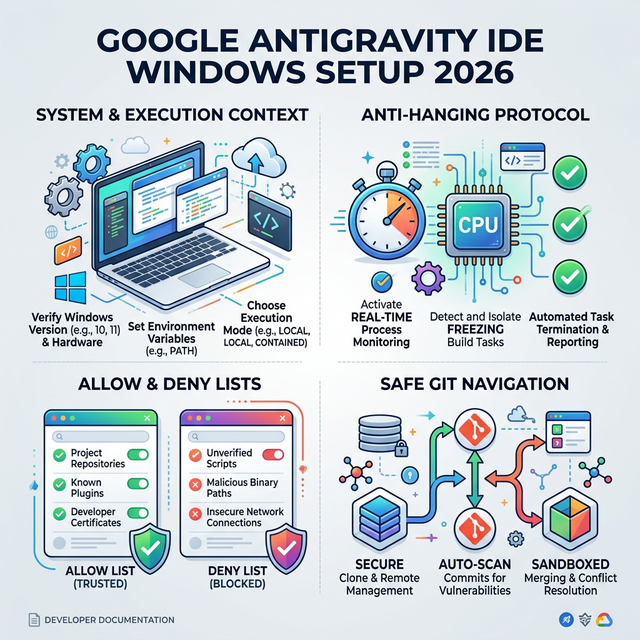
The Perfect Setup for Google Antigravity IDE on Windows (2026)

Infographic

The Perfect Setup for Google Antigravity IDE on Windows (2026 Edition)

If you are using Google’s Antigravity IDE on Windows to power autonomous AI agents, you’ve likely encountered terminal hanging, broken token parsing, and endless execution loops. Agents natively default to Unix-style thinking, struggling with pwsh, file path escapes, and the IDE's internal CLI safeguards.

This guide provides the Absolute AI System Prompt (gemini.md) and the Optimal IDE Settings (Allow/Deny lists) to transform your Windows environment into a flawlessly stable workspace for any LLM agent.