Skip to content

Instantly share code, notes, and snippets.

@tomysmile
Created July 11, 2016 10:45
Show Gist options
  • Select an option

  • Save tomysmile/3b37ab4a1ddd604093fe724d0a882166 to your computer and use it in GitHub Desktop.

Select an option

Save tomysmile/3b37ab4a1ddd604093fe724d0a882166 to your computer and use it in GitHub Desktop.
Setup PHP Composer using Brew
@lucwollants

Copy link
Copy Markdown

@lacivert they are now managed inside homebrew-core

@mahmoudissmail

Copy link
Copy Markdown

@JoaoGFarias Works fine for me!

@M-Doja

M-Doja commented Nov 21, 2017

Copy link
Copy Markdown

just what I was looking for. Thanks

@nic9075

nic9075 commented Jan 14, 2018

Copy link
Copy Markdown

How exactly is this done with a Windows 10 PC?

@ckieffer

Copy link
Copy Markdown

The homebrew/dupes tap was deprecated and its formulae migrated.

@nic9075 see http://kizu514.com/blog/install-php7-and-composer-on-windows-10/

@fbiville

Copy link
Copy Markdown

Now it's simple as brew install php composer.

@hongttran

hongttran commented Oct 4, 2019

Copy link
Copy Markdown

Now it's simple as brew install php composer.

Still works in October of 2019
Most up to date version of php is 7.3

On Macbook:

brew install php@7.3

@hendisantika

Copy link
Copy Markdown

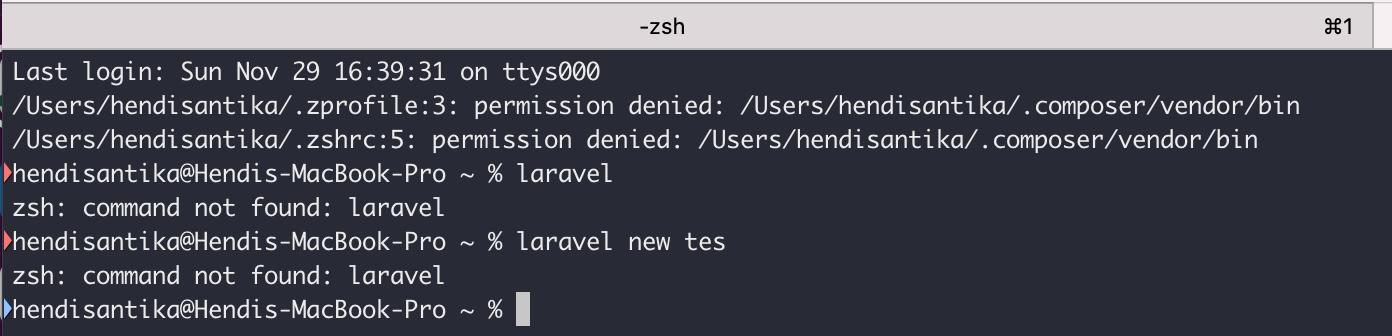
I was installing composer using brew.

But I am having this error:

image

Do You have any advice?

Thanks a lot

@NickM101

Copy link
Copy Markdown

This Worked for me ๐Ÿ˜‡
You need to edit bash_profile

  1. nano ~/.bash_profile
  2. Copy/paste export PATH=~/.composer/vendor/bin:$PATH
  3. Then run source ~/.bash_profile

@SandeepN97

Copy link
Copy Markdown

should the composer be installed in the project folder or the server folder.
for example, if I am using WAMP64 as a local host inside the www folder of I have my project should I install it in the WAMP64 folder or the project folder like perfect cup

Sign up for free to join this conversation on GitHub. Already have an account? Sign in to comment