Skip to content

Instantly share code, notes, and snippets.

@manduks
manduks / openclaw-soul-md-best-practices.md
Created March 29, 2026 15:14
OpenClaw SOUL.md Best Practices — 6 Industry Templates (E-commerce, SaaS, Real Estate, Creator, Freelancer, Small Business). Free generator at midastools.co/soul-generator

OpenClaw SOUL.md Best Practices — 6 Industry Templates

Your SOUL.md is the brain of your OpenClaw agent. A vague SOUL.md = a vague agent = zero useful output.

After studying agents that actually generate revenue (including Felix Craft, which made $14,718 in 3 weeks), here are the best practices.

Generate Your SOUL.md in 60 Seconds

Free SOUL.md Generator — choose your industry, describe your business, get a production-ready config. No signup required.

@AndrewAltimit
AndrewAltimit / !README.md
Last active June 10, 2026 21:34
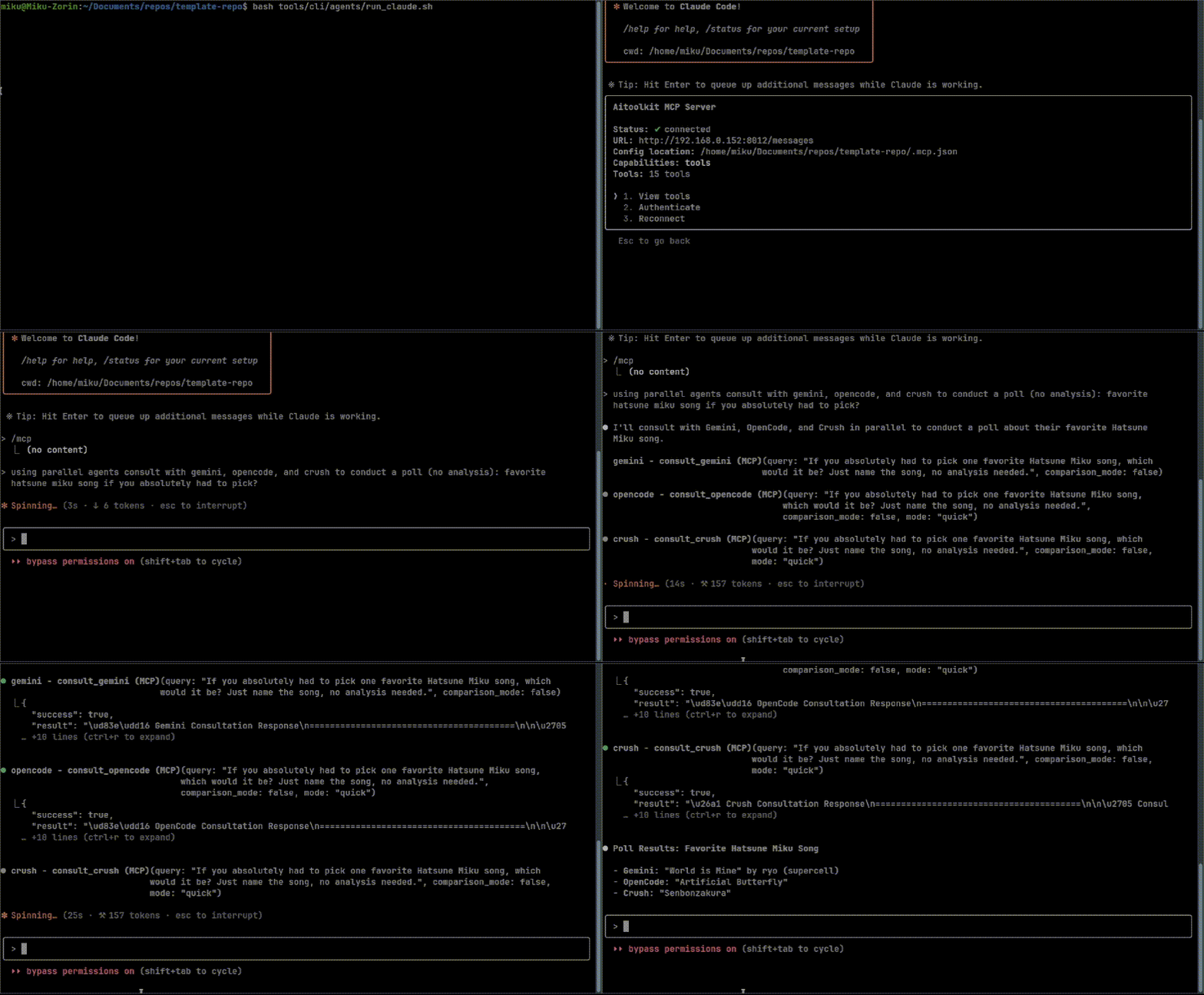
ComfyUI MCP Server (local image/video generation)

ComfyUI MCP Server (local image/video generation)

Warning: Requires a powerful GPU!

A containerized ComfyUI setup with MCP (Model Context Protocol) integration for AI-driven image generation workflows. Includes both standard MCP (stdio) access and HTTP API access.

Usage

See the template repository for a complete example. Also includes the model training mcp used for creating checkpoints / loras.

mcp-demo

@Acephalia
Acephalia / enviorenmentfixes.md
Last active December 19, 2025 23:53
Quick Guide For Fixing/Installing Python, PyTorch, CUDA, Triton, Sage Attention and Flash Attention For Local AI Image Generation

Quick Guide For Fixing/Installing Python, PyTorch, CUDA, Triton, Sage Attention and Flash Attention For Local AI Image Generation

With all the new local image & video generation tools coming out I've been seeing a lot of posts and error threads being opened for various issues with cuda/pytorch/sage attantion/triton/flash attention. I was tired of digging links up so I initially made this as a cheat sheet for myself but expanded it with hopes that this will help some of you get your venvs and systems running smoothly.

In This Guide:

  1. Check Installed Python Versions
  2. Set Default Python Version by Changing PATH
  3. Installing VS Build Tools
  4. Check the Currently Active CUDA Version
@chase-lambert
chase-lambert / chatgpt-cli.clj
Last active June 7, 2023 08:35
chatGPT API cli
#!/usr/bin/env bb
;; You need to have an OpenAI API key and set it like:
;; export OPENAI_API_KEY=<your key> in your .bashrc
;;
;; Make sure you have babashka installed
;; https://github.com/babashka/babashka#installation
;;
;; One way to run this is to install bbin
;; https://github.com/babashka/bbin
@joelonsql
joelonsql / PostgreSQL-EXTENSIONs.md
Last active June 20, 2026 19:08
1000+ PostgreSQL EXTENSIONs

🗺🐘 1000+ PostgreSQL EXTENSIONs

This is a list of URLs to PostgreSQL EXTENSION repos, listed in alphabetical order of parent repo, with active forks listed under each parent.

⭐️ >= 10 stars
⭐️⭐️ >= 100 stars
⭐️⭐️⭐️ >= 1000 stars
Numbers of stars might not be up-to-date.

@roalcantara
roalcantara / XDG.cheat-sheet.md
Last active June 23, 2026 05:24
XDG cheat sheet

XDG - Base Directory Specification (extended)

Directories

Base

The intended use-case for BaseDirectories is to query the paths of user-invisible standard directories that have been defined according to the conventions of the operating system the library is running on.

@jlyonsmith
jlyonsmith / Mac Keyboard Symbols.md
Last active June 24, 2026 15:10 — forked from Zenexer/Mac Keyboard Symbols.md
List of Mac/Apple keyboard symbols

Common symbols

Modifiers

When a key combination is displayed, the modifiers are written in the order presented here. For example, Control + Option + Shift + Command + Q would be written as ⌃⌥⇧⌘Q.

Sym Key Alt
Control
Option

Typing vagrant from the command line will display a list of all available commands.

Be sure that you are in the same directory as the Vagrantfile when running these commands!

Creating a VM

  • vagrant init -- Initialize Vagrant with a Vagrantfile and ./.vagrant directory, using no specified base image. Before you can do vagrant up, you'll need to specify a base image in the Vagrantfile.
  • vagrant init <boxpath> -- Initialize Vagrant with a specific box. To find a box, go to the public Vagrant box catalog. When you find one you like, just replace it's name with boxpath. For example, vagrant init ubuntu/trusty64.

Starting a VM

  • vagrant up -- starts vagrant environment (also provisions only on the FIRST vagrant up)
import React from "react";
import { StyleSheet, Text, View } from "react-native";
import SphericalMercator from "@mapbox/sphericalmercator";
import { MapView, Constants } from "expo";
const merc = new SphericalMercator();
const getZoomLevelFromRegion = (region, viewport) => {
const { longitudeDelta } = region;
const { width } = viewport;