
Operations Security (OpSec) is about controlling the information you leak into the world. In an age of data brokers, constant surveillance, and automated tracking, practicing good OpSec is necessary.
Before adopting any of these practices, you must first define your Threat Model.
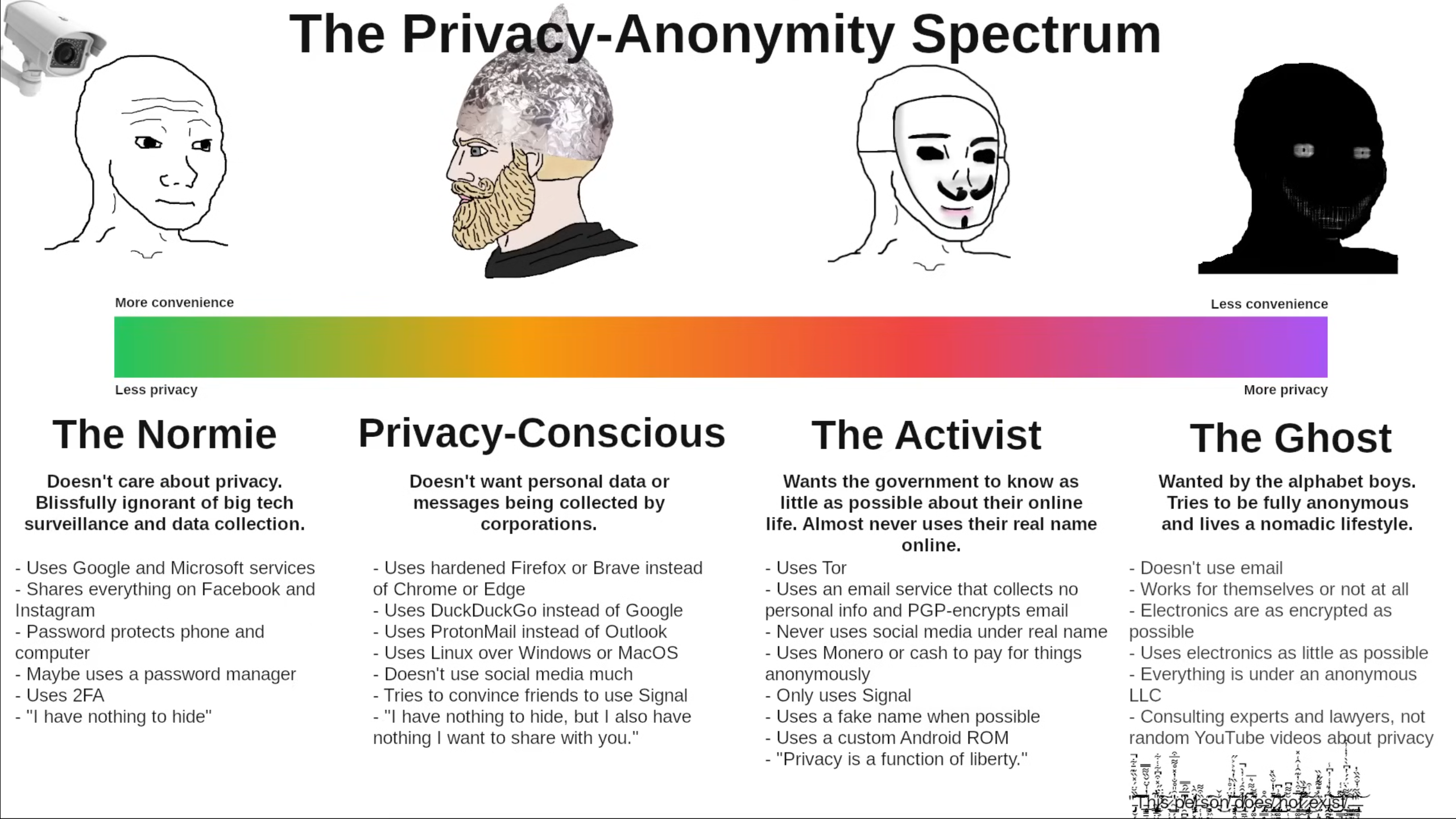 Spectrum from Eric Murphy's YouTube video.
Security is not a one-size-fits-all checklist. Perfect security is impossible, and highly restrictive security is often unusable. Threat modeling is the process of finding the right balance for your specific life.
To build your threat model, answer these five foundational questions (adapted from the Electronic Frontier Foundation's guidelines):
- What do I want to protect? (Assets) Are you protecting your physical location, your financial data, your private communications, or your browsing history?
- Who do I want to protect it from? (Adversaries) Are you hiding from targeted advertisers, an abusive ex-partner, a stalker, corporate espionage, or a nation-state intelligence agency?
- How likely is it that I will need to protect it? (Likelihood) Is your adversary actively looking for you right now, or are you just sweeping up your digital footprint as a precaution?
- How bad are the consequences if I fail? (Impact) Will you see an annoying targeted ad, lose money, face public embarrassment, or go to prison?
- How much trouble am I willing to go through? (Friction) Are you willing to give up social media? Are you willing to carry a second phone? Security always comes at the cost of convenience.
Example Models:
- The Average Citizen: Wants to stop identity theft and creepy ads. Needs basic hygiene like password managers, 2FA, and a VPN on public Wi-Fi.
- The Activist/Journalist: Needs to protect sources from government surveillance. Needs encrypted comms (Signal), burner devices, Tor, and strict compartmentalization.
Once you know your threat model, you can apply the following guidelines appropriately.
Your digital footprint is the easiest way for someone to build a profile on you. This zone focuses on breaking the links between your real identity and your online activities.
- Practice Compartmentalization: Never cross-pollinate your identities. If you have an anonymous persona, do not follow your real-life friends, use your real-life catchphrases, or talk about hyper-local landmarks.
- Burner Identifiers: Never register sensitive accounts with your real phone number or primary email. Use alias services like SimpleLogin for emails and SMS services for verification codes.
- Upgrade your 2FA: SMS text messages can be intercepted. Use open-source authenticator apps like Aegis or Ente Auth, or physical security keys like YubiKey.
- Scrub Metadata: Every photo you take contains invisible data about the exact GPS coordinates and camera model used. Strip this data using tools like ExifEraser before posting anything online.
- Mask Your Writing Style: People have distinct typing rhythms and vocabulary habits. If absolute anonymity is required, run your text through translation services back and forth to neutralize your unique "voice."
Real-World Example: In 2012, a hacker associated with Anonymous was tracked down by the FBI. He posted a photo of his girlfriend online and forgot to strip the EXIF data, which contained the exact GPS coordinates of his house. (Source: FBI Criminal Complaint / Wired, "FBI Swears It Tracked Anonymous Hacker by His Girl's Cleavage," 2012)
Your smartphone is essentially a tracking device that makes phone calls. Securing it is one of the most impactful steps you can take.
- Control the OS: Standard iOS and Android are heavily integrated with Apple and Google tracking. For the highest security, use a Pixel device and flash it with GrapheneOS, a privacy-hardened, open-source operating system.
- Minimize Connectivity: Leave Wi-Fi, Bluetooth, and Location Services turned off by default. Only turn them on exactly when you need them.
- Use Encrypted Comms: Avoid standard SMS and regular voice calls for sensitive conversations. Use Signal, which provides audited end-to-end encryption.
- Audit App Permissions: Apps will ask for access to your microphone, camera, and contacts even if they do not need them to function. Deny all permissions by default and grant them only when absolutely necessary.
- Establish a Duress Plan: Modern custom ROMs like GrapheneOS allow you to set a "Duress PIN." If you are forced to unlock your phone, entering this specific PIN will silently and instantly wipe the entire device.
Real-World Example: Amazon founder Jeff Bezos had his iPhone compromised in 2018. The attackers sent a malicious video file through a WhatsApp message, which silently executed code and extracted gigabytes of private data without needing physical access. (Source: UN experts report / The Guardian, "Jeff Bezos hack: Amazon boss's phone 'hijacked by Saudi crown prince'," 2020)
Browsing the web leaves a trail of breadcrumbs. Your goal is to make those breadcrumbs look exactly like everyone else's.
- Blend In, Do Not Stand Out: Using highly customized browser settings makes you unique. Check your browser fingerprint on sites like amiunique.org. Using a standard installation of the Brave browser or Tor Browser helps you blend in with the crowd.
- Isolate Your Browsing: Do not log into your bank in the same browser you use for casual web surfing. Use different browsers for different threat levels (e.g., Brave for daily driving, Tor for sensitive research).
- Block the Trackers: If you are not using Brave, install the uBlock Origin extension. It blocks malicious scripts, trackers, and ads from loading in the first place.
- Trust No Network: Public Wi-Fi is inherently dangerous. Always route your traffic through a trusted, no-logs VPN like Mullvad or IVPN, or use the Tor network for absolute anonymity.
- Evaporate Your History: Configure your secure browsers to automatically delete all cookies, cache, and history the moment you close the window.
Real-World Example: In 2013, a Harvard student tried to get out of a final exam by emailing a fake bomb threat. He smartly used Tor to hide his IP address, but he connected to Tor while on the university's campus Wi-Fi. The FBI simply asked Harvard for the logs of anyone connecting to Tor at the exact time the email was sent. He was the only one. (Source: FBI Criminal Affidavit / Boston Globe, "Harvard student charged with bomb hoax," 2013)
Your computer's local environment needs to be treated like a vault.
- Encrypt Everything: Full Disk Encryption (FDE) is mandatory. Use BitLocker on Windows, FileVault on macOS, or LUKS on Linux. If your laptop is stolen, the data remains scrambled and useless without your password.
- Prefer Open Source: Closed-source software requires blind trust. Open-source software (like Linux operating systems) allows anyone to inspect the code for backdoors or telemetry.
- Use Virtual Machines (VMs): If you need to open a suspicious file or visit a sketchy link, do it inside a disposable Virtual Machine. Once you close the VM, the contained environment is destroyed.
- Sanitize Deleted Files: Moving a file to the trash does not delete it. It just tells the computer the space is available to be written over. Use secure deletion tools like BleachBit to overwrite the data completely.
Real-World Example: In 2006, a laptop belonging to a Department of Veterans Affairs employee was stolen from their home. It contained the unencrypted personal data of 26.5 million veterans. A simple Full Disk Encryption setup would have turned a national security disaster into a minor hardware loss. (Source: Department of Veterans Affairs OIG Report / Washington Post, 2006)
Following the money is the oldest trick in the investigative playbook.
- Understand Ledger Transparency: Bitcoin is not anonymous. It is pseudonymous. The entire blockchain is a public ledger. If a specific wallet is ever linked to your real identity, every transaction you have ever made becomes visible.
- Use Privacy Coins: For genuine financial privacy, use Monero (XMR). Monero encrypts the sender, the receiver, and the amount sent, making blockchain analysis virtually impossible.
Real-World Example: Federal agents took down the Silk Road marketplace largely by analyzing the public Bitcoin blockchain. They traced the flow of funds from public accounts directly to the servers and individuals involved, years after the transactions took place. (Source: IRS Criminal Investigation / FBI indictments, detailed in books like "American Kingpin")
Digital security is useless if your physical environment is compromised.
- Power Down: When crossing borders or leaving your devices unattended, power them down completely. A powered-off device requires a decryption key to boot up. A sleeping device keeps the decryption keys stored in the RAM, leaving it vulnerable to "Cold Boot" attacks.
- Cover Your Lenses: Hardware mute buttons and physical webcam covers ensure that even if your system is compromised, the attacker gets a black screen and dead silence.
- Protect Your Biology: Avoid commercial DNA testing services like 23andMe or Ancestry. You are handing over the most personal blueprint you have to a private corporation that can be hacked, sold, or subpoenaed.
- Mind the Cameras: Assume you are being recorded in public. Be aware of security cameras, Ring doorbells, and people filming on their phones around you.
Real-World Example: The Golden State Killer eluded police for decades. He was finally caught in 2018 not because of a digital hack, but because his distant relatives uploaded their DNA to an open-source genealogy website. Investigators built a family tree and narrowed it right down to his front door. (Source: Sacramento County District Attorney / The New York Times, 2018)

See you space cowboy.