Skip to content

Instantly share code, notes, and snippets.

View amishakov's full-sized avatar
🧠
On vacation

Alex(k$ei) Mishakov amishakov

🧠
On vacation
View GitHub Profile
@amishakov
amishakov / webos_homebrew_repo.json
Created November 24, 2025 17:47 — forked from ohmybahgosh/webos_homebrew_repo.json
WebOS Homebrew Repository (English Translation)
{
"paging": {
"page": 1,
"count": 1,
"maxPage": 1,
"itemsTotal": 1
},
"packages": [
{
"id": "com.ottplay.app",
@amishakov
amishakov / #Xiaomi's ATV Hacks
Created October 20, 2025 16:21 — forked from jasimancas/#Xiaomi's ATV Hacks
Xiaomi Mi Box / Mi Box S / Mi TV Stick hacks
Modifications for Xiaomi's Android TV devices
telnet 192.168.8.1
mount -o remount,rw /system /system
busybox sh
printf "\n#Change MAC address to unique one\nsleep 10 && ip link set br0 address ba:ab:be:34:00:00" >> /system/etc/autorun.sh
exit
mount -o remount,ro /system /system
reboot
@amishakov
amishakov / ios-downgrade-dualboot.md
Created April 9, 2025 10:12 — forked from LukeZGD/ios-downgrade-dualboot.md
Downgrade and dualboot status of almost all iOS devices

Downgrade and dualboot status of almost all iOS devices

UPDATED: 2025-04-04

@amishakov
amishakov / self-signed-certificate-with-custom-ca.md
Created February 10, 2024 10:56 — forked from fntlnz/self-signed-certificate-with-custom-ca.md
Self Signed Certificate with Custom Root CA

Create Root CA (Done once)

Create Root Key

Attention: this is the key used to sign the certificate requests, anyone holding this can sign certificates on your behalf. So keep it in a safe place!

openssl genrsa -des3 -out rootCA.key 4096
@amishakov
amishakov / bootstrap_ubuntu.sh
Created October 28, 2023 11:33
Ubuntu Desktop Deployment Script
#!/bin/bash
# Short URL: https://git.io/fjY3J
#
# ~ For Ubuntu 18.04 or newer ~
#
# How to use:
# $ cd ~/Downloads
# $ wget -O bootstrap.sh https://git.io/fjY3J
# $ chmod +x bootstrap.sh
@amishakov
amishakov / database.sh
Created October 28, 2023 11:32
Frequent MySQL/MariaDB operations
MySQL Operations
--------------------------------------
In this document:
- Export/Import DB
- Export/Import Table from DB
- mysqladmin
- Repair DB
--------------------------------------

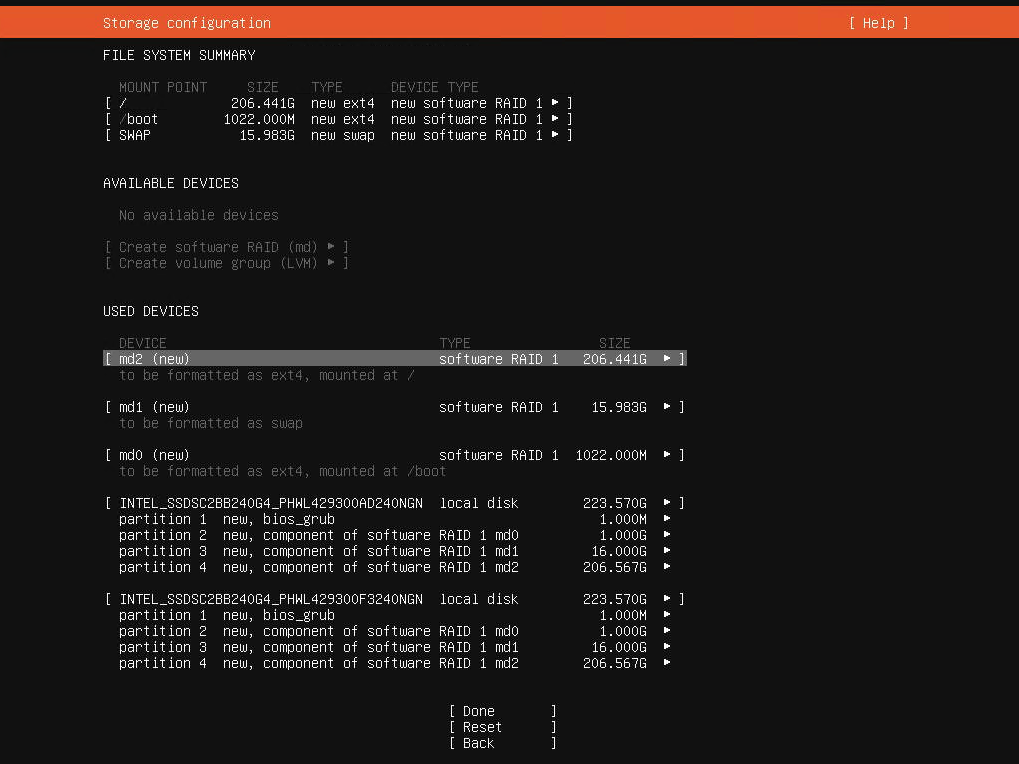
Looking to create a Software RAID 1 setup for your 2-disk server on Ubuntu Server 20.04?

Screen Shot 2020-06-05 at 20 55 31

Let's start with the basics: the official guide by Ubuntu (https://ubuntu.com/server/docs/install/storage) is outdated/wrong. And as of March 2021 it's possible that there's a bug as well with how the bios_grub partitions are created when using multiple disks.

Now on to the solution:

  • Select "Custom storage layout" when you reach the storage configuration step of the installer.
  • If the disks have existing partitions, click on each disk under AVAILABLE DEVICES and then select REFORMAT. This will (temporarily) wipe out the partitions.
@amishakov
amishakov / my.cnf
Created October 28, 2023 11:31 — forked from fevangelou/my.cnf
Optimized my.cnf configuration for MySQL/MariaDB (on Ubuntu, CentOS, Almalinux etc. servers)
# === Optimized my.cnf configuration for MySQL/MariaDB (on Ubuntu, CentOS, Almalinux etc. servers) ===
#
# by Fotis Evangelou, developer of Engintron (engintron.com)
#
# ~ Updated December 2021 ~
#
#
# The settings provided below are a starting point for a 8-16 GB RAM server with 4-8 CPU cores.
# If you have different resources available you should adjust accordingly to save CPU, RAM & disk I/O usage.
#
@amishakov
amishakov / kirby.conf
Created October 27, 2023 13:14 — forked from BillBrower/kirby.conf
Nginx configuration for Kirby CMS
server {
listen 80;
server_name kirby.dev www.kirby.dev;
root /path/to/www/kirby;
access_log /var/log/nginx/access.log;
error_log /var/log/nginx/error.log;
# Route LetsEncrypt ACME Challenges to the right place
location ^~ /.well-known/acme-challenge/ {