Skip to content

Instantly share code, notes, and snippets.

View amishakov's full-sized avatar
🧠
On vacation

Alex(k$ei) Mishakov amishakov

🧠
On vacation
View GitHub Profile
@Exenifix
Exenifix / gist-frp-lock.md
Created August 29, 2024 07:50
How to disable FRP lock on Android

So, you're probably here because you went through nine circles of hell trying to figure out how to disable FRP lock that's preventing you from installing APKs on your android. You probably even factory reset your device, logged into google account million times, but it didn't work at all. I went through the same process, but a random message on a random forum with SO simple solution saved me. I will share it with everyone now.

You will need

  1. A phone
  2. A computer with adb installed
  3. Some basic terminal knowledge

Phone Preparation

  1. Enable developer mode (you know how)
  2. In developer settings, check these two
@amishakov
amishakov / README.md
Created October 23, 2023 10:33 — forked from francoism90/README.md
Change country to unlock channels, increase TX-power. (Use at your own risk)

Warning

Following instructions are provided without any warranty, and may even get you in trouble legally. The instructions are provided for testing, and should be use with care. We (including commentators) are not responsible for any damage to your device(s).

Introduction

This may enable additional channels and power (in most cases don't) on ASUS Merlin provided routers.

@jasimancas
jasimancas / #Xiaomi's ATV Hacks
Last active October 20, 2025 16:21
Xiaomi Mi Box / Mi Box S / Mi TV Stick hacks
Modifications for Xiaomi's Android TV devices
@LukeZGD
LukeZGD / ios-downgrade-dualboot.md
Last active April 18, 2026 15:57
Downgrade and dualboot status of almost all iOS devices

Downgrade and dualboot status of almost all iOS devices

UPDATED: 2026-04-18

@deg0nz
deg0nz / iOS-VPN-autoconnect-WireGuard.mobileconfig
Created January 23, 2021 22:18
Connect iOS to WireGuard VPN when connected to untrusted WiFi
<?xml version="1.0" encoding="UTF-8"?>
<!DOCTYPE plist PUBLIC "-//Apple//DTD PLIST 1.0//EN" "http://www.apple.com/DTDs/PropertyList-1.0.dtd">
<plist version="1.0">
<dict>
<key>PayloadContent</key>
<array>
<!-- Connect to VPN when connected to untrusted networks -->
<dict>
@fevangelou
fevangelou / Software RAID 1 setup on Ubuntu Server 20.04.md
Last active January 15, 2026 22:19
Software RAID 1 setup on Ubuntu Server 20.04 (or newer)

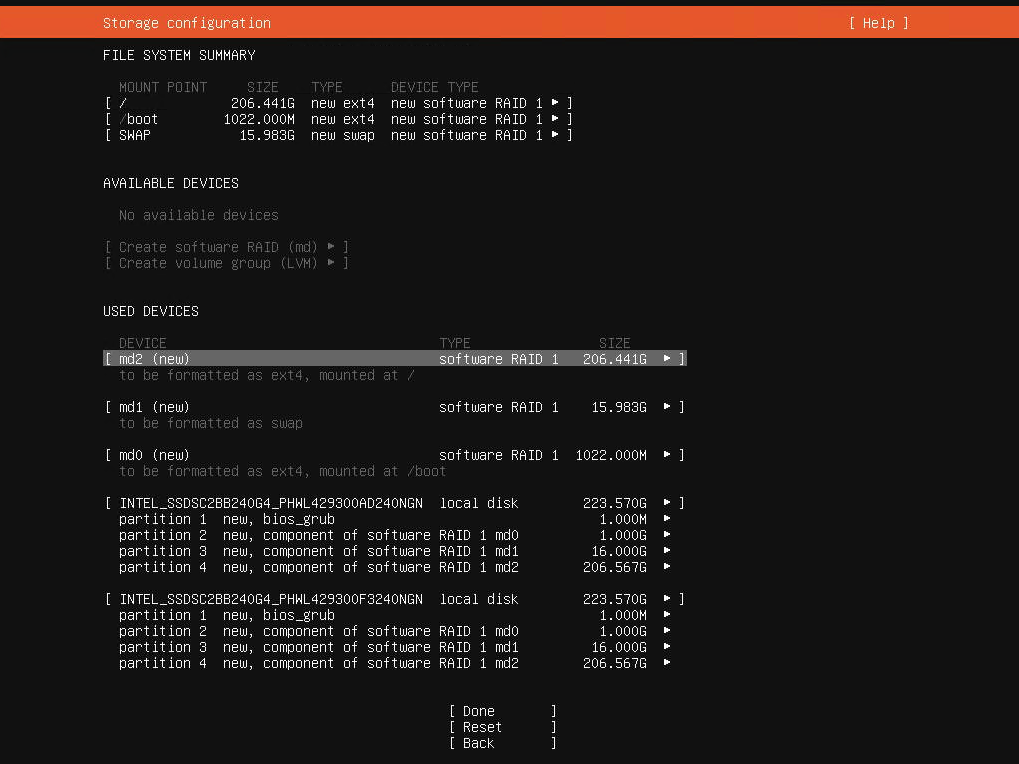
Looking to create a Software RAID 1 setup for your 2-disk server on Ubuntu Server 20.04?

Screen Shot 2020-06-05 at 20 55 31

Let's start with the basics: the official guide by Ubuntu (https://ubuntu.com/server/docs/install/storage) is outdated/wrong. And as of March 2021 it's possible that there's a bug as well with how the bios_grub partitions are created when using multiple disks.

Now on to the solution:

  • Select "Custom storage layout" when you reach the storage configuration step of the installer.
  • If the disks have existing partitions, click on each disk under AVAILABLE DEVICES and then select REFORMAT. This will (temporarily) wipe out the partitions.
@mopsicus
mopsicus / turbo_aegea.php
Last active July 7, 2021 23:30
Generate RSS channel file Yandex turbo for Aegea blogengine
<?
$db_user = ''; // db user name
$db_password = ''; // db pass
$db_database = ''; // db name
$db_host = 'localhost'; // db url
$db = new mysqli($db_host, $db_user, $db_password, $db_database);
$result = $db->query("SELECT * FROM `notes` WHERE IsPublished = 1 AND isvisible = 1 ORDER BY `Stamp` DESC LIMIT 1");
@BillBrower
BillBrower / kirby.conf
Last active March 26, 2024 19:47
Nginx configuration for Kirby CMS
server {
listen 80;
server_name kirby.dev www.kirby.dev;
root /path/to/www/kirby;
access_log /var/log/nginx/access.log;
error_log /var/log/nginx/error.log;
# Route LetsEncrypt ACME Challenges to the right place
location ^~ /.well-known/acme-challenge/ {
@trandaison
trandaison / starUML.md
Last active April 14, 2026 07:18
Get full version of StarUML
@fntlnz
fntlnz / self-signed-certificate-with-custom-ca.md
Last active April 13, 2026 05:08
Self Signed Certificate with Custom Root CA

Create Root CA (Done once)

Last update: Nov 2025.

Create Root Key

Attention: this is the key used to sign the certificate requests, anyone holding this can sign certificates on your behalf. So keep it in a safe place!

openssl ecparam -genkey -name secp384r1 | openssl ec -aes256 -out rootCA.key